3CX V18 not working on Mobile phones

Status
Not open for further replies.

vincent Kavila

Silver Partner
Advanced Certified
Joined
Mar 26, 2019
Messages
150
Reaction score
20
Hi,

After upgrading my 3CX to version 18, client mobile devices are not able to make calls whereas the desktop app is able to.

What could be the issue?

Thank you
 
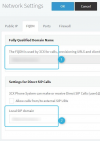
As a quick test, could you go into "Settings >> Network >> FQDN" and check the following two fields 1 & 2:


1637075872125.png


Make sure that they both are the exact same and that they contain the PBX's FQDN, regardless of whether "Allow calls from/to external SIP URIs" is enabled.

Click on OK and then try it again, if the same thing happens, please provide the following info so that we can get a better understanding of your setup:
https://www.3cx.com/community/threads/every-new-post-must-contain.20492/
 
  • Like
Reactions: vincent Kavila
As a quick test, could you go into "Settings >> Network >> FQDN" and check the following two fields 1 & 2:


View attachment 25878


Make sure that they both are the exact same and that they contain the PBX's FQDN, regardless of whether "Allow calls from/to external SIP URIs" is enabled.

Click on OK and then try it again, if the same thing happens, please provide the following info so that we can get a better understanding of your setup:
https://www.3cx.com/community/threads/every-new-post-must-contain.20492/
Hi,

All settings are OK.

We have different users with different phones.
Mine is iPhone 6s running on ios 15
 
We'll definitely need more info on the issue if we're to narrow it down:

We have different users with different phones.
Mine is iPhone 6s running on ios 15
• So is every single mobile client unable to make calls, both Android and iOS?
• Are all mobile clients having the issue regardless of where they are connected, different Wifi network or LTE?
• In your initial description you mention not being able to make calls, does that mean they are able to receive calls?
• Do you get a specific error on the mobile app when you try to make a call?
• Does presence information work in the mobile apps(can see extensions in status, can see contacts, etc)?
• Where is the PBX hosted and on what OS, are the mobile clients local or remote to it?
 
We'll definitely need more info on the issue if we're to narrow it down:


• So is every single mobile client unable to make calls, both Android and iOS? YES
• Are all mobile clients having the issue regardless of where they are connected, different Wifi network or LTE? YES
• In your initial description you mention not being able to make calls, does that mean they are able to receive calls? NO THEY CANT NEITHER CAN THEY INITIATE A CALL
• Do you get a specific error on the mobile app when you try to make a call? NO, I JUST CANT DO ANYHTING ON THE APP
• Does presence information work in the mobile apps(can see extensions in status, can see contacts, etc)? YES, BUT CANT CALL ANY OF THE CONTACTS\EXTENSIONS.
• Where is the PBX hosted and on what OS, are the mobile clients local or remote to it? WINDOWS SERVER 2019 AND WINDOWS 10 PRO 64 BIT
Please see the feedback above
 
I have to ask, are the following issues on the same PBX?
https://www.3cx.com/community/threa...tion-to-activation-3cx-com.85741/#post-403596
1. https://www.3cx.com/community/threa...tion-to-activation-3cx-com.85741/#post-403596

2. https://www.3cx.com/community/threads/calls-disconnecting-when-dialing.85798/

The problem regarding the SIP Trunk may very well end up being unrelated but if the 3CX PBX cannot contact our activation servers then that is something you should definitely look into first.
 
Status
Not open for further replies.

Members Online Now

Forum statistics

Threads
111,832
Messages
589,283
Members
164,662
Latest member
DejanMDS