3CX V18 Windows App v18.3.33 provisioning won't work

Status
Not open for further replies.

DjordjeV

Bronze Partner
Advanced Certified
Joined
Jan 15, 2020
Messages
33
Reaction score
2
Does anyone know what is the problem with provisioning link of 3cx windows app (version 18.3.33)? App itself installs fine but when I try to click on provision button in webclient panel nothing happens. Any suggestions?
 
What browser are you using? Could you try the latest version of Google Chrome if you have not done so already?

First thing I would check is make sure that the 3CX Desktop App is selected as the default app for the TCX+APP protocol.

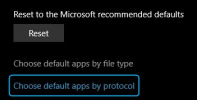
Access Windows default app settings and then click on "Choose default apps by protocol":

1631609795609.png

Search for TCX+APP and make sure that the 3CX Desktop App is selected:

1631609777193.png
 
Capture.PNG
Default App is fine , chrome is up to date, I have tried Edge also... same thing, nothing happens, when I click on provision 3cx app starts and then just instructions how to provision.
 
From that same PC could you please try using the extensions QR Code URL in the browser? You can find the QR Code in "3CX Webclient >> Settings >> Scan QR Code". It should download the provisioning file when you use it in the browser.

Let me know what happens.
 
From that same PC could you please try using the extensions QR Code URL in the browser? You can find the QR Code in "3CX Webclient >> Settings >> Scan QR Code". It should download the provisioning file when you use it in the browser.

Let me know what happens.
When I scan QR from webclient from mobile app it fails , because it is pointing to local interface , where can I change to FQDN instead , maybe that is the problem ?
 
The address in the QR code will depend on how you have access the 3CX Webclient. Try accessing the webclient using the FQDN and then give it another go.
 
The address in the QR code will depend on how you have access the 3CX Webclient. Try accessing the webclient using the FQDN and then give it another go.
Ok , I will try in few minutes.
 
  • Like
Reactions: ChrisC_3CX
I switched network on my PC , it is working outside LAN, when in same network it won't provision...
 
I switched network on my PC , it is working outside LAN, when in same network it won't provision...
ANd i can only access weblcient via FQDN outside local network.
 
I switched network on my PC , it is working outside LAN, when in same network it won't provision...
Under normal circumstances, you should've also been able to provision it from within the same LAN too. That said, this might be related to network config.

ANd i can only access weblcient via FQDN outside local network.
When remote it would actually make sense that you can only use the FQDN.
 
Under normal circumstances, you should've also been able to provision it from within the same LAN too. That said, this might be related to network config.


When remote it would actually make sense that you can only use the FQDN.
Strange, it used to work on erlier versions...
 
Status
Not open for further replies.

Forum statistics

Threads
112,349
Messages
592,027
Members
165,513
Latest member
megalmazan