


- Joined
- Dec 16, 2024
- Messages
- 17
- Reaction score
- 3
Hi,
We are looking to move our current V20 install to Azure instead of running in a allocated datacenter.
We deployed 3CX V20 from the marktedplace of Azure and setup swap, ready to deploy a backup of our current machine:
https://azuremarketplace.microsoft.com/nl-nl/marketplace/apps/3cx-pbx.3cx-pbx?tab=Overview
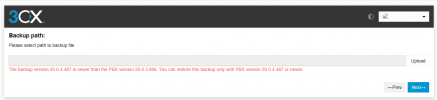
But once we wanted to upload and restore our back we got the message that our back is from a newer 3CX setup then the deployed machine from Azure:
Our 3CX current machine is Version 20.0 Update 4 (Build 487 Release).
The image of the Azure Marketplace seems to be Version 20 update 3 (Build 487 Release).
How can we fix this, is it possible to perform a ugrade from cli true ssh on the new machine running on Azure?
Or do we need to deploy the install again from scratch with a other image of install from ISO?
Anyone who has run into this issue before?
Best regards,
Kristof
We are looking to move our current V20 install to Azure instead of running in a allocated datacenter.
We deployed 3CX V20 from the marktedplace of Azure and setup swap, ready to deploy a backup of our current machine:
https://azuremarketplace.microsoft.com/nl-nl/marketplace/apps/3cx-pbx.3cx-pbx?tab=Overview
But once we wanted to upload and restore our back we got the message that our back is from a newer 3CX setup then the deployed machine from Azure:
Our 3CX current machine is Version 20.0 Update 4 (Build 487 Release).
The image of the Azure Marketplace seems to be Version 20 update 3 (Build 487 Release).
How can we fix this, is it possible to perform a ugrade from cli true ssh on the new machine running on Azure?
Or do we need to deploy the install again from scratch with a other image of install from ISO?
Anyone who has run into this issue before?
Best regards,
Kristof


