3CX V20 Call Quality Monitoring Tool - A Video

NicholasP_3CX

Support Team
3CX Support
Premier Customer
Advanced Certified
Joined
Apr 25, 2014
Messages
2,487
Reaction score
2,357

Detect the source of call glitches with on-demand, real-time monitoring.​

With 3CX V20 enables you to monitor call quality issues with the Call Monitoring Tool. This means you can diagnose and solve any problems in record time. From the 3CX apps this can be done in real-time during a call. Easily identify and isolate which leg o...
Continue reading the Original Blog Post.
 
Last edited by a moderator:
Good work Nicholas!
 
How to Enable this feature using admin console ?

And If i enable this feature for all User will it cause any issue in Bandwidth and Storage Space on PABX ?
 
Can someone explain the "Packet Bursts/Average" stat?
 
  • Like
Reactions: jed
Can someone explain the "Packet Bursts/Average" stat?
When several RTP packets come one by one with little or zero pause in between (opposed to the "normal" 20 ms delay), this is considered a "burst".
"Packet Bursts" is the total count of such bursts in a call, and "Average" is the average length of a burst as integer value (i.e. sum of all packets in bursts divided by total burst count).
 
Of course, bursts are compensated by the jitter buffer to some extent, yet if the burst count is high compared to the number of packets and the average burst length is high too (>5), this might indicate network problems.
 
Of course, bursts are compensated by the jitter buffer to some extent, yet if the burst count is high compared to the number of packets and the average burst length is high too (>5), this might indicate network problems.
Great, thank you.
 
  • Like
Reactions: jed
Great tool, will there be an option to enable this as a manager or systemadmin?

Could you make a video or a how to sheet to read the info (for dummy's)
 
  • Like
Reactions: sanch6 and ArtR
I must say that the new monitoring feature is absolutely fantastic. You guys have really launched an amazing feature.

However, I have one question about it. Once our users discover this feature, they will continuously start the 7-day period and rate every call. At the slightest problem, they will immediately call IT support. With 300 users, this can get quite annoying.

Are you planning to restrict the feature in any way? It would be great if only administrators had access to it.
 
Hi, using this on myself at present and it's great, but as others have said, as admin we should be able to turn this on at the admin for certain users or all and see the results rather than the end users having to turn it on or having them mess around with it.
 
Ciao, al momento lo sto utilizzando su me stesso ed è fantastico, ma come hanno detto altri, come amministratori devono essere in grado di attivarlo per determinati utenti o per tutti e vedere i risultati, anziché dover essere gli utenti finali ad attivarlo oa dover armeggiare con esso.
@NicholasP_3CX
@ivank Are there any updates on whether the system owner can enable monitoring of various extensions?
 
If the system Owner is in the same department, they will be able to trigger this from the "Team" tab

1723189806495.png
 
  • Like
Reactions: NicholasP_3CX
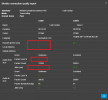
So I'm wondering if someone can help me figure out what is going on with the monitoring tool.

When I run this monitoring tool I get no results from the provider sip server side. I don't get packet loss % / Round Trip ms / Jitter etc. So the score on that leg of the call always shows up as Unknown.

Is 3CX just using ICMP to collect this info?

I control the provider sip server and i've whitelisted the 3CX PBX for ICMP but I still get zero results for that.

See image attached (i've removed some of the sensitive info)Capture3.PNG
 
So I'm wondering if someone can help me figure out what is going on with the monitoring tool.

When I run this monitoring tool I get no results from the provider sip server side. I don't get packet loss % / Round Trip ms / Jitter etc. So the score on that leg of the call always shows up as Unknown.

Is 3CX just using ICMP to collect this info?

I control the provider sip server and i've whitelisted the 3CX PBX for ICMP but I still get zero results for that.

See image attached (i've removed some of the sensitive info)View attachment 45410
Is your FreeSWITCH configured to enable RTCP? A quick google indicates that it's not enabled by default.
 
  • Like
Reactions: ArtR and ivank
Is your FreeSWITCH configured to enable RTCP? A quick google indicates that it's not enabled by default.
No its not, thanks for that. I'll look into that.
 
When several RTP packets come one by one with little or zero pause in between (opposed to the "normal" 20 ms delay), this is considered a "burst".
"Packet Bursts" is the total count of such bursts in a call, and "Average" is the average length of a burst as integer value (i.e. sum of all packets in bursts divided by total burst count).
As others have mentioned, is it possible to get a blog post up detailing the various results, what is normal, what is not so we can identify and try to resolve issues? Currently checking an issue and looking between results doesn't give me a clear picture of what is good or bad.
It *would* also be great to have a view that just shows the results from these in a table format, for quick review of many calls, rather than having to click into each one.
This way, we could possibly see a pattern of issues if it exists.. oh, this user keeps having higher this than everyone else, maybe they have a poor connection etc.
 
As others have mentioned, is it possible to get a blog post up detailing the various results, what is normal, what is not so we can identify and try to resolve issues? Currently checking an issue and looking between results doesn't give me a clear picture of what is good or bad.
I would love to do a post about this next year if Nick agrees. It would be a bit more technical than the previous one but that's the nature of it as too much stuff is going under the hood...
 
Hello,
How can we enable call quality monitor for other users, please? I'm a system owner and I need to enable it for a few users but according to the video, I can only do it for my own account (extension). I don't want to log on as them because that means to reset their password.
Thanks
 

Members Online Now

Forum statistics

Threads
111,834
Messages
589,287
Members
164,662
Latest member
DejanMDS