3CX V20 Fake Ring Tone

Wunan

Premier Customer
Joined
Oct 19, 2020
Messages
38
Reaction score
4
Hello Expert Minds

I need your help to resolve the Fake Ring Tone issue every since I upgraded the 3CX to version 20. When an outbound call is made, phone starts to play fake ring tone well before the actual phone starts to ring on the other side. I never had this issue with version 18.

Can someone help me to resolve this issue please.

Thank you in advance.
 
I've seen this happen when the system doesnt have enough resources.

what is the spec of your server?
 
We have self-hosted this with Microsoft Azure. So when we installed 3CX, it automatically picked the recommended hardware
 
We have self-hosted this with Microsoft Azure. So when we installed 3CX, it automatically picked the recommended hardware
The hardware requirements for v18 are different to v20. Check your hardware requirements for your pbx and check azure its that what you need.
 
  • Like
Reactions: CentrexJ
What type of trunks are you talking about, VoIP, PSTN gateway?
With VoIP trunks, call setup time is usually very quick. There shouldn't be a long delay before the called phone starts ringing, Some mobiles can take a bit longer. It sounds like (no pun), the audio is not being cut through until 3CX receives an additional SIP message, as I'm going to assume, that ring-back begins when a RINGING message is received.
Wireshark, or perhaps the 3CX Activity Log, in Verbose, should show what is happening.

In the event of long call setup time, a ring-back tone is usually provided to let the caller know the call is still proceeding, as it is better than silence.
 
  • Love
Reactions: fxbastler
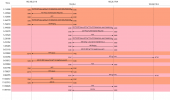
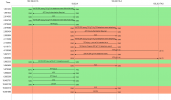
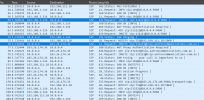
I have attached the PCAP screenshots of the call here.
 

Attachments

  • Screenshot 2025-12-08 at 11.45.45 AM.png
    Screenshot 2025-12-08 at 11.45.45 AM.png
    72.9 KB · Views: 24
  • Screenshot 2025-12-08 at 11.46.42 AM.png
    Screenshot 2025-12-08 at 11.46.42 AM.png
    73.3 KB · Views: 24
When an outbound call is made, phone starts to play fake ring tone well before the actual phone starts to ring on the other side.
Maybe it will get better if the SIP trunk is switched to G711.a, as the provider wants. Apparently, they don't like G722. The time spent negotiating with the provider is taking too long.
 
Provider support G711 and G722. Either way, 3CX is designed to transcode codec both ways. As per the provider wants and as per the extension wants.

I never had this issue on version 18 or before. This only started after upgrading to version 20.
 
Provider support G711 and G722. Either way, 3CX is designed to transcode codec both ways. As per the provider wants and as per the extension wants.

I never had this issue on version 18 or before. This only started after upgrading to version 20.
As you see in your pcap, the provider is sending g711a and you g722, thats always not a good thing. try to set g711 as the first codec.
 
so whats the spec of the vm?
 
  • Like
Reactions: fxbastler and bitn2
Provider support G711 and G722. Either way, 3CX is designed to transcode codec both ways. As per the provider wants and as per the extension wants.
Let's summarize: you have a problem and want it resolved. Then, at least change the configuration of the 3CX for testing purposes to see under what circumstances the provider reacts better. This includes simplifying and speeding up the entire transmission by choosing a more suitable codec. The provider dictates this.
We ourselves usually follow provider preferences when configuring our systems and therefore use G711.a almost exclusively internally as well.

The 3CX generally has no issues with transcoding. It may also be the case that the provider claims to support G722, but he does not respond to it and instead negotiates the codec G711.a. Moreover he does not react appropriately as it takes almost 5 seconds to negotiate. This is very clearly visible in your screenshots.

Therefore my recommendation is to go along with the provider’s codec so that the process might run more quickly.
 
  • Like
Reactions: leejor and bitn2
I did all these tests before I asked for help, anyway for your satisfaction, I did two more test and got the capture.

Test-1: Changed the Trunk Codec Priority to G711A, while phone remained as OPUS.
Test-2: Changed the Phone Codec Priority also to G711A.

Same results.

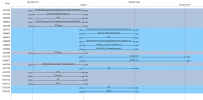
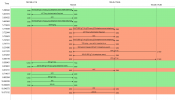
As you can see on the PCAP screenshot, 3CX is sending 180 immediately. Provider is not even sending 180. They are sending 183 in one screenshot and directly 200 in the other screenshot.

So, this very clearly shows the fake ringback tone is generated by 3CX.

Please let me know if I and wrong.

Thank you
 

Attachments

  • Screenshot 2025-12-18 at 7.56.10 AM.png
    Screenshot 2025-12-18 at 7.56.10 AM.png
    71.6 KB · Views: 4
  • Screenshot 2025-12-18 at 7.58.48 AM.png
    Screenshot 2025-12-18 at 7.58.48 AM.png
    73.8 KB · Views: 4
So, this very clearly shows the fake ringback tone is generated by 3CX.
The test scenario is good. That was the plan.
I still think this is due to the provider who in my opinion still reacting far too late - even to a now better-adapted INVITE. I would first look for further issues within your own network environment (we don’t know yours) and if it still lies outside of that I would specifically contact the provider about it.

The first response with 200 OK (and even the 183) should come much faster. We don't know or have that. 3CX intervenes there and signals to the caller that the call actually exists. From a customer perspective this is better than hanging in limbo and waiting longer without any feedback. Based on our experience, otherwise (long silence) there are many more follow-up questions from customers directed at us as the 3CX installer and operator.

In 3CX under Admin / System / Options / General there is also the option 'Play prompt when 3CX cannot contact the number a person dialed'. This is disabled by default. We enable it on all of our 3CX systems. I’m not sure whether disabling this option (if it is enabled there) would resolve your fake ring tone issue, since in that case there could be silence.
But that contradicts the customer requirements we are familiar with and therefore this option is enabled everywhere in our setup.

edit:
If you already have such nice packet captures: you can also see exactly at what point in time the ring tone is generated by 3CX toward the caller. What about that? When exactly does it occur?
As already written: we’re not familiar with this and I can’t really reproduce or set this up for such a call easily (it would be quite extensive).
 
Last edited:
Thank you very much for taking your time review my case. I have tried this with 3 different providers. All same results. Again, this only happens after the V20 upgrade. All these years with V18 and earlier, never ever had this issue.

Attached is the packet screenshot. Here you can see, I have highlighted 3 rows. 3CX is sending the invite to the carrier after sending the 180 to the caller. This is the part I am confused.

As per what you said, that the carrier is sending the 200 in a delayed manner, is contradicting with the capture because as per the capture, 3CX is the one sending the invite to the carrier after sending 180 to the caller. Why 3CX is behaving like this, I have no clue.

As per my understanding, 3CX should send the invite as soon as it receives and wait for the response from the carrier. If the carrier delays the response, then it can intervein and send the 180 to the caller. Please correct me if I am wrong.

I am also attaching the PCAP if you like to take a look, if you are interested.
 

Attachments

  • Screenshot 2025-12-18 at 8.51.20 AM.png
    Screenshot 2025-12-18 at 8.51.20 AM.png
    300.9 KB · Views: 2
  • PCAP.zip
    PCAP.zip
    599.7 KB · Views: 2
As per what you said, that the carrier is sending the 200 in a delayed manner, is contradicting with the capture because as per the capture, 3CX is the one sending the invite to the carrier after sending 180 to the caller. Why 3CX is behaving like this, I have no clue.
Imho this ist normal, Status 180 ringing from 3CX to the caller is not the same as the ring tone via RTP. It's just a SIP command, not a tone. But someone with more knowledge on hand may correct me pls if I'm wrong.
Edit:
It could also be the 3CX endpoint that generates the tone itself due to the 180 response, because further SIP responses are delayed. This might depend on the specific 3CX endpoint. We haven't discussed that yet.

As per my understanding, 3CX should send the invite as soon as it receives and wait for the response from the carrier. If the carrier delays the response, then it can intervein and send the 180 to the caller. Please correct me if I am wrong.
I should grab RFC3261 and take a deeper look when this SIP command should and could be sent from 3CX to the caller. At this time of the day here in middle europe (UTC+1, good morning Germany) - pls no ;)
I mean it could (and should) be sent immediatly, just no tone. Your 3CX FQDN (and maybe the azure vm - who knows) is located in down under, the Trunk provider IP per whois is located in tunesia (it says LTE - 3G Tuniesia Telecom pool, who knows). That may raises further questions.

About the pcap: hell, so much calls at this time (here...) *eyes_rolls* 28 running calls in less than 20 seconds ...
But the call from 101 and all the other calls, as quickly as I looked through them, are incomplete. Pcap is too short.

At this point, I would like to voluntarily stop for now, sorry for that. It will take a bit more time in total to track the problem more specifically with larger and more complete packet captures (for example, test calls from 101) rather than doing it in a rush like I’m doing here.

general questions:
Has the issue already been communicated to your 3CX partner?
Alternatively, it might be a good idea to involve 3CX via a support ticket, especially with such a frequently used system.
 
Last edited:
Than you again for the effort and take a look at this when ever you are free.

Regarding the SIP 180 sent from the 3CX to the caller, i think you are right, 3CX doesn't send the actual ring tone, Based on the 180 received by the handset, it plays the rigngback tone.
 
  • Like
Reactions: fxbastler
Than you again for the effort and take a look at this when ever you are free.
you're welcome
I'm looking down and sending best regards :)

pcap is too short
 
Hi @Wunan ,

Is the firewall checker green?
 
Just curious, is this playing your MOH when its doing the fake ring tone?
 
Just curious, is this playing your MOH when its doing the fake ring tone?


No, when I am making an outbound call, phone starts to ring immediately as soon as I complete last digit of the number but the actual phone on the other side is not ringing.
 

Latest Posts

Forum statistics

Threads
111,953
Messages
589,916
Members
164,851
Latest member
DrunkeMeister