3CX v20 Reporting is missing feature parity from v18

jowens

Platinum Partner
Basic Certified
Joined
Jul 17, 2022
Messages
1
Reaction score
0
On v18 we were able to pull a Trunk/DID report that measured total call volume on the trunk. No longer exists in v20.
On v18, we could disseminate between the following with Call Reports, which are no longer available in v20.

- From or To Internal/External Calls
- From or To Extension Ranges

Without any of the above, we are left without ways to track overall call volume without manual manipulation of data. We have customers who use these reports weekly, while we have been focusing on migrating them to v20 where they are without insight. It's also causing us to have to restructure call patterns to align with existing available reports, just so we can track metrics. e.g. migrating all Digital Agent destinations to queues. As there's way more call details in queue reports available.

Lastly, Ring Group Statistics report is measuring unanswered call incorrectly at the summary(high) level. For each group, a call is only "counted" as unanswered by the report if the call doesn't make it to voicemail. If so, the call is marked/counted as an answered call.

-The Answered column reflects a higher number of Answered calls than the total of calls reflected per user when expanding the ring group header.
- If a Call Report is pulled against (To) that same Ring Group, w/ only unanswered, it will show all the calls that didn't get counted for unanswered and instead added to Answered by the Ring Group Statistics Report.

This creates for an inaccurate report for potentially hundreds of calls that would then require manual data validation.

Some suggestions,

Give us back the Trunk/DID report

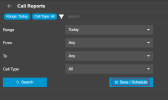
Give us back granular Call Report filters

Add a voicemail column right of unanswered. Properly count unanswered calls and count any that were received at voicemail in the new column.

We need a solution for v20 call volume so our customers can accurately report, is there a solution inhouse for this or will we need to turn to external, 3rd party, methods.
 
Update 5 will iroduce the integration with platforms like Grafana which will allow you to pull the data from the PBX and literally create any type of report you wish, both in data and/or graph form.

This topic has been raised countless times, and a solution is coming.
 
Update 5 will iroduce the integration with platforms like Grafana which will allow you to pull the data from the PBX and literally create any type of report you wish, both in data and/or graph form.

I don't think this is really the answer.
It was a mistake by 3CX for them to not have the same reports from v18 in v20 and it's made our [partners] lives harder.
Often, we dont have the time to build, maintain and configure reporting into other services like Grafana.
For us, our clients are happy with the standard reports found in v18. Removing them is putting unnecessary pressure to find alternatives.

Hopefully there's enough feedback from the community that they bring this back.

</rant>
 
I don't think this is really the answer.
It was a mistake by 3CX for them to not have the same reports from v18 in v20 and it's made our [partners] lives harder.
Often, we dont have the time to build, maintain and configure reporting into other services like Grafana.
For us, our clients are happy with the standard reports found in v18. Removing them is putting unnecessary pressure to find alternatives.

Hopefully there's enough feedback from the community that they bring this back.

</rant>
Totally agree with this statement. I can understand not introducing new reporting features/parameters but to remove so many from an upgrade is causing issues with clients and resellers
 
Totally agree with this statement. I can understand not introducing new reporting features/parameters but to remove so many from an upgrade is causing issues with clients and resellers Now i must download reports, export them to another tool, and spread them in the office. Too many extra handlings for an easy report how many calls etc
 
Totally agree with this statement. I can understand not introducing new reporting features/parameters but to remove so many from an upgrade is causing issues with clients and resellers Now i must download reports, export them to another tool, and spread them in the office. Too many extra handlings for an easy report how many calls etc
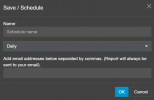
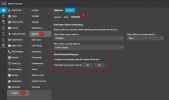
A report can be sent to multiple emails.

1731494253064.png

1731494278217.png
 
A report can be sent to multiple emails.
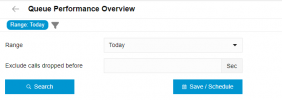
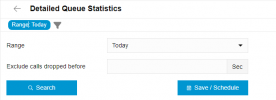
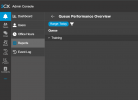
Cool, but why can't we, for example, filter by Queues. Or provide other filters like we had in v18.
This is a core report for our clients, since they would be emailed to the manages of those queues, and don't need to see the stats of the other queues.

1732050043245.png

1732050078101.png

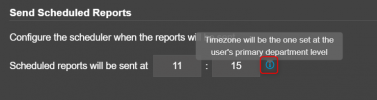
Additionally, you cannot specify the schedule of the report when it to be sent. It's just "Daily".
We've got some reports that we would trigger for 9am so the managers would review these first thing in the morning.
 
The triggering of the daily reports can be done from the PBX scheduler

1732092695455.png

The queues are part of a department, and if the user is a manager of the departments containing any queues, they wil be able to see those queues in the reports.

My example below is showing the report of a single queue in my department. I do have other qeues in my PBX but these are not visible to this user

1732093038620.png

Its all down to the department the manager and the queue is in.
 
This will be triggered for the timezone of the department

1732162458989.png
 
  • Like
Reactions: Greg_G
Since we are on the subject of reports. One I miss from V18 is the DDI usage report.

Any hacks on how to get that data, i.e. report on how many calls each DDI number has had over a period of time?

Dave.
 
We are experiencing a lot of problems due to the lack of these graphical reports and we are being forced to use a license that does not have this data.
 
It is not understood why V18 reports have been removed when migrating to V20
 
Introducing new features in reporting is great! However, removing the features that already have in V18 is unnecessary.

Any idea when update 5 will be released?
 
Introducing new features in reporting is great! However, removing the features that already have in V18 is unnecessary.

Any idea when update 5 will be released?
Exact date is not known but it should be in the beginning of next year. We are about to release Update 4 final.
 
  • Like
Reactions: Greg_G
Exact date is not known but it should be in the beginning of next year. We are about to release Update 4 final.
Hi Nicholas, I really enjoy your webinars!

On the subject of Reporting 2.0, I have 2 questions:
1) Will this restore what others are describing as "parity" in v20 with what reporting was available in v18?
2) From the Reporting 2.0 blog, I can't tell but it reads as if an external package and platform will be required to take advantage of all the enhancements. True?

Thanks in advance, and looking forward to an opportunity to catch your v20 Advanced class after the holidays...
 
On v18 we were able to pull a Trunk/DID report that measured total call volume on the trunk. No longer exists in v20.
On v18, we could disseminate between the following with Call Reports, which are no longer available in v20.

- From or To Internal/External Calls
- From or To Extension Ranges

Without any of the above, we are left without ways to track overall call volume without manual manipulation of data. We have customers who use these reports weekly, while we have been focusing on migrating them to v20 where they are without insight. It's also causing us to have to restructure call patterns to align with existing available reports, just so we can track metrics. e.g. migrating all Digital Agent destinations to queues. As there's way more call details in queue reports available.

Lastly, Ring Group Statistics report is measuring unanswered call incorrectly at the summary(high) level. For each group, a call is only "counted" as unanswered by the report if the call doesn't make it to voicemail. If so, the call is marked/counted as an answered call.

-The Answered column reflects a higher number of Answered calls than the total of calls reflected per user when expanding the ring group header.
- If a Call Report is pulled against (To) that same Ring Group, w/ only unanswered, it will show all the calls that didn't get counted for unanswered and instead added to Answered by the Ring Group Statistics Report.

This creates for an inaccurate report for potentially hundreds of calls that would then require manual data validation.

Some suggestions,

Give us back the Trunk/DID report

Give us back granular Call Report filters

Add a voicemail column right of unanswered. Properly count unanswered calls and count any that were received at voicemail in the new column.

We need a solution for v20 call volume so our customers can accurately report, is there a solution inhouse for this or will we need to turn to external, 3rd party, methods.
Yes you are right, we are working on bringing back these things. Not sure I understood about the voice mail but Trunk DID and filters is being worked on.
 
  • Like
Reactions: Greg_G

Latest Posts

Forum statistics

Threads
111,962
Messages
589,959
Members
164,863
Latest member
dipesh09