- Joined
- Dec 30, 2021
- Messages
- 68
- Reaction score
- 15
Hello Dear forum
Really need your help to show mw the way to troubleshoot. I'm facing with this kind of isse for the first time.
Look. I have a Fortigate device which has 2 ISP providers. Those network interfaces (WAN1 & WAN2) configured as SDWAN Interface and named as VirtualWanLink. SDWAN does his job. I’m sure. I have many IPSEC connection (all of them are dual) and a everything seems to work.
So, What is the case
BTW, I noticed this issue today. When in the afternoon today WAN2 had internet outage, 2 of my SIP trunks just stopped working. Those SIP trunks are connected through internet: public IP address, resolvable FQDN.
So, briefly those t2o trunks didn’t want to register via 1.1.1.1. After 2 hours Provider fixed his issue and all start to work. In the evening, before I left the office, I made some tests. I disabled WAN2 interface (2.2.2.2) and saw that those 2 trunks were red.
I started troubleshooting
But SIP trunk denied to register!!!

I thought that SIP Provider blacklisted my WAN1 IP address (1.1.1.1) What did to check it?!
I disabled those two trunks. I downloaded and installed MicroSIP application onto my computer. My computer also passed all network related tests and I had internet through WAN1 (1.1.1.1) interface.
But MicroSIP registered this SIP account successfully. That means SIP provider didn’t blacklisted my IP. I’m sure.
Wireshark shows register logs. All seems are OK… But trunk doesn’t want to register
What else can I do ??
PS: in the past this worked. I’m sure! But this issue may persists for a long time… I just noticed it today
Really need your help to show mw the way to troubleshoot. I'm facing with this kind of isse for the first time.
Look. I have a Fortigate device which has 2 ISP providers. Those network interfaces (WAN1 & WAN2) configured as SDWAN Interface and named as VirtualWanLink. SDWAN does his job. I’m sure. I have many IPSEC connection (all of them are dual) and a everything seems to work.
So, What is the case
- WAN1 IP: 1.1.1.1
- WAN2 IP: 2.2.2.2
BTW, I noticed this issue today. When in the afternoon today WAN2 had internet outage, 2 of my SIP trunks just stopped working. Those SIP trunks are connected through internet: public IP address, resolvable FQDN.
So, briefly those t2o trunks didn’t want to register via 1.1.1.1. After 2 hours Provider fixed his issue and all start to work. In the evening, before I left the office, I made some tests. I disabled WAN2 interface (2.2.2.2) and saw that those 2 trunks were red.
I started troubleshooting
- Ping to voip provider: OK
- Telnet to voip provider 5060: OK
- Nslookup voip provider FQDN: resolved correct IP address.
But SIP trunk denied to register!!!
I thought that SIP Provider blacklisted my WAN1 IP address (1.1.1.1) What did to check it?!
I disabled those two trunks. I downloaded and installed MicroSIP application onto my computer. My computer also passed all network related tests and I had internet through WAN1 (1.1.1.1) interface.
But MicroSIP registered this SIP account successfully. That means SIP provider didn’t blacklisted my IP. I’m sure.
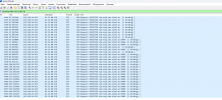
Wireshark shows register logs. All seems are OK… But trunk doesn’t want to register
What else can I do ??
PS: in the past this worked. I’m sure! But this issue may persists for a long time… I just noticed it today