3CX V20 Update 10 – Firewall Checker Fails Due to Missing STUN IP in Official Documentation

cpe90

Premier Customer
Joined
Mar 7, 2023
Messages
84
Reaction score
19
Hello 3CX Team,

After upgrading our 3CX system to V20 Update 10 (Build 1801), the Firewall Checker repeatedly failed the Full Cone NAT tests for UDP 5060 and multiple RTP ports.

We're using a Palo Alto PA-1420 firewall with restricted inbound and outbound rules based on the STUN server IP addresses published in the official 3CX documentation:

https://www.3cx.com/docs/firewall-checker/

During troubleshooting, we discovered that our Palo Alto was denying incoming UDP traffic from 34.73.139.160 to multiple RTP ports (9042, 9052, 9060, 9066, 9072, and 9076).

This IP address is not included in the official 3CX Firewall Checker whitelist.

After adding this IP to our restricted firewall address group, the previously failing firewall tests started passing.

I also found a German 3CX Community Forum discussion reporting a similar issue involving secondary STUN response addresses (34.159.93.50):

https://www.3cx.de/forum/threads/fi...bes-nachweislich-bei-der-pbx-ankommen.127080/

Could the 3CX team please confirm whether 34.73.139.160 is an official secondary STUN response server and update the Firewall Checker documentation to include it?

Administrators using source-IP-restricted firewall policies rely on this documentation to properly configure their firewalls without allowing unrestricted inbound traffic.

Thank you!
1795212422335.png
 
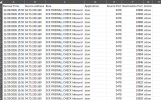
Hi @cpe90 during the test you can notice the domains used for the test for example:
  • resolving 'stun-sa.3cx.com'... done
  • resolving 'stun2.3cx.com'... done
  • resolving 'stun3.3cx.com'... done
  • resolving 'sip-alg-detector.3cx.com'... done
Also you can check this guide which explains what is checked during the test.
 
Hi Alejandro,

Thanks for your response. I checked the FQDN resolution directly on our Palo Alto PA-1420 using:

`show dns-proxy fqdn all`

The results show:

- **stun-us.3cx.com:** 34.83.212.229, 34.138.123.132
- **stun2.3cx.com:** 34.83.212.229, 34.40.164.62, 34.138.123.132, 34.40.60.101
- **stun3.3cx.com:** The same four IP addresses
- **sip-alg-detector.3cx.com:** 34.141.156.185

However, none of these FQDNs currently resolve to **34.73.139.160**.

The 3CX guide is only showing IPs 34.40.60.101, 34.40.164.62, 34.83.212.229, and 34.138.123.132.

Our Palo Alto traffic logs confirmed that the Firewall Checker received secondary STUN responses from **34.73.139.160:3479**, which were initially denied by our restricted inbound firewall policy.

After explicitly allowing that IP, the previously failing full-cone NAT tests passed.

Could you please clarify whether there is a separate FQDN for this secondary STUN response server, or whether 34.73.139.160 should be added to the official whitelist documentation?

Thank you!
 
Last edited:
The thing here is that for the Full Cone NAT test the ports must be unrestricted, please check the document I sent you.

Test 2, the 3CX server sends another request to the same STUN server. However, this time:

  • The 3CX Server marks the request with "Change IP and Change Port" set to (1).
  • This instructs the STUN server to send its response from an IP address and port that is different from the one the initial request was sent to.
  • This new source IP/Port is unknown to the firewall, which would typically expect a response from the original destination.
Firewall Checker - Example 2(Firewall Checker - Example 2)

If the server sends multiple requests without receiving a reply from the STUN server, it indicates that Full Cone NAT is not working.

Unlike Test 1, where 3CX expects a response from the server it actively communicated with, Test 2 simulates receiving data from a source that 3CX has not directly "talked to" (similar to an audio server of a VoIP provider). If no response is received, it means the firewall is blocking this type of traffic. In this case, contact your firewall manufacturer to resolve the problem.

A successful response in Test 2 would show the "Mapped-Address" as exactly the same IP and Port as in Test 1. If you wish to investigate further, check your firewall logs for traffic from the 3CX STUN server IP addresses, as the expected answer never reached the 3CX server's network interface.
 
Thank you for the detailed explanation. I understand now that the Full Cone NAT test requires receiving UDP traffic from a different source IP and port.

I wanted to point out a possible clarification in the official guide.

Under "3CX STUN servers to whitelist for a successful Firewall Check", the documentation lists four IP addresses. However, under "Test 2: Full Cone NAT Validation", it explains that responses can originate from a different IP and port.

In our case, our Palo Alto PA firewall was configured to allow the four documented STUN IPs, but the test continued to fail. Our firewall logs confirmed that responses from 34.73.139.160:3479 were being denied.

After adding that IP to our restricted firewall policy, the test passed.

We understand that Full Cone NAT requires this behavior. However, from a security standpoint, we try to follow the principle of least privilege and avoid allowing inbound traffic from unrestricted sources whenever practical.

Perhaps the guide could clarify that the four published STUN IPs may not cover all secondary response addresses used during Test 2, and explain the recommended approach for administrators using source-IP-restricted enterprise firewalls.

This would help other administrators avoid the same confusion while maintaining appropriate firewall security.

Thank you again for your assistance! :)
 
Tbf... It does say in the documentation "3CX verifies that "Full Cone NAT" is correctly configured on your firewall.." So if your NAT was full cone it would have passed test 2. You passed test 1, STUN figures out its WAN IP. Then test to fails on checking NAT type. The documentation then goes onto say if it fails "...In this case, contact your firewall manufacturer to resolve the problem.". I dont think this documentation will be updated.
 

Forum statistics

Threads
112,568
Messages
593,349
Members
165,787
Latest member
SteveBMG