3CX v20 Update 3 build 806 release breaks SMB path

SGan

Customer
Joined
Dec 21, 2007
Messages
18
Reaction score
1
Hello,

Does anyone encounter issues with connecting to storage path using SMB after the latest v20.0 update 3 build 806? Our 3CX automatic upgrade kicked in last week. Everything else works fine except my backup and call recording archiving which worked flawlessly before the update.

Did something changed in the SMB behaviour in this update released?

Any suggestion or fixes?

Thanks.
 
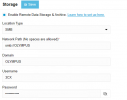
No, everything is fine. Just show a screenshot of your storage options.
 
Thanks
 

Attachments

  • 3CX Storage Option.png
    3CX Storage Option.png
    10.8 KB · Views: 92
  • Like
Reactions: bitn2
Both Backups and Call Recording Archiving stopped working after the update 3 upgrade. Thanks.
 
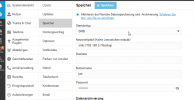
I think you need to specify the folder where the data should go. Like this:1729160599008.png
 
  • Like
Reactions: Evolute IT
what's the defaut folder name for backup and archive? Thanks.
 
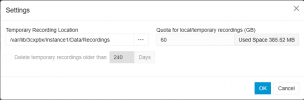
There's no settings for archive path. Archiving was working up until the update 3. Can't find the archiving settings now too.

Thanks.
 

Attachments

  • 3CX Recording Archive.png
    3CX Recording Archive.png
    11.8 KB · Views: 41
It is now in System > Storage
 
what's the default folder name? before the upgrade to update 3, backup and recording archive is working fine. So I need to know the default folders so I can manually add and get access to the old files. Thanks.
 
I can't find the old path from the saved config files. Kindly advise where to look for the path in the backup configuration files. Thanks.
 
Go to Admin > Advanced > Parameters, type inst_backup in Search. It will list all existing parameters for previous version backup.
If your backups indeed used SMB, type inst_backup_ns to show only SMB-related parameters.
 
Last edited:
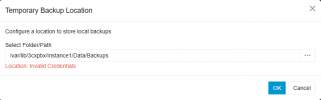
Cannot find inst_backup_ns in the parameters. Noticed that the Inst_Backup_Repository shows /var/lib/3cxpbx/Instance1/Data/Backups. Backup settings shows Location: invalid credentials?
 

Attachments

  • 3cx backup settings.png
    3cx backup settings.png
    10 KB · Views: 31
During the update, the system tried to merge your archiving settings into one (because now only one storage is supported).
If your backups were going someplace else, you need to assign a folder for them in the new common storage in System > Storage.
After that your new backups will be created there.
If you still need old backups, you have to manually copy them to the new location.

You haven't described your situation fully. I can't even figure out what you're trying to achieve.

* How was recording archiving configured before?
* How was backup archiving configured before?
* Were they targeting the same remote storage?
* What is set in your System > Storage now?
* Do you have access to your old recordings?
* Can you create a backup manually in Backup > Backup Now and after it finishes, see and access the new zip in UI?
 
I also have issue with smb backups. recordings are working. Also manual backups, but I receive the error "Your 3CX backup failed due to the following reason(s): \3CXScheduledBackup.zip.tmp : STATUS_INVALID_PARAMETER" when I take a scheduled backup". I see that the backup 3CXScheduledBackup.zip.tmp is made in the smb folder. But there is only 1 file, it's overwritten each time. But in 3cx I don't see the backup (rotation is set to 3).
 
Same here, recordings are stored, but whatever I try to do with the backup section, I receive a "Invalid Credentials" error.
Before update 3, recordings where stored to SMB, but backups where stored to Google
 
Same here. After upgrading to v20, it lost access to the SMB storage. I'm getting the error message "Invalid Credentials'. I have another system that was upgraded before this last release and it is working fine.
 

Attachments

  • Screenshot 2024-10-23 085750.png
    Screenshot 2024-10-23 085750.png
    66.2 KB · Views: 38
  • Screenshot 2024-10-23 085709.png
    Screenshot 2024-10-23 085709.png
    2.6 KB · Views: 34
Now that I tried to rebuild the smb storage, I am not able to store recordings anymore. I just called the support, and they suggest to restart services.
 
Now that I tried to rebuild the smb storage, I am not able to store recordings anymore. I just called the support, and they suggest to restart services.
I created a subfolder under the main shared folder and It's working again.

Before:
C:\3CX_Backup
\\ip_address\3CX_Backup

Network Path (No spaces are allowed)
smb://ip_address/


After:
C:\3CX_Backup\3CX_Backup

Network Path (No spaces are allowed)
smb://ip_address/3CX_Backup

Please see attached pictures for details.
 

Attachments

  • Affter.png
    Affter.png
    79.9 KB · Views: 63
  • Before.png
    Before.png
    66.2 KB · Views: 59
I think the issue is the single path supported in this new update version.

I added the folder "backups" to my storage path setting are both backup and recording archiving is working now. Unfortunately, now I have an undesirable issue since both under a single path.

Before the update:
Backup: /var/lib/3cxpbx/Instance1/Data/Backups
Recording: smb://OLYMPUS/3CX_Recordings

After the upgrade and with the Storage path set to smb://OLYMPUS/BACKUPS
Backup: smb://OLYMPUS/BACKUPS/BACKUPS
Recording: smb://OLYMPUS/BACKUPS/3CX_Recordings

Before the upgrade, I simpy used smb://OLYMPUS with the credentials.

Not too much of a problem since 3CX can view all old recordings including old archiving. I will need to rename the folder name 3CX and move old recordings over.
Backup: smb://OLYMPUS/3CX/Backups
Recording: smb://OLYMPUS/3CX/3CX_Recordings
 
I think the issue is the single path supported in this new update version.

I added the folder "backups" to my storage path setting are both backup and recording archiving is working now. Unfortunately, now I have an undesirable issue since both under a single path.

Before the update:
Backup: /var/lib/3cxpbx/Instance1/Data/Backups
Recording: smb://OLYMPUS/3CX_Recordings

After the upgrade and with the Storage path set to smb://OLYMPUS/BACKUPS
Backup: smb://OLYMPUS/BACKUPS/BACKUPS
Recording: smb://OLYMPUS/BACKUPS/3CX_Recordings

Before the upgrade, I simpy used smb://OLYMPUS with the credentials.

Not too much of a problem since 3CX can view all old recordings including old archiving. I will need to rename the folder name 3CX and move old recordings over.
Backup: smb://OLYMPUS/3CX/Backups
Recording: smb://OLYMPUS/3CX/3CX_Recordings
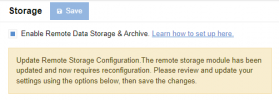
I did something similar as you can see above it. It is working but I'm still getting an alert on the dashboard and on the storage page. Are you getting this same alert?

Please see attached picture.
 

Attachments

  • Screenshot 2024-10-24 104103.png
    Screenshot 2024-10-24 104103.png
    2.6 KB · Views: 41
  • Screenshot 2024-10-24 105026.png
    Screenshot 2024-10-24 105026.png
    12.6 KB · Views: 40
Last edited:

Forum statistics

Threads
112,285
Messages
591,708
Members
165,408
Latest member
tom.walker@blackcountryra