3CX - Video Conferencing Allowed for a extension.

techies

Silver Partner
Basic Certified
Joined
Sep 25, 2009
Messages
33
Reaction score
2
1752133298331.png

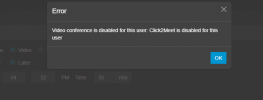
Please can I have some support - How do you allow the video conference option for specific extensions without giving the user a role like manager or higher.
Have gone on the admin console and in users to find perhaps a option to allow video conferencing calls but cannot find one.
We are on 3CX Version 20
License = Pro Annual

Let me know if you need more details
 
Hello,

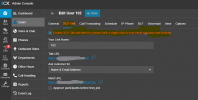
In Admin->Users->Edit User->3CX Talk: Check Enable 3CX Talk and Meet....

1752134238195.png
 
Thank you for the prompt reply - She has that enabled. Any Ideas why it would still say the video conference is disabled?
 
Is it working OK for other users?
 
Only one user has video conferencing enabled and that's because his role is Manager.
 
Let me make sure I am understanding.

All users have the Check Box for "Enable 3CX Talk and Meet..." activated.

One user that has a Manager role is able to schedule Video Conferences.

All other users cannot schedule Video Conferences.
 
Could you enable Debug for the event log, try to do a meeting again and see if anything relevant shows?

Clearing browser cache and perhaps reloading services might help clear any old setting that is somehow stuck.
 
Well - The users that want to use the Video Conference option have it is already ticket but it will not work.
I will get a remote session on their PC's and see If i can figure it out.
 
  • Like
Reactions: KyriacosS_3CX

Latest Posts

Forum statistics

Threads
111,961
Messages
589,954
Members
164,862
Latest member
ARTipsadmin