


- Joined
- Mar 17, 2020
- Messages
- 1
- Reaction score
- 0
I'm having some troubling issue with using the 3CX web client. Running Linux (Arch) and Chromium (most recent version, shouldn't matter anyways) + 3CX Extension.
To connect to our internal company network, I use an OpenVPN connection. This OpenVPN connection creates "tunX" adapters (i.e. tun0, tun1, etc.) for communicating over the VPN tunnel. Now, as soon as those tunnel adapters are created, 3CX uses these in STUN negotiations. Because of this, I only hear a few ringing tones and as soon as the target phone rings, my headset gives me nothing but silence. Because this is a really critical issue for me I analyzed the network traffic with Wireshark and found out what I described earlier in this post.
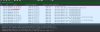
The marked IP "10.242.2.5" is the IP of my "tun0" adapter. This tunnel adapter can not connect to the outside world. Now I understand if 3CX tries all the adapters, but even then, why can't I make phone calls as long as this "tun0" adapter exists? "192.168.43.53" is my local network IP so at least this IP is listed correctly.
"ip route" with OpenVPN connected:
"ip route" without OpenVPN connected:
Something seems wrong here and I have no idea. When I stop OpenVPN, 3CX works flawlessly, so there seems to be some routing issue. 3CX is the only thing giving me any kind of issues with my setup, so it very probably is an issue with 3CX. I'm starting to get really desperate... what could this be?
To connect to our internal company network, I use an OpenVPN connection. This OpenVPN connection creates "tunX" adapters (i.e. tun0, tun1, etc.) for communicating over the VPN tunnel. Now, as soon as those tunnel adapters are created, 3CX uses these in STUN negotiations. Because of this, I only hear a few ringing tones and as soon as the target phone rings, my headset gives me nothing but silence. Because this is a really critical issue for me I analyzed the network traffic with Wireshark and found out what I described earlier in this post.
The marked IP "10.242.2.5" is the IP of my "tun0" adapter. This tunnel adapter can not connect to the outside world. Now I understand if 3CX tries all the adapters, but even then, why can't I make phone calls as long as this "tun0" adapter exists? "192.168.43.53" is my local network IP so at least this IP is listed correctly.
"ip route" with OpenVPN connected:
Code:
default via 192.168.43.1 dev wlp64s0 proto dhcp metric 600
10.242.2.0/24 dev tun0 proto kernel scope link src 10.242.2.5
81.3.4.78 via 192.168.43.1 dev wlp64s0
172.17.0.0/16 dev docker0 proto kernel scope link src 172.17.0.1 linkdown
172.19.0.0/16 dev br-a50eb21bccf6 proto kernel scope link src 172.19.0.1 linkdown
172.21.0.0/16 dev docker_gwbridge proto kernel scope link src 172.21.0.1 linkdown
172.22.0.0/16 dev br-dd05af4c39e0 proto kernel scope link src 172.22.0.1 linkdown
172.24.0.0/16 dev br-1c571ba34c30 proto kernel scope link src 172.24.0.1 linkdown
192.168.9.0/24 via 10.242.2.1 dev tun0
192.168.43.0/24 dev wlp64s0 proto kernel scope link src 192.168.43.53 metric 600
192.168.150.0/24 via 10.242.2.1 dev tun0
192.168.222.0/24 dev br-58e1179b3b2a proto kernel scope link src 192.168.222.1 linkdown
"ip route" without OpenVPN connected:
Code:
default via 192.168.43.1 dev wlp64s0 proto dhcp metric 600
172.17.0.0/16 dev docker0 proto kernel scope link src 172.17.0.1 linkdown
172.19.0.0/16 dev br-a50eb21bccf6 proto kernel scope link src 172.19.0.1 linkdown
172.21.0.0/16 dev docker_gwbridge proto kernel scope link src 172.21.0.1 linkdown
172.22.0.0/16 dev br-dd05af4c39e0 proto kernel scope link src 172.22.0.1 linkdown
172.24.0.0/16 dev br-1c571ba34c30 proto kernel scope link src 172.24.0.1 linkdown
192.168.43.0/24 dev wlp64s0 proto kernel scope link src 192.168.43.53 metric 600
192.168.222.0/24 dev br-58e1179b3b2a proto kernel scope link src 192.168.222.1 linkdown
Something seems wrong here and I have no idea. When I stop OpenVPN, 3CX works flawlessly, so there seems to be some routing issue. 3CX is the only thing giving me any kind of issues with my setup, so it very probably is an issue with 3CX. I'm starting to get really desperate... what could this be?


