- Joined
- Nov 23, 2020
- Messages
- 30
- Reaction score
- 16
I wanted to test out my desktop mic and speaker but the WebRTC error prevented testing. I decided try downloading the Windows Client app and it works great. You can still use the Web client, you just select that calls will go through the installed Windows Program, not chrome.
(1) Download the Windows program (app) client -
https://downloads-global.3cx.com/downloads/3CXPhoneforWindows16.msi (also found here)
(2) Run the downloaded application to install it.
(3) You must drag and drop the .3cxconfig file from the welcome email sent to the extension you are trying to configure.
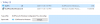
(4) I was unable to find my welcome email, so I had to resend it as I am the administrator as well.
(5) You need to login to your 3cx as the administrator, click the left hand select box of the extension you want to setup (10 in this case) and click [Send Welcome email at the top, seen in grey on the image]

(6) check your mail and you'll get an email like this.

Download the .3cxconfig file to your hard drive and drag and drop it onto your unconfigured Windows Application.
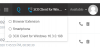
(7) then, from the web browser extension, select the Windows app as the preferred calling source.
That should be it, hope that helps.
(1) Download the Windows program (app) client -
https://downloads-global.3cx.com/downloads/3CXPhoneforWindows16.msi (also found here)
(2) Run the downloaded application to install it.
(3) You must drag and drop the .3cxconfig file from the welcome email sent to the extension you are trying to configure.
(4) I was unable to find my welcome email, so I had to resend it as I am the administrator as well.
(5) You need to login to your 3cx as the administrator, click the left hand select box of the extension you want to setup (10 in this case) and click [Send Welcome email at the top, seen in grey on the image]
(6) check your mail and you'll get an email like this.
Download the .3cxconfig file to your hard drive and drag and drop it onto your unconfigured Windows Application.
(7) then, from the web browser extension, select the Windows app as the preferred calling source.
That should be it, hope that helps.