3cx Webclient - People Colours?

Status
Not open for further replies.

Rich.Hopkins

Premier Customer
Joined
Mar 27, 2018
Messages
78
Reaction score
17
Is it possible to change the color shown of a user’s extension because she doesn’t like to appear in brown?
To add to this, her name in group chats also appears brown, so can’t just change the profile picture.
1f644.png
I need more coffee...
 
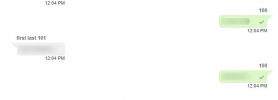
The colour cannot be changed without deleting and recreating the extension. Do bear in mind that in 3CX v18, the name colour is neutral for all users so this will not matter once you upgrade.
 
The colour cannot be changed without deleting and recreating the extension. Do bear in mind that in 3CX v18, the name colour is neutral for all users so this will not matter once you upgrade.
Thanks Chris, when you say colour is neutral.. what does the new client look like?
 
Here's a screenshot of a group chat. Chat is between extension 100(Name: none) and 101(Name: first / LastName: last)
1629883197147.png
 
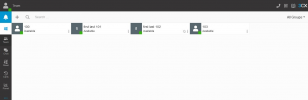
Great, and the people tab?
 
Here's what it looks like:
1629883576561.png
 
Thanks Chris, my user has (Jokingly - I hope) hinted that it's a colour diversity issue - I’ve checked our upgrade options in the management console and the V18 update is there. Hopefully that'll solve the problem before things get out of hand!
 
  • Like
Reactions: ChrisC_3CX
Do remember to always take a full backup and move it away from the machine before applying updates.

Also, applying the updates during out of office hours to avoid downtime is always best!
 
  • Like
Reactions: Rich.Hopkins
Status
Not open for further replies.

Forum statistics

Threads
112,349
Messages
592,027
Members
165,513
Latest member
megalmazan