- Joined
- Jul 24, 2019
- Messages
- 108
- Reaction score
- 22
With the newest 3CX update (V18), 3CX looks to have made some changes with Webmeeting. Webmeeting now displays a separate participant on screen for people joining the meeting via video and users who dial in via phone.
We have a scenario in where we have multiple customer sites with a conference room set up. They dial into the meeting using a Yealink CP960 conference room with satellite microphones phone for audio, and use a Intel NUC, connected to a TV (audio muted) via HDMI with a Logitech webcam for video.
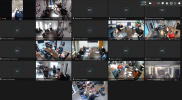
This results in a separate audio and video participant for each branch dialing into the meeting, which clutters up the screen (see attached).
How can this be resolved? Is there not a way to disable dial-in users from appearing on the Webmeeting display?
We have a scenario in where we have multiple customer sites with a conference room set up. They dial into the meeting using a Yealink CP960 conference room with satellite microphones phone for audio, and use a Intel NUC, connected to a TV (audio muted) via HDMI with a Logitech webcam for video.
This results in a separate audio and video participant for each branch dialing into the meeting, which clutters up the screen (see attached).
How can this be resolved? Is there not a way to disable dial-in users from appearing on the Webmeeting display?