Solved 3CX Windows client call failure

Status
Not open for further replies.

cloud19

Gold Partner
Basic Certified
Joined
Jun 30, 2016
Messages
13
Reaction score
5
We have an issue with the Windows client at customer. This customer works with Jabra headset and had 22 Windows clients in use.

With 2 Windows Clients we have the issue that the user gets a call failure. The client gives the same call failure with the machine mic and speaker....and also with a Panasonic head set.

Where can we look when 20 web clients are working fine and just 2 give this failure?

Extra info
  • 3CX Version, e.g. Standard Annual 16.0.2.910
    • Professional 16.08.9
  • Server OS, e.g. Debian 9 / Windows Server 2012 R2 / Raspberry Pi
    • Debian 9
  • Is the 3CX Server Hosted?
    • Hosted
  • Has the Firewall Checker passed: YES / NO
    • Yes
  • Client is on the same network as the PBX or not?
    • No
  • Do you get a specific error message? If yes what?
    • Dutch “oproep mislukt” or call failure
  • Does this happen for all PCs/Windows clients on this network or just one?
    • Just 2. Other (more than 20) just work
  • You mention placing calls, does receiving calls work?
    • no
  • Can you reach the 3CX Management Console from the PC running the Windows client with https://xxx.3cx.com:5001?
    • Yes >
 
Which exact version of the 3CX Windows App are you running?

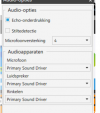
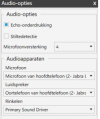
Also, launch the affected 3CX Windows App and go to Settings >> Audio Options and check that the correct Audio devices are set.
 
Hi Chris,

Thanks for your reply, still call failure.

Which exact version of the 3CX Windows App are you running?

Version 16.3.0.220


Also, launch the affected 3CX Windows App and go to Settings >> Audio Options and check that the correct Audio devices are set.

Done, both pc audio and Jabra, no result see print screens
 

Attachments

  • Screenshot 2021-04-08 at 17.30.16.png
    Screenshot 2021-04-08 at 17.30.16.png
    30.1 KB · Views: 6
  • Screenshot 2021-04-08 at 17.30.47.png
    Screenshot 2021-04-08 at 17.30.47.png
    33.2 KB · Views: 6
  • Screenshot 2021-04-08 at 17.31.24.png
    Screenshot 2021-04-08 at 17.31.24.png
    26.8 KB · Views: 6
Ok, everything looks in place.

Could you say what exactly these 2 Windows clients do when they try to make a call? Where do you see the error message?

Also it might be a good idea to also check what the 3CX Windows Client log file says:
%appdata%\3CXPhone for Windows\Logs\3CXPhoneForWindows.log

What I suggest is to exit the client completely, delete the log file, relaunch the client and replicate, then exit again. This way it will be much smaller in size and easier to go through.
 
Hi Chris,

The first time I made a call and configured Audio as Primary sound driver

The second time I made a call and configured Jabra as sound driver

Both times the dutch client gives “oproep mislukt” (call failed), you can find the log in the attachment.

Hope you have a suggestion
 
Last edited:
From the logs you sent this is what I find strange:
Code:
[12.04.2021 16:32:02.098][21] 16:32:02.098      PjsipCall !***************** CREATING OUTGOING CALL SIP URI = <sip:[email protected];transport=tcp;tag3cx=8ec661c45e0f4dd5b9b9484be6aa0424>
[12.04.2021 16:32:02.098][21] 16:32:02.098   pjsua_call.c  Making call with acc #1 to <sip:[email protected];transport=tcp;tag3cx=8ec661c45e023rA3W484be6aa0424>
[12.04.2021 16:32:02.098][21] 16:32:02.098    pjsua_aud.c  .Set sound device: capture=1, playback=2
[12.04.2021 16:32:02.098][21] 16:32:02.098    pjsua_aud.c  ..Opening sound device PCM@32000/1/10ms
[12.04.2021 16:32:02.107][21] 16:32:02.107 wmme_dev_3cx.c  ... WaveAPI Sound player "Oortelefoon van hoofdtelefoon (2- Jabra LINK 360)" initialized (format=PCM, clock_rate=32000, channel_count=1, samples_per_frame=320 (10ms))
[12.04.2021 16:32:02.110][21] 16:32:02.110 wmme_dev_3cx.c  ...Stopped WMME playback stream
[12.04.2021 16:32:02.111][21] 16:32:02.111    pjsua_aud.c  ..Opening sound device PCM@44100/1/10ms
[12.04.2021 16:32:02.118][21] 16:32:02.118 wmme_dev_3cx.c  ... WaveAPI Sound player "Oortelefoon van hoofdtelefoon (2- Jabra LINK 360)" initialized (format=PCM, clock_rate=44100, channel_count=1, samples_per_frame=441 (10ms))
[12.04.2021 16:32:02.121][21] 16:32:02.121 wmme_dev_3cx.c  ...Stopped WMME playback stream
[12.04.2021 16:32:02.123][21] 16:32:02.123    pjsua_aud.c  ..Opening sound device PCM@48000/1/10ms
[12.04.2021 16:32:02.129][21] 16:32:02.129 wmme_dev_3cx.c  ... WaveAPI Sound player "Oortelefoon van hoofdtelefoon (2- Jabra LINK 360)" initialized (format=PCM, clock_rate=48000, channel_count=1, samples_per_frame=480 (10ms))
[12.04.2021 16:32:02.131][21] 16:32:02.131 wmme_dev_3cx.c  ...Stopped WMME playback stream
[12.04.2021 16:32:02.133][21] 16:32:02.133    pjsua_aud.c  ..Opening sound device PCM@32000/1/10ms
[12.04.2021 16:32:02.140][21] 16:32:02.140 wmme_dev_3cx.c  ... WaveAPI Sound player "Oortelefoon van hoofdtelefoon (2- Jabra LINK 360)" initialized (format=PCM, clock_rate=32000, channel_count=1, samples_per_frame=320 (10ms))
[12.04.2021 16:32:02.142][21] 16:32:02.142 wmme_dev_3cx.c  ...Stopped WMME playback stream
[12.04.2021 16:32:02.143][21] 16:32:02.143    pjsua_aud.c  ..Opening sound device PCM@16000/1/10ms
[12.04.2021 16:32:02.151][21] 16:32:02.151 wmme_dev_3cx.c  ... WaveAPI Sound player "Oortelefoon van hoofdtelefoon (2- Jabra LINK 360)" initialized (format=PCM, clock_rate=16000, channel_count=1, samples_per_frame=160 (10ms))
[12.04.2021 16:32:02.153][21] 16:32:02.153 wmme_dev_3cx.c  ...Stopped WMME playback stream
[12.04.2021 16:32:02.155][21] 16:32:02.155    pjsua_aud.c  ..Opening sound device PCM@8000/1/10ms
[12.04.2021 16:32:02.161][21] 16:32:02.161 wmme_dev_3cx.c  ... WaveAPI Sound player "Oortelefoon van hoofdtelefoon (2- Jabra LINK 360)" initialized (format=PCM, clock_rate=8000, channel_count=1, samples_per_frame=80 (10ms))
[12.04.2021 16:32:02.164][21] 16:32:02.164 wmme_dev_3cx.c  ...Stopped WMME playback stream
[12.04.2021 16:32:02.164][21] 16:32:02.164    pjsua_aud.c  ..Unable to open sound device: Unknown pjmedia-audiodev error 450011 [status=450011]

What I understand from this is that the 3CX Windows App cannot access the playback device.

Could it be that on these 2 PCs that have this issue, there is some Windows Privacy settings that has been enabled preventing this?
Similar to this, but for the playback.

Also in the past we have run into similar issues if there is some other application running that it "locking" the device and not allowing other Apps to access it.
 
Hi Nick and Chris,

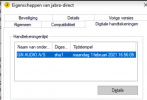
Thanks for your help. I think we found it, Jabra has an invalid certificate on its application (1 feb 2021). Kaspersky only checks for validity during installation. Jabra applications installed before February 1, 2021 will work, but not after….

Therefore Jabra cannot access windows resources. Jabra has an invalid certificate on his application. Kaspersky only checks that it is valid during installation. Jabra applications installed before February 1, 2021 will work, but not after….

Therefore, Jabra cannot access windows resources.

1618499046732.png
 
I am glad to hear you found a solution!

Although I am a bit surprised that this still happens when you didn't select the Jabra as the audio device.
 
Hi Nick,

It is Kaspersky who is the cause, because of the Jabra certificate. It works without Kaspersky.
 
Thank for info, this is for sure something that we need to keep in mind for future similar cases!
 
Status
Not open for further replies.

Members Online Now

Forum statistics

Threads
111,832
Messages
589,282
Members
164,662
Latest member
DejanMDS