3CX Windows CRM names displayed twice

Status
Not open for further replies.

RRussell

Forum User
Joined
Aug 12, 2019
Messages
6
Reaction score
1
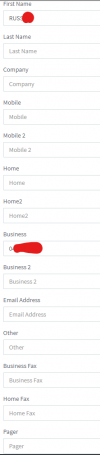
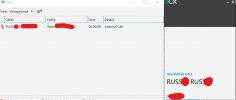
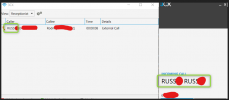
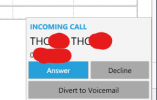
Hi Team, We have 3CX pulling contact info from our practice software via the CRM feature, namely their CODE and NUMBER. These fields are populated into 3CX contacts to the FIRSTNAME and BUSINESS field and works great. What we have found though in the recent updates of the windows client is the firstname is being displayed twice. Screenshots attached of the popup and the entry in 3CX console.

Problem exists in desktop versions:
16.3.0.198
16.3.0.179

Appears to be fine on version:
16.3.0.144
 

Attachments

  • 3CX-DesktopApp.png
    3CX-DesktopApp.png
    7.9 KB · Views: 6
  • 3CX-Web.png
    3CX-Web.png
    15.5 KB · Views: 6
Hi!

I tried this scenario and I cannot replicate it, mind you I am using the newest version of the Windows App 16.3.0.220.

I would suggest, make sure you are on the latest PBX version (16.0.8.9) which will also prompt your users to install the latest Windows app (16.3.0.220), then try again.

The way contacts are displayed is a combination of server and client, so upgrade both and let us know.
 
Hi Nick

I will give that a try. I see 16.0.8.9 is available to upgrade to (we're still running 16.0.7.1078) so will schedule some downtime this weekend and try it.
 
  • Like
Reactions: NickD_3CX
Hi Nick

Updated our 3CX instance to 16.0.8.9 and desktop client to 16.3.0.220 and same problem exists. Images attached.

I've also deleted my CRM entry from the 3CX contact so it could pull it again and same result.
 

Attachments

  • CRM_Entry.png
    CRM_Entry.png
    20.9 KB · Views: 6
  • IncomingCall.png
    IncomingCall.png
    23 KB · Views: 6
  • Version_License.png
    Version_License.png
    10.7 KB · Views: 6
Ok, I think I spotted something:
1613981907121.png

On the Switchboard view, the name appears once, while on the right it appears twice.
I have a feeling that on the right you are seeing it 2 times, because it is either getting from some Inbound Rule, or from the Trunk Provider.

Either way, it looks like the PBX is behaving correctly and I am sure there is a very logical explanation based on the above, but if you need help figuring it out, you could contact a 3CX Partner for more help.
 
Status
Not open for further replies.

Forum statistics

Threads
112,349
Messages
592,026
Members
165,512
Latest member
gmacinit