3CXPhone for Windows cannot control Deskphone(CTI)

Status
Not open for further replies.

CS-BGUPTILL

New User
Joined
Dec 15, 2021
Messages
6
Reaction score
0
I have 3CXPhone for Windows v16.3.0.264 installed. Recently, it stopped being able to control my Deskphone. I can make/recieve calls no problem in Softphone mode, but if I switch to Deskphone mode, it seems to not have connection to my deskphone. No one else in my organization seems to be having this issue. When I get a call, it pops up on my screen, but if I click "answer" nothing happens on my deskphone, and it just keeps ringing.

I also have the 3CX Desktop App installed and that is able to control my deskphone, and everything seems to work as expected in that app. Just don't care for that app.

We are hosted and are running 3CX V18.

Any ideas?
 
Hi @CS-BGUPTILL,

What model of phone are you using?

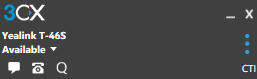
Does it show that the phone is enabled in CTI mode?

1639648597382.png

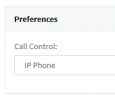
Have you changed your preferences to primarily try to use the phone when making calls? You can find the option in Users >> [YOUR EXTENSION] >> Phone Provisioning >> select 3CX App under Your Phones >> scroll down to Preferences and choose IP Phone.
1639648313522.png
 
Hi @CS-BGUPTILL,

What model of phone are you using?

Does it show that the phone is enabled in CTI mode?

View attachment 26630

Have you changed your preferences to primarily try to use the phone when making calls? You can find the option in Users >> [YOUR EXTENSION] >> Phone Provisioning >> select 3CX App under Your Phones >> scroll down to Preferences and choose IP Phone.
View attachment 26629

I am using Yealink T46G. Yes, it shows the CTI enabled. Yes, I checked preferences... even tried setting it to softphone and saving then back to IP phone.
 
It is odd because when I get a call, it pops up on my computer screen... but if I click ANSWER nothing happens... so it's like it's connected to the phone, but it's not accepting or sending commands to the phone. Likewise, if I click on a user to initiate a call, it goes to a screen that looks like it's going to dial, but it never does and the phone never does anything.
 
Hi @CS-BGUPTILL,

Is this specific to your extension? If you factory reset the phone and add it to another extension, can it then answer calls? Try this by creating a new test extension without editing any of the options, factory reset the phone and add the phone to the new extension, test and let me know.
 
It
Hi @CS-BGUPTILL,

Is this specific to your extension? If you factory reset the phone and add it to another extension, can it then answer calls? Try this by creating a new test extension without editing any of the options, factory reset the phone and add the phone to the new extension, test and let me know.
It worked when I factory reset it and assigned it to a new extention. I was able to control it from my PC. But once I factory reset it again and re-assigned it to my extension, it still has the same issue.
 
Hi @CS-BGUPTILL,

The 3CX Client and Phone must be on the same network, the Windows Client will ask the Management Console for a IP address, if it can access it, then the Client will be able to see the phone and remote control it. Where is the phone in relation to the extension? Are both devices on the same network?
 
Last edited:
Hi @CS-BGUPTILL,

The 3CX Client and Phone must be on the same network, the Windows Client will ask the Management Console for a IP address, if it can access it, then the Client will be able to see the phone and remote control it. Where is the phone in relation to the extension? Are both devices on the same network?
Yes both devices are on the same network... in fact sitting next to each other connected to the same switch.
 
Hi @CS-BGUPTILL,

How are you provisioning the phone? STUN, Locally or with a SBC?

When you go to the Phones section, what IP address do you see for this device?
 
Hi @CS-BGUPTILL,

How are you provisioning the phone? STUN, Locally or with a SBC?

When you go to the Phones section, what IP address do you see for this device?
Provisioning via SBC and the IP is the phone IP and the SBC IP.
 
OK, try this, on the PC where the Windows Client is running (to be clear, the 'old' Windows Client, not the new Desktop App), start capturing with Wireshark , then make an incoming call and try to press the "Answer" button on the Windows.

Then stop the capture, filter with the IP of the IP Phone and it should look something like this:
1640098564744.png

xx.xx.0.41 (the PC) send a HTTP GET request to xx.xx.0.43 (T46G) with key=OK, then the phone replies with a 200 OK response.

Do you see this?
 
  • Like
Reactions: Evolute IT
Status
Not open for further replies.

Forum statistics

Threads
112,349
Messages
592,027
Members
165,514
Latest member
megalmazan