3CXPhoneSystemMC01 service stops

Status
Not open for further replies.

AlexanderReichert

Customer
Advanced Certified
Joined
Aug 7, 2018
Messages
144
Reaction score
37
So this is a new one .
We are on 16.0.8.9 on Debian and the 3CXManagementConsole service now stops intermittently. Never had that happen before but it occurs since the update to 16.0.8 .
Obviously this is concerning.
Any idea where to start to look.
I would also be interested to actually see the logfile (I know my way around Linux) but I am not sure where they are stored.
From the console after restarting the service via ssh I only get to the newest one,which doesn't include the crash of the service.
 
exact service name is 3CXPhoneSystemMC01 that stopped.
 
Hi @AlexanderReichert,

Can you describe the system you're running the PBX on? Does it have enough RAM and disk space? When the management console stops, it is often connected to a disk space issue. Are you receiving an email mentioning that the service is being stopped?

To check the logs, enable verbose logging from Dashboard >> Activity Log >> Settings >> Logging Level: Verbose. Restart the Services.

When this happens again, go back to the Activity Log >> Logs >> Instance and you'll find the Management Console log file. Let me know if this casts some light on why this is happening.
 
Happens now every day at least once.
system is with 4GB RAM and 60 GB storage 30% memory used and 42% storage
the log file so far doesn't seem anything indicating
log level for management level i son trace.

sometimes I receive an email that the service stopped and sometimes like today I do not.

in the management log file I see following error popping up on a regular basis

Trc|[Microsoft.AspNetCore.Authentication.Cookies.CookieAuthenticationHandler] Webclient was not authenticated. Failure message: No principal.

Inf|PRV: Requested file '/provisioning/<unique directory>/phonebook.xml' cannot be generated
 
Could you check if there is "core" or "dump" file in directory /var/lib/3cxpbx/ ?
If there is, can you check the date/time that it was generated and if it matches approximately the last time the MC service stopped?
 
checked there was only one CORE dump but that was an old one. delete that one.
I enabled in the meantime the daily upgrade check. Which seems to restart the services every night now although no 3CX updates are listed to be applied. But I was hoping that maybe outstanding Debian updates will be updated this way. Maybe outstanding Debian updates cause the 3CX management console to crash?
 
If you have enabled the "Automatic Updates" in the 3CX Management Console, you can check if any Debian packages were installed in this log file: /var/lib/3cxpbx/Data/Logs/unattended-upgrade.log

You did well in deleting to Core dump file, if a new one is created let me know.

As far as why it is crashing, what does the syslog say, is there clue?

Also at this point I need to ask:
There is a reason why we have an ISO and tested Hypervisors, we have seen some weird behaviors in the past.

One more thing you do if you can take the system offline for a little while is to just take a backup, complete format the server (or delete the VM), re-deploy from the ISO and then restore your backup.
 
We have the same problem, it just random crashes on PBX' upgraded to 16.0.8
There's plenty available cpu, mem and hdd.
 
We have the same problem, it just random crashes on PBX' upgraded to 16.0.8
There's plenty available cpu, mem and hdd.
Please provide the same information asked above:
  • Where is it deployed
  • How was it deployed
  • What Hypervisor is being used
  • H/W Specs + size of system
  • Is there is "core" or "dump" file in directory /var/lib/3cxpbx/ and if yes, does its creation date more or less match the time when the MC service stopped?
 
in our case 3CX was deployed via the ISO and it runs on VMWare. So all a supported configuration. And as above I have to stress that up until 16.0.8 this installation was running stable for over 3 years. So something was changed in the last update IMO.

also checked the unattandend-upgrade.log and yes Debian updates are being installed.
 
in our case 3CX was deployed via the ISO and it runs on VMWare. So all a supported configuration. And as above I have to stress that up until 16.0.8 this installation was running stable for over 3 years. So something was changed in the last update IMO.

also checked the unattandend-upgrade.log and yes Debian updates are being installed.
Good that that's out the way. Does the time you see the Debian Update happen match approzimately the time that the MC service stops? Also, is there anything in syslog around the time the service stops that gives any clues?
 
No the MC uncontrolled service stop does not relate to the Debian update. The Debian updates were not enabled when that happened.


Since the automatic updates are enabled (daily nightly check) and every night some update seems to be applied what causes the system to reboot we didn’t have another MC controller stop during the day. So I will have to watch this if this “solved” the issue
 
  • Like
Reactions: NickD_3CX
it just happened again.
saved all relevant log files before restart
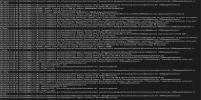
syslog shows this:

Screen Shot 2021-03-10 at 1.41.07 PM.png

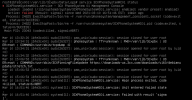
last entry from the MC log file :

Screen Shot 2021-03-10 at 1.42.31 PM.png


no core dump.
 
and another time - this is getting super critical

Screen Shot 2021-03-10 at 5.07.19 PM.png
 
I can only ever remember seeing this happen like this if the system runs out of memory or disk space.
Ok, as this happens randomly, just in case this does have something to do with the RAM, you could leave a terminal open running this:
Code:
while :; do date; free; sleep 10s; done > ramlog
Maybe you could then open a second terminal and do something like that for the free disk space (df) as well.

Then when this happens again, check the ramlog file just to make sure that there was enough RAM at the time of the incident.

If everything will look OK, I think the best recommendation is to contact a 3CX Partner so that they can open this case with the 3CX Support Team for further investigation.
 
Status
Not open for further replies.