Solved 408 Request Time Out

Status
Not open for further replies.
It's good to get it working to gain the experience, but I would feel much more confident with an SBC in this deployment.

You have 15 phones that will need to all consume bandwidth even for local calls. Yoiu will need to forward 15 SIP ports, 15 RTP Ranges, and ensure that communication with the STUN servers, RPS, PBX SIP, RTP and Provisioning ports is not blocked. That's quite a bit of work that can be saved by using an SBC.

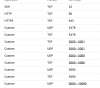
I am using Amazon Lightsail, and have forwarded these ports:
1583579529284.png

I am still having issues, not all phones ring at once and sometimes when then transfer it goes straight to voicemail as well as some BLF keys not flashing/not illuminating when someone is on the phone.

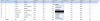
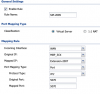
I have attached the Firewall rules on the local router. I have given each phone their own RTP range and SIP port.

I will be deploying over 200+ phones in the coming months, and would like to get this working before I get an SBC just to understand how it all works. I also have a training course booked later this month, but please can someone assist in getting this working?
 

Attachments

  • Screenshot 2020-03-07 at 11.14.15.png
    Screenshot 2020-03-07 at 11.14.15.png
    140.5 KB · Views: 3
You can find more details on how it works and what is required here: https://www.3cx.com/3cxacademy/videos/intermediate/configuring-remote-extensions/

You will need to assign your IP phones a static local IP and then port forward the ports you have set up under each extension to that IP. So each phone will need its own rule. Also make sure that your firewall at the phones side has SIP ALG disabled.
 
You can find more details on how it works and what is required here: https://www.3cx.com/3cxacademy/videos/intermediate/configuring-remote-extensions/

You will need to assign your IP phones a static local IP and then port forward the ports you have set up under each extension to that IP. So each phone will need its own rule. Also make sure that your firewall at the phones side has SIP ALG disabled.

1583751163871.png

So I have to create a NAT rule for each device??

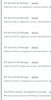
Yes I have followed that course and passed it. I have put 12 ports per Yealink device for RTP and 5060,5061,etc per device and am still having the issue. Also this keeps happening still:

1583751254003.png
 
Glad to see the issue has been resolved.
 
Status
Not open for further replies.

Members Online Now

Forum statistics

Threads
111,832
Messages
589,282
Members
164,662
Latest member
DejanMDS