Solved 408 Request Timeout after 3 minutes

Status
Not open for further replies.

Kim Andersen

Forum User
Joined
Jan 25, 2022
Messages
5
Reaction score
0
We're having problems with calls going over a Uni-Tel sip trunk, both inbound and outbound.
The call goes through just fine and both ends can hear each other, but after 3 minutes the call gets disconnected with a "408 Request Timeout"

Looking at the packet traces i can see 3CX sends 3 x "SIP Request INFO (ping)" packets without getting a reply after which we the the Timeout errors.

Uni-Tel is certified for 3CX, but it seems they dont support these INFO ping requests, is there any way to turn them off?


Regards

Kim
 
Hello @Kim Andersen

I doubt that these messages are causing the issue but check if keep alives are enabled on your PBX.
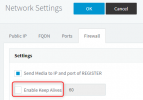
Navigate to Settings / Network / Firewall and make sure that the option "Enable Keep Alives" is disabled.
1643112644191.png

This option is not used for sending Keep Alives to providers but to clients but give it a shot. As far as I know 3CX does not send SIP INFO messages to providers for keep alives so If that is indeed where the issue comes from then I would suspect the device you are using for placing these calls. What device are you using for making these calls and how are these devices provisioned.
Also what PBX version are you using?
 
I tried disabled Keep Alives but that did not help.

The devices are primarily Yealink T46G and T48S, they provisioned via TFTP and custom configuration files.
We recently upgraded to 3CX 18.0 (Build 314)

This setup has been working for a long time, its only recently it has started to cause problems, we havent changed anything in the phones configurations.
 
Can you try to make a call from a 3CX Webclient and see if you can replicate the behavior?
 
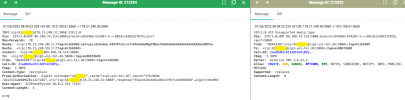
Seems to work from the Webclient, i've attached a few images here, the first one is the call from the webclient that works:
working.png

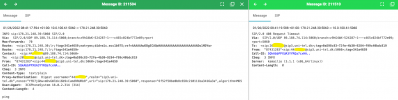
And this is an earlier call that times out:
timeout.png
The only difference i can see is that in the info line, the request that works contains a username in the INFO line at the top, whereas the one that fails only contains the ipaddress in the INFO line.
 
I am really not sure what is happening here. What we see are INFO messages from the PBX but I am not sure why the PBX is sending them. I tried to replicate using our Uni-Tel trunks but our systems do not send INFO messages to providers so I am guessing this is something unique to your system.
Nevertheless since its working with the webclient then the next step is to factory reset a Yealink phone and provision it with the default 3CX template and try again. If that also works then its has something to do with the custom templates used.
 
It looks like setting up a STUN server on the yealink phones seems to have helped.
But i can see we also have the same problem when using the 3CX app.
 
Can you run a firewall checker test and let us know of the results? I suspect this is more of a network issue than a provider/PBX issue.
 
The firewall checker reports no errors.
The server is behind a fortigate firewall and we've made sure to disable SIP ALG and so on.
 
I will sent you a p.m. shortly for some extra info
 
The issue was that a custom parameter was set to send keep alive info messages every 3 minutes which the provider did not support. After setting the value to "0" the issue was resolved.
 
Status
Not open for further replies.

Latest Posts

Forum statistics

Threads
112,324
Messages
591,897
Members
165,475
Latest member
lastshadow