5060 Port IP Restrictions

Status
Not open for further replies.

Frank86

Bronze Partner
Joined
Jan 18, 2018
Messages
300
Reaction score
26
Is it best practice to restrict IPs on firewall's port 5060 (UDP and TCP) to my ISP's IP addresses?
Should all other 3CX ports be left to allow ANY inbound IPs?
 
Is it best practice to restrict IPs on firewall's port 5060 (UDP and TCP) to my ISP's IP addresses?
Should all other 3CX ports be left to allow ANY inbound IPs?
Yes you can restrict it to your provider's IP ONLY IF you don't use any Direct SIP phones in STUN. If yes then you need to also allow any remote phone IP, which can be dynamic so it's a pain.
 
  • Like
Reactions: Frank86 and AWS2P
I don't use STUN.
 
I just asked this question last week. It seems that there's some conflicting info directly from 3CX. What it boils down to is this: Follow the proper port forwarding rules to get your firewall checker to pass and be happy after install. Then, if not using STUN external phones, close 5060 to everything except your SIP provider's addresses. Don't re-run the firewall checker as it will fail and give you an ugly red X. :-)
 
  • Like
Reactions: Frank86
I haven't seen conflicting information, but what it boils down to is this. Asking for best practices and implementing them without understanding why the are best practices will cause problems. Everything is clearly documented in several places and even includes pictures! This link is the one referenced if you read the manual:

https://www.3cx.com/docs/manual/firewall-router-configuration/

At the bottom of that page are links to more information including a video if the pictures didn't help:

https://www.3cx.com/3cxacademy/videos/basic/nat-port-forwarding/

Once you understand what the ports are used for, it's very easy to decide how much you want to lock the system down and what might break when you do.
 
Just to clarify what I meant by conflicting information... When you have issues and send in a support ticket or even post about it here, one of the 1st questions asked is: "Did the firewall checker pass?" If ANYTHING is locked down past 3CX's recommendations, it will fail. You are told to correct the firewall checker 1st and them come back for help. With those default recommendations, you will have many intrusion attempts over 5060.

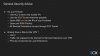
If you watch the 3CX advanced certification video detailing "security and anti-fraud", they clearly tell you to 'open 5060 only for the IPs of your providers'. See slide #22 below...

12898

This 'General Security Advice" will break the firewall checker. No mention is made about this. That's where my statement about conflicting information comes from. Of course, I am NOT an expert at this yet, so I may be interpreting this wrong.

Of note: I did follow this security advice on 2 of my production installs and they have been quiet (no visible intrusion attempts) for 48 hours! Yay!
 
  • Like
Reactions: Frank86
you are totally right, firewall checker is green when 5060 is open to the world IPs, if you open 5060 only on SIP provider IP then you are quiet , no intrusion , but if you do a test with FW checker it will be RED
 
Ok so that's not conflicting It actually more so illustrates my point. For the firewall checker to pass, your ports need to be accessible to the 3CX testing ranges at a mininum. So technically you can block your SIP provider and still have the firewall checker pass, you just won't have a working system. For a basic, functioning system, you have all the ports open and the 3CX firewall checker does it's best to confirm that. Once you have a working system, then, if you desire, you can enhance security by future restricting access per that security slide. It's not conflicting, it's just not mentioned/implied that you have to undo those changes if you later want to run the firewall checker which also illustrates point. If you don't know why you are doing things, you shouldn't do it. It's not up to 3CX's support (or anyone here on the forums for that matter) to understand what someone might have done different from base install. So if you are asking for support with something that can be related to the firewall/network, it is expected you can get your system to the standard of passing the firewall checker while troubleshooting.

The forums are littered with posts for people that made changes to the firewall and then don't understand why they have one-way audio or other issues. And it's entirely possible to pass the firewall checker and still have issues based on the design, the same as you can have a completely working setup that fails the firewall checker. It's just a tool to establish a baseline and help troubleshoot, but whoever is installing or maintaining 3CX is expected to have a solid understanding of networking principles. This is why when VoIP came out, your old school phone vendors floundered and IT/Networking guys started selling phone systems.
 
Last edited:
This is why when VoIP came out, your old school phone vendors floundered and IT/Networking guys started selling phone systems.
You are right , and perhaps also this is why so many features in voip are designed IT spirit more than Telecom
 
  • Like
Reactions: Evolute IT
BTW the firewall checker has never been green for me since updating to version 16, even with port 5060 fully open. It was green under version 15 with the exact same settings.

3CX works just fine even if it fails the firewall checker under v16.
 
Well as long as 3CX is working for you, you can disregard the firewall checker. It's only if 3CX isn't working and you come here or ask 3CX support for help will you be asked to make the firewall checker pass (assuming it appears to be a firewall/network related issue). Otherwise sounds like you are good!
 
  • Like
Reactions: Evolute IT
Status
Not open for further replies.

Forum statistics

Threads
111,934
Messages
589,818
Members
164,811
Latest member
aurorasigntrtechitnet