


- Joined
- Jun 8, 2009
- Messages
- 18
- Reaction score
- 1
I'm trying to setup 802.1x on my Yealink T48G to connect with certificates to my RADIUS NPS Server.
I have cloned the yealinkT4xeol.ph.xml template and added these options per the Yealink documentation for this phone:
network.802_1x.mode = 2
network.802_1x.identity = yealink
network.802_1x.root_cert_url = http://192.168.100.57:88/provisioning/ca.crt
network.802_1x.client_cert_url = http://192.168.100.57:88/provisioning/client.pem
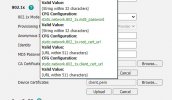
Per the Yealink site, all these phones should now support the new templates, and when I'm in the web interface the help even calls them out like this, so why is the template in 3CX still using the old template style? Is this what is breaking the 802.1x setting from working?
static.network.802_1x.mode = 2
static.network.802_1x.anonymous_identity = Anonymous
static.network.802_1x.identity = yealink
static.network.802_1x.root_cert_url = http://192.168.100.57:88/provisioning/ca.crt
static.network.802_1x.client_cert_url = http://192.168.100.57:88/provisioning/client.pem
The phone is not picking up the provisioning template changes for 802.1x. I can see config changes like adding or removing BLF, but it ignores the 802.1x settings.
Is this because the templates have not been upgraded to match the new firmware?
I have even tried placing both sets of settings in the template and nothing works.
The firmware has been updated to 35.83.0.136 per the 3CX Console and the 3CX website list of supported firmware.
I have deleted the phone and added it back to make sure it was getting the new template.
I have cloned the yealinkT4xeol.ph.xml template and added these options per the Yealink documentation for this phone:
network.802_1x.mode = 2
network.802_1x.identity = yealink
network.802_1x.root_cert_url = http://192.168.100.57:88/provisioning/ca.crt
network.802_1x.client_cert_url = http://192.168.100.57:88/provisioning/client.pem
Per the Yealink site, all these phones should now support the new templates, and when I'm in the web interface the help even calls them out like this, so why is the template in 3CX still using the old template style? Is this what is breaking the 802.1x setting from working?
static.network.802_1x.mode = 2
static.network.802_1x.anonymous_identity = Anonymous
static.network.802_1x.identity = yealink
static.network.802_1x.root_cert_url = http://192.168.100.57:88/provisioning/ca.crt
static.network.802_1x.client_cert_url = http://192.168.100.57:88/provisioning/client.pem
The phone is not picking up the provisioning template changes for 802.1x. I can see config changes like adding or removing BLF, but it ignores the 802.1x settings.
Is this because the templates have not been upgraded to match the new firmware?
I have even tried placing both sets of settings in the template and nothing works.
The firmware has been updated to 35.83.0.136 per the 3CX Console and the 3CX website list of supported firmware.
I have deleted the phone and added it back to make sure it was getting the new template.


