Solved 8SC Pro "Not available for your license"

Status
Not open for further replies.

anschluss

Bronze Partner
Joined
Aug 30, 2018
Messages
7
Reaction score
20
Hello,

I am trying to access call logs as System Owner of an 8SC on the premise system. When I click on Reports-Call log:
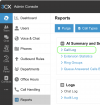
Bildschirmfoto 2025-01-31 um 12.22.28.png

All I get is "Not available for your license":
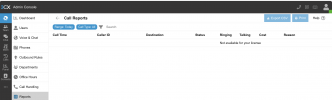
Bildschirmfoto 2025-01-31 um 12.21.35.png

I am confused by the "AI Summary" heading since I neither ordered, activated nor approved any "AI" function. Can somebody chime in what's happening here?

Just to clarify: This is a PAID "Pro" license.

Thanks for any hints!
 
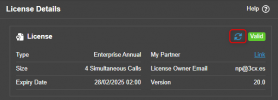
Go into the dashboard to see the license details

1738323335870.png

Click on this and refresh your license

1738323391178.png

I am confused by the "AI Summary" heading since I neither ordered, activated nor approved any "AI" function. Can somebody chime in what's happening here?
We have integrated some AI functionality into 3CX, where the call recordings can be transcribed, summarised, and a sentiment score provided with AI.

https://www.3cx.com/blog/releases/v20u4-call-transcription/

If you havent activated the AI transcription, you should see the summary and sentiment fields are blank in your reports.
 
  • Like
Reactions: Evolute IT
Go into the dashboard to see the license details


Click on this and refresh your license


We have integrated some AI functionality into 3CX, where the call recordings can be transcribed, summarised, and a sentiment score provided with AI.

https://www.3cx.com/blog/releases/v20u4-call-transcription/

If you havent activated the AI transcription, you should see the summary and sentiment fields are blank in your reports.

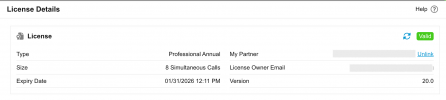
I am sorry but this is not working. In fact refreshing the license was the first thing I tried. I don't have an enterprise license, just "Pro":

Ohne Titel.png
I would very much like to see the call reports again. They were available with the v18 "Pro" license. I see no reason why my license should not include a basic feature like call logs/report.
 
I can assure you that reports are available in the Professional edition. This is an isolated event that is only affecting your PBX.

Following our PM, I would suggest restarting the services of the system, to properly get the level of access for the system.
 
  • Like
Reactions: Evolute IT
Thanks for the help. Restarting the server made the call logs appear as expected.
 
Status
Not open for further replies.

Forum statistics

Threads
112,293
Messages
591,750
Members
165,422
Latest member
Subject1725