A specific user does not automatically switch status to available

Status
Not open for further replies.

bytesolutions

Bronze Partner
Joined
May 30, 2016
Messages
80
Reaction score
10
Goodmorning everyone.
I have a problem on a 3CX v. 18.0.237 virtualized on Vmware ESXI v. 7.0 update 3.
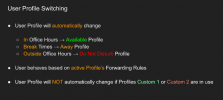
I have five active extensions, each set up with specific office hours. Four extensions correctly switch between "Available" and "out of office" following the set times, while one extension sometimes locks to "out of office" and does not switch to "Available". In fact, entering the control panel I see the status is set to "out of office" despite being an opening time. I fix it simply by issuing the "reboot" command from 3CX terminal. Once 3CX is restarted (without restarting Vmware) everything is resolved for a few days. It is a trivial but very uncomfortable operation. I just can't understand why sometimes the state doesn't switch automatically. Has something similar happened to anyone before? How can I fix it, or at least what can I check to make sure everything is ok?
Thanks so much everyone for the help
 
Have you asked user if they've explicitly set themselves to any other status apart from available prior to the switch?

1638198042547.png
 
  • Like
Reactions: Evolute IT
Have you asked user if they've explicitly set themselves to any other status apart from available prior to the switch?

View attachment 26233
Thank you for your answer.
The user cannot manually change the status as no phone or 3CX App is associated with these extensions. They are only used to divert calls to a mobile number, but only during opening hours. So the user does not have access to the starcodes "* 30 etc ...
 
So its one ext in particular? If youre only forwarding then I would delete and recreate, see if the problem follows.
 
So its one ext in particular? If youre only forwarding then I would delete and recreate, see if the problem follows.
Yes that's right, it's just an user that gives problems. All configured in the same way. I too had thought about removing it and reconfiguring it. Before doing this work, however, I wanted an opinion or advice from you.
 
Yes that's right, it's just an user that gives problems. All configured in the same way. I too had thought about removing it and reconfiguring it. Before doing this work, however, I wanted an opinion or advice from you.
This this should not be happening in the first place, we would probably have to take a closer look to determine why it's happening which would in turn mean probably reviewing logs. This may end up being very time consuming and not worth the effort especially if the cause is related to the particular extension's configuration and hence fixable by deleting/recreating it. I'd recommend taking a quick look at the extension's autoswitching settings such as making sure it is following the global pbx office hours and does not have it's own, etc and if you can't find any differences just proceed with re-creating it to see what happens.
 
This this should not be happening in the first place, we would probably have to take a closer look to determine why it's happening which would in turn mean probably reviewing logs. This may end up being very time consuming and not worth the effort especially if the cause is related to the particular extension's configuration and hence fixable by deleting/recreating it. I'd recommend taking a quick look at the extension's autoswitching settings such as making sure it is following the global pbx office hours and does not have it's own, etc and if you can't find any differences just proceed with re-creating it to see what happens.
Good morning.
Thank you for your answer. Each extension has specific office hours, no global hours are set. I have checked that extension's specific times over and over and they are correct. If they were incorrect or there was a configuration problem it would not be solved simply restarting 3CX services. I also checked the system date and time of the debian VM and they are correct, the event log also marks the correct time. If I can help by sending reports or system logs in order to fix a possible bug I am available. In the meantime I will delete and re-create the user hoping that the problem will be solved.
Thank you very much
 
  • Like
Reactions: ChrisC_3CX
In the meantime I will delete and re-create the user hoping that the problem will be solved.
This would be your best bet for now. We'll determine what the next best course of action will be based on what happens after you try this so do keep as posted.

EDIT:

Also, since you mention using VMWare, have you made sure to install VMWare tools on the VM (3CX Host)? If not, please do and let me know if that helps too.
 
Last edited:
Status
Not open for further replies.

Forum statistics

Threads
111,974
Messages
590,083
Members
164,901
Latest member
Silent_Guru