Abandoned calls - Name of the queue is no longer displayed

Status
Not open for further replies.

ict-project

Silver Partner
Advanced Certified
Joined
Jul 28, 2020
Messages
8
Reaction score
1
Hello everyone,

I have noticed that the name of the queue is no longer displayed in the "Abandoned calls". It used to look like this:


2023-11-15 12_28_03.png


Now this part is missing and I don't understand why. Does anyone have an idea?

Thanks in the meantime!
 
Hi, I tested and it shows the queue name.

Caller from external and internal and both showed the queue name.

1700222965728.png


From external calls, if you are using inbound rules, check they have a name configured.

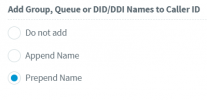
In the pbx management console ----- advanced --- contacts ---- options --- check it is configured like this

1700223786769.png
 
  • Like
Reactions: OlegR_3CX
Hi Alejandro,

thank you for your reply.

Yes, there are names given for inbound rules and the option "Prepend Name" is active.

A strange thing: After our customer reported this issue, I've tested it on our PBX. So i changed the name of one of our quees and after this change we had the same issue on our PBX. I cancelled the name change, but the problem remained.

Maby you can test to rename your queue and watch what happens?

Thank you an best regards
 
I changed, called again and it shows the new queue name also for the older calls

1700229777012.png
 
Thank you for testing.

Do you have any other ideas for resolving the problem?
 
Do you have any other ideas for resolving the problem?
I could not replicate this from my side. Is the pbx running version 18.0.8.939? is the desktop app running version 18.13.959?

Since this is a Hosted by 3CX, can you open a technical support ticket in order to review your settings.

Thanks!
 
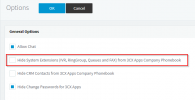
SOLUTION: Untick under Settings --> Options "Hide System Extensions"

1700813697174.png
 
  • Like
Reactions: Gilles (Transacom)
Status
Not open for further replies.

Forum statistics

Threads
112,328
Messages
591,905
Members
165,483
Latest member
AshleyStokes