Solved About those meeting invites

Status
Not open for further replies.

N_G

Founder
Joined
Jun 6, 2006
Messages
4,857
Reaction score
9,290
This thread is to clarify how meeting invites work and what changes we will make going forward.

First off - meeting invites must be sent by the organizer. This is the correct way to do it. here are the scenarios:

a. Google Mail, Microsoft 365 online, Outlook online - works perfect. The invite will be added to the calendar and you can add participants and everything will work perfect.

b. Microsoft 365 online & Outlook locally installed - works perfect - select Microsoft 365 and it will ask you to login in to your Microsoft 365 account and the meeting will be created there. Information will be synced with the locally installed Outlook.

c. Microsoft Outlook locally installed WITHOUT Microsoft 365 (i.e. onsite exchange server) - you will need to download the iCal/ics and open it up on the desktop. The default mail client (outlook if so configured) will be opened and the invite created. Its an extra step and a little clunky (just like full fat outlook), but there is little we can do about this.

The above are the recommended options. Now if you want to have 3CX mail out the invites, this is possible but there will be big limitations. The mail will be sent out from your mail server or the 3CX smtp service. The RSVP will not work and the email looks terrible. It will possibly end up in spam folders at your invitees.

Now the good news for the users that insist on having 3CX send out the invites that we are going to revert the ics invite back to the way it was. Furthermore we are going to update the schedule meeting interface and document the options better. This change should be available as update 7a in the coming week.

V18

For V18 we are studying the Microsoft 365 and Google Calendar API to be able to create the meeting directly in Microsoft 365 or Google. The nice thing about this is that if the meeting time changes, then we can update the meeting on 3CX automatically. This is something we are researching and is likely to be part of the new version unless we hit some road block.

Furthermore we will include the ability for admins to set a default behaviour for scheduled meetings.

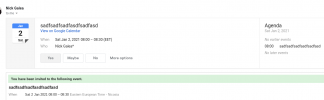
The screenshot shows how it looks if you use Gsuite and you select it from the drop down for the meeting

I am closing the other threads. If you comment please include what exactly mail and server you are using.
Screenshot 2021-01-02 at 07.41.42.png
 
Last edited:
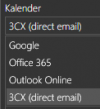
The drop down in the updated schedule interface will be as follows:

“Calendar” to be renamed "Select eMail / Calendar to add to ”

Drop Down:
“Google” to be renamed to “Google Calendar”
“Office 365” to be renamed to “Microsoft 365”
“Outlook” to be renamed to “Outlook Online”
“iCal” to be renamed to “Desktop Outlook Calendar (.ics)”
“3CX (direct email)” to be renamed to “Send .ics by e-mail (Legacy, No RSVP)”
 
Nick -
is there any chance we could see the ICS file default to status: Busy ?
 
No sorry, we are not touching that ics file sent by email. But you can change this option easily from the email/calendar invite....

And with V18 certainly we can post the meeting in Office 365 or Google and automatically set to busy
 
Last edited:
Good morning,

Thank you for the reply and the work done.

Any chance that the admin can choose what options are displayed to the users in the dropdown?
 
  • Like
Reactions: N_G
@TeKNacion - Thank you :) And thank you for your constructive feedback! Yes, but for v18 this will be considered....
 
I'll second the suggestion in the other thread to have a copy/paste option to send our own email invites. Adds flexibility.

In my case since I'm working from home (Remote Desktop to work), while I have Outlook at home for my personal email it doesn't have my company email configured, and I'd prefer not to sign in to OWA/OFTW (whatever they call it now) in my home browsers. The reason for that is I've had many experiences where Microsoft automatically logs in as an old logged-out account even if you're logged in to another account...i.e. it quietly switches accounts for no reason. The workaround for that is to always open Microsoft sites in a separate Firefox Container for each account you want to use, which AFAIK Chrome doesn't have (other than Incognito windows which are all one session, like Firefox's Private windows). I suppose in my case I could just have Chrome run as Incognito for 3CX all the time, as a workaround.

Writing that out, I suppose another method would be to log in to the 3CX webclient at the office, and schedule the meeting from there using the .ics option. That's probably not that intuitive for most users though, if they're already logged in. Also when I log out at the office, it logs me out at home also, I see.
 
@SteveITS - Thanks for the feedback. Right now the feedback link is in the summary page and you can copy and paste it.... But yes we will make it better in v18

However for your use case the current solution works perfect as it will simply take the active gmail or outlook session (even if it is your private mail) and will organize the meeting there. It does not have to be the email configured in the PBX.....
 
This thread is to clarify how meeting invites work and what changes we will make going forward.

First off - meeting invites must be sent by the organizer. This is the correct way to do it. here are the scenarios:

a. Google Mail, Microsoft 365 online, Outlook online - works perfect. The invite will be added to the calendar and you can add participants and everything will work perfect.

b. Microsoft 365 online & Outlook locally installed - works perfect - select Microsoft 365 and it will ask you to login in to your Microsoft 365 account and the meeting will be created there. Information will be synced with the locally installed Outlook.

c. Microsoft Outlook locally installed WITHOUT Microsoft 365 (i.e. onsite exchange server) - you will need to download the iCal/ics and open it up on the desktop. The default mail client (outlook if so configured) will be opened and the invite created. Its an extra step and a little clunky (just like full fat outlook), but there is little we can do about this.

The above are the recommended options. Now if you want to have 3CX mail out the invites, this is possible but there will be big limitations. The mail will be sent out from your mail server or the 3CX smtp service. The RSVP will not work and the email looks terrible. It will possibly end up in spam folders at your invitees.

Now the good news for the users that insist on having 3CX send out the invites that we are going to revert the ics invite back to the way it was. Furthermore we are going to update the schedule meeting interface and document the options better. This change should be available as update 7a in the coming week.

V18

For V18 we are studying the Microsoft 365 and Google Calendar API to be able to create the meeting directly in Microsoft 365 or Google. The nice thing about this is that if the meeting time changes, then we can update the meeting on 3CX automatically. This is something we are researching and is likely to be part of the new version unless we hit some road block.

Furthermore we will include the ability for admins to set a default behaviour for scheduled meetings.

The screenshot shows how it looks if you use Gsuite and you select it from the drop down for the meeting

I am closing the other threads. If you comment please include what exactly mail and server you are using.

View attachment 19923
"Now the good news for the users that insist on having 3CX send out the invites that we are going to revert the ics invite back to the way it was. Furthermore we are going to update the schedule meeting interface and document the options better. This change should be available as update 7a in the coming week."

Our customers use Outlook and are asking us when functionality will be restored
Thanks.
 
Our customers use Outlook and are asking us when functionality will be restored
Thanks.
We are putting the final touches on the update, possibly within the next few days.
 
Are you going to add iCal (or Desktop Outlook Calendar (.ics)) to the Windows Client? Currently iCal is only availabe in the Webclient.

1611066201599.png
 
No sorry, we are not touching that ics file sent by email. But you can change this option easily from the email/calendar invite....

And with V18 certainly we can post the meeting in Office 365 or Google and automatically set to busy

Is there a specific reason for this? this has been a major pain point for us. We had issues with the Office 365 option in the past (Microsoft API changed which 3cx had to update to address) and a lot of client's forget to check to set their status as busy and set a reminder for their meeting.

Since the meeting ICS file does not contain the below (as an example) the client has to set the reminder and status every time.

"X-MICROSOFT-CDO-BUSYSTATUS:BUSY","BEGIN:VALARM","TRIGGER:pT15M","ACTION:DISPLAY","DESCRIPTION:Reminder","END:VALARM",

might also be worth setting the location to 3CX Video Conference

That being said, this may become a moot issue once the outlook plugin comes....

We are using office 365 as our server and outlook as our mail client.
 
Last edited:
For V18 we are studying the Microsoft 365 and Google Calendar API to be able to create the meeting directly in Microsoft 365 or Google. The nice thing about this is that if the meeting time changes, then we can update the meeting on 3CX automatically. This is something we are researching and is likely to be part of the new version unless we hit some road block.
I agree with this, this is a good feature, it reduces the "extra step" of having to load the outlook online page.
Furthermore we will include the ability for admins to set a default behaviour for scheduled meetings.
This is definitely a useful feature, when we had implemented this, this was one part where some client's got confused... so we can simply removed the "unused" options.
 
  • Like
Reactions: JLSeagull
We are delaying it slightly longer to improve a few more things based on feedback we have received in the forums, but I think the small delay will certainly be worth it.
 
  • Like
Reactions: FridayIT
we look forward to resolving the problem
 
Are you going to add iCal (or Desktop Outlook Calendar (.ics)) to the Windows Client? Currently iCal is only availabe in the Webclient.
 
First off - meeting invites must be sent by the organizer. This is the correct way to do it. here are the scenarios:
... CUT ...
Now the good news for the users that insist on having 3CX send out the invites that we are going to revert the ics invite back to the way it was. Furthermore we are going to update the schedule meeting interface and document the options better. This change should be available as update 7a in the coming week.

I am closing the other threads. If you comment please include what exactly mail and server you are using.
We use an interna mail server (Cyrus IMAP and Postfix) like many ISP and big companies do...
We use Open-Xchange as a commercial solution for push and calendar and thunderbird and lightning as desktop email client.
The recent changes on your 3CX mail invites broke the compatibility with iphones too and that's very bad!

It seems to me that you're ignoring the fact that companies who are using and paying Google Workspace or Office 365, are for sure using their webmeeting solutions (meet and teams) because they are more mainstream, fully integrated in the calendaring solution and feature rich.
I think that users of 3CX webmeetings are mainly coming from other solutions than thoose two and you are not only snobbing and making fun of us, but also worse braking the working featureson on which we rely on!

I think that the most of 3CX webmeeting users will be far more happy to finally see SAML SSO or AD integration than seeing big efforts to make a better integration with platforms that are including a complete webmeeting solution!

Thoose are my 2 cents.
 
  • Like
Reactions: mickymac
OK, Thanks for the info.

Regards
 
@FridayIT If you are using office 365 you must use the office 365 option in the drop down, not the ICS file. Outlook users without Office 365 should use the ical option - which will be renamed to Outlook desktop. You should not use the ICS file and no there will be no changes to it.
 
Status
Not open for further replies.

Forum statistics

Threads
111,973
Messages
590,078
Members
164,896
Latest member
sameage