- Joined
- Jul 25, 2019
- Messages
- 36
- Reaction score
- 17
Hello,
We are currently in the testing phase for 3CX and have been having some difficulty with conference calls.
We are in a call center and it happens that we need to conference an external call with another external call, or someone internally.
The issue comes when we create the active conference from existing call (through the Conference option), all of the external numbers will show as our own ID instead of their IDs. Example:
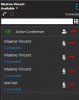
In this screenshot, how am I supposed to figure out who's who? All 3 first IDs are my own ID instead of being Mine + the two external calls. The 4th ID is an internal extension named Test Test, that one is fine.
If I hangup one of them and call them back, then it will update to their external number. If I add someone to the active conference from this menu, they'll show properly. It's only when adding existing call to the conference through the Conference option.
I've searched for this specific issue everywhere and I have never found anyone with this issue... Everyone seems to see every caller ID properly when creating a conference. Some assistance would be appreciated.
Thanks,
We are currently in the testing phase for 3CX and have been having some difficulty with conference calls.
We are in a call center and it happens that we need to conference an external call with another external call, or someone internally.
The issue comes when we create the active conference from existing call (through the Conference option), all of the external numbers will show as our own ID instead of their IDs. Example:
In this screenshot, how am I supposed to figure out who's who? All 3 first IDs are my own ID instead of being Mine + the two external calls. The 4th ID is an internal extension named Test Test, that one is fine.
If I hangup one of them and call them back, then it will update to their external number. If I add someone to the active conference from this menu, they'll show properly. It's only when adding existing call to the conference through the Conference option.
I've searched for this specific issue everywhere and I have never found anyone with this issue... Everyone seems to see every caller ID properly when creating a conference. Some assistance would be appreciated.
Thanks,