- Joined
- May 21, 2020
- Messages
- 27
- Reaction score
- 10
Hi,
i econuntered a strange behaviour, i didn't now if is correct.
from Dashboard->Activity logs, if i try to filter datas from previous days i didn't see anything.
It seems like it keeps less than data from the last 24 hours.
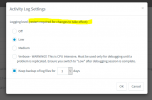
Under settings i'v enabled the keep log files for 10 days, and, if i go in log folder i've backup log folder from the previous days.
Am i wrong expecting to see previous datas from activity logs?
There is a way to see the datas showed in activity logs page from log files?
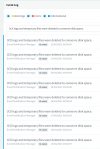
Plus, i didn't know if is related, i've those message in event log (There are another place, moreover Activity logs->settings->keep backup file) where is possible to set to keep datas?
i econuntered a strange behaviour, i didn't now if is correct.
from Dashboard->Activity logs, if i try to filter datas from previous days i didn't see anything.
It seems like it keeps less than data from the last 24 hours.
Under settings i'v enabled the keep log files for 10 days, and, if i go in log folder i've backup log folder from the previous days.
Am i wrong expecting to see previous datas from activity logs?
There is a way to see the datas showed in activity logs page from log files?
Plus, i didn't know if is related, i've those message in event log (There are another place, moreover Activity logs->settings->keep backup file) where is possible to set to keep datas?
Last edited: