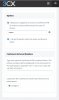
So the issue I am seeing with this is when the conference schedule is sent out it does not provide a call in #. I configured inbound DID. Not sure why it is not providing the inbound dial in number. Please see below:
To join dial and enter the conference ID 782518.
Internal employees can join by dialing 700 followed by conference ID 782518.
Notes:
So the issue I am seeing with this is when the conference schedule is sent out it does not provide a call in #. I configured inbound DID. Not sure why it is not providing the inbound dial in number. Please see below:
To join dial and enter the conference ID 782518.
Internal employees can join by dialing 700 followed by conference ID 782518.
Notes: