- Joined
- Jun 27, 2019
- Messages
- 7
- Reaction score
- 0
Hi
I need some assistance with settings up a speed dial on the phone's provisioning template.
The speed dial can be set up on the phone via its web interface or buttons but when the phone reboots it looks at the provisioning file and removed the custom entries.
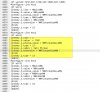
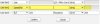
I have located the "Line Key" section on the template and entered the attached details and saved the template, I then reprovisioned the phone.
The key does show as a speed dial now but the value and label are not applying.
The speed dial that I am trying to set up is "call pick up" which is 20 I even tried adding other speed dial but it does not apply the value and label
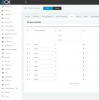
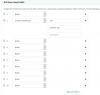
On the other hand when I do the same to "Programmable Key" and change one of the keys the speed dial it works.
Yealink T40G
Firmware: 76.84.0.95
3cx V16
On-Prem deployment
Please help.
I need some assistance with settings up a speed dial on the phone's provisioning template.
The speed dial can be set up on the phone via its web interface or buttons but when the phone reboots it looks at the provisioning file and removed the custom entries.
I have located the "Line Key" section on the template and entered the attached details and saved the template, I then reprovisioned the phone.
The key does show as a speed dial now but the value and label are not applying.
The speed dial that I am trying to set up is "call pick up" which is 20 I even tried adding other speed dial but it does not apply the value and label
On the other hand when I do the same to "Programmable Key" and change one of the keys the speed dial it works.
Yealink T40G
Firmware: 76.84.0.95
3cx V16
On-Prem deployment
Please help.