Adding the second sip trunk

Status
Not open for further replies.

clemy246

Free User
Joined
May 12, 2021
Messages
18
Reaction score
0
Hello Guys , Please assist , I have added the second sip truck , configured inbound rule , route calls to another externsion or forward to mobile numbe, but the second line still rings on the first sip trunk line
 
First off, just so that we can get a better understanding of your current setup, please provide the relevant information mentioned here: https://www.3cx.com/community/threads/information-to-provide-when-requesting-help.67558/

Also,
• Is the second SIP Trunk for the same provider or a different one?
• Are you using a different DID on the second SIP Trunk, which if called, still goes through the first SIP Trunk?
Hi Sir , Thank for your reply really appreceiate.
1. Yes second SIP Trunk is the same provider
2. Yes i am using different DID on the second SIP Trunk but still goes though the first SIP Trunk
3.
 
If you are using a different DID, from the same provider, it usually isn't necessary to create an additional trunk. Did your provider tell you that you needed a new trunk? What you would have to do, is create an additional Inbound DID rule, that matches the new DID number. If the DID does not match a rule, then the call will follow the default route, set in the trunk.
 
Last edited:
  • Like
Reactions: Evolute IT
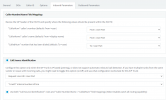
To resolve this issue you need to open your SIP trunk and go to inbound parameters. At the bottom of the list is a tick option which basically enables the use of number and call source, this option has the following text

Use both "Call Source Identification" rules and "Caller Number/Name -> CalledNum" field mappings (Note: Disables catch all routing capability)


For us we use Voiceflex and do this a lot for multiple site setups. We found that if this option was not ticked the call on the 2nd trunk would look like it came down the first trunk and route as per the default for that trunk.

Hope this helps.
 
If you are using a different DID, from the same provider, it usually isn't necessary to create an additional trunk. Did your provider tell you that you needed a new trunk? What you would have to do, is create an additional Inbound DID rule, that matches the new DID number. If the DID does not match a rule, then the call will follow the default route, set in the trunk.
There are so many reasons why you need additional SIP trunks and not just more numbers or channels on a single trunk.

One reason is the max call allowance, if you have two sites for a customer it means each site can have a fair share of ability to receive outside calls.

Also you can set different open times via the trunk which is vital if the office is in a different time zone.
 
There are so many reasons why you need additional SIP trunks and not just more numbers or channels on a single trunk.

One reason is the max call allowance, if you have two sites for a customer it means each site can have a fair share of ability to receive outside calls.

Also you can set different open times via the trunk which is vital if the office is in a different time zone.
Hi Robin, I have created an additional Inbound DID rule, that matches the new DID number. and Optionally assigned a DID to receive calls directly to different extension but still rings on the first sip trunk number
 
Hi Robin, I have created an additional Inbound DID rule, that matches the new DID number. and Optionally assigned a DID to receive calls directly to different extension but still rings on the first sip trunk number
Hi Clemy246,

Please see my comment above about

Use both "Call Source Identification" rules and "Caller Number/Name -> CalledNum" field mappings (Note: Disables catch all routing capability)

This should solve your issue
 
1620891314353.png
i have tried this still not working
 
Hi @clemy246

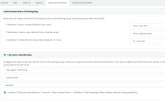
This is our configuration that works at multiple sites
1620892044415.png


This is based on the supplier Voiceflex, they provide an additional string as part of their invite that we can map / match against. Looking at the additional settings you are using they almost look like the same as the "Caller Number" information.
 
Hi @clemy246

Since you are using different DIDs per trunk the "Use both "Call Source Identification" rules and "Caller Number/Name -> CalledNum" field mappings (Note: Disables catch all routing capability)" is not required. Actually your best option is to disable call source identification completely.
I am not sure how you have everything set up but i am guessing you have call source identification enabled and since that matches calls go the first trunk that matches. By disabling it completely you "force" the PBX to match via DIDs which should give you the desired results.

Please note that for that to work your DIDs MUST match the caller number completely. So if your provider is using a local format for the number e.g. 01234567989 then your DIDs must be configured the same way.

https://www.3cx.com/docs/multi-account-sip-trunks/
 
  • Like
Reactions: Evolute IT
Hi Yianish thank you so much for the reply , It is working now, but incoming calls on second line displays the first line number, how do i disable that
 
Hi Yianish thank you so much for the reply , It is working now, but incoming calls on second line displays the first line , how do i disable that
What do you mean by this exactly? Can you explain the scenario so we can better understand?
 
Incoming calls to the second line sip trunk , displays the first sip trunk number ,
It does not display external caller number
 
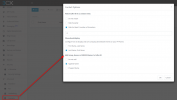
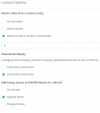
DId you create an Inbound rule for the second trunk DIDs? If so then you might be looking at the inbound rule name. Please navigate to contacts --> Options and under the "Add Group, Queue or DID/DDI Names to Caller ID" select the "Do not add" option.
Make another test call to see if that resolves the issue.
 
I dont have this option Add Group, Queue or DID/DDI Names to Caller ID on my 3CX version

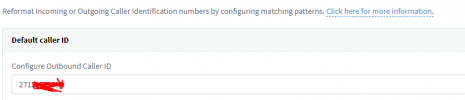
1620897442418.png
 
Its in the contacts menu in the management console not in the trunks settings.

1620898690906.png
 
  • Like
Reactions: Evolute IT
Contact Option is on default settings1620899213850.png
 
Ok good. Select the "Do not add" option and try the call again.
 
Status
Not open for further replies.

Latest Posts

Forum statistics

Threads
111,991
Messages
590,167
Members
164,929
Latest member
Cloudstar