Rmn3 Free User Joined Aug 30, 2021 Messages 90 Reaction score 2 Jun 7, 2022 #1 Hi guys, in the 3cx management console, is there any chance to change my own password? Thanks in advance.
Hi guys, in the 3cx management console, is there any chance to change my own password? Thanks in advance.
Saqqara Bronze Partner Basic Certified Joined Mar 12, 2014 Messages 4,775 Reaction score 1,471 Jun 7, 2022 #2 Security -> Admin Credentials.
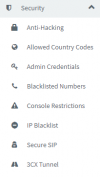
Rmn3 Free User Joined Aug 30, 2021 Messages 90 Reaction score 2 Jun 7, 2022 #3 Unfournately i dont have any chance to change my password there. Under the Point Security i only have attack protection, countrycodes, blocked numbers, console entrance, ip-blocklist, secure sip and 3cx-tunnel
Unfournately i dont have any chance to change my password there. Under the Point Security i only have attack protection, countrycodes, blocked numbers, console entrance, ip-blocklist, secure sip and 3cx-tunnel
Alphabetic 3CX MVP Silver Partner Advanced Certified Joined Jul 1, 2016 Messages 6,571 Reaction score 2,582 Jun 7, 2022 #4 Sounds like you're not the main admin. In which case, you should edit your password from the web client > General Unless you're using hosted 3cx..
Sounds like you're not the main admin. In which case, you should edit your password from the web client > General Unless you're using hosted 3cx..
Saqqara Bronze Partner Basic Certified Joined Mar 12, 2014 Messages 4,775 Reaction score 1,471 Jun 7, 2022 #5 are you logged in the console as admin user - in the top right do you see uppercase A If you are logged in as admin, these are the options you should see
are you logged in the console as admin user - in the top right do you see uppercase A If you are logged in as admin, these are the options you should see