After Paying for Upgrade NO SMS/MMS tab

Status
Not open for further replies.

SKYFY

Bronze Partner
Advanced Certified
Joined
Jan 3, 2023
Messages
12
Reaction score
1
Hi guys,

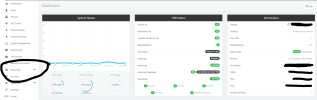
After upgrading the license to a Pro Edition and configuring Flowroute, There are no other options for SMS/MMS config anywhere.
 

Attachments

  • Screenshot 2023-01-05 124001.png
    Screenshot 2023-01-05 124001.png
    98.1 KB · Views: 6
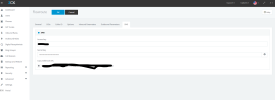
SMS is configured in the SIP trunk. There will be a tab if the provider is supported.
 
  • Like
Reactions: AndreasC_3CX
Here is a screenshot of it configured with FlowRoute
 

Attachments

  • Screenshot 2023-01-05 124403.png
    Screenshot 2023-01-05 124403.png
    46.1 KB · Views: 7
Here is a screenshot of it configured with FlowRoute
Yup so it is configured. Now, make sure every DID is entered as E164 and configure the inbound rules to where calls & sms should go. Users don't have to be enabled anymore with this new setup.
 
It does not show any settings for SMS/MMS under users and for DID routing. I might have a botched install.
 
Nor does it have it on the side for Facebook integration as well.
 
It does not show any settings for SMS/MMS under users and for DID routing. I might have a botched install.
SMS now follow the same DID rules as the calls. So, the Inbound Rule.

As for users, if you have a DID assigned to that user, it will use that as outbound DID. Otherwise, the user is presented with the list of DIDs and can choose which one to use. No need to "enable" anything.

I strongly suggest you read the SMS docs:
U5: https://www.3cx.com/docs/manual-u5/sms-text/
U6: https://www.3cx.com/docs/manual/sip-trunks/#h.uphdz78dxdph
 
Please open a ticket from portal.3cx.com if you require assistance from 3cx technical support but with regards to 3cx hosted instances, these are deployed as update 6 with trial keys. If you updated the subscriptions recently, your instance might be on update 6, so this option you are referring to is no longer required.

If you have multiple DIDs set under your SMS trunk, you will be presented with a choice of which DID to use when sending SMS and can direct the SMS delivery from where the DID is routing, from inbound rules.

You can also set the option from the user settings from under the user's sections of the admins webclient, for the option 'Assign valid DID,' if you want to choose which DID to send SMS from and have multiple DIDs for SMS and each user needs to use a specific DID for SMS.

U5: https://www.3cx.com/docs/manual-u5/sms-text/
U6: https://www.3cx.com/docs/manual/sip-trunks/#h.uphdz78dxdph
 
Last edited:
Status
Not open for further replies.

Forum statistics

Threads
111,974
Messages
590,081
Members
164,899
Latest member
mazet