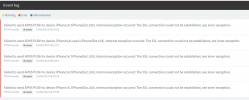
After the Final Update on hosted 18.0 (Build 912) no notification on iOS & Android

Status
Not open for further replies.

Sam TELPO

Forum User
Joined
Aug 16, 2023
Messages
3
Reaction score
1
Check if your servers date and time is correct.


If that's not it go into Activity Log / Settings and set your Log Level to verbose.

Then reproduce the issue and check the logs showing the inner exception of the SSL. You can also click on support / generate support info, this will create a file with a lot of log files in there.


Always put Logging Level back to Low afterwards.
 
This instant was Hosted by 3CX , cant goto networking setting and see date is correct
 
If it's Hosted you need to go through 3CX support.
 
Hi @Sam TELPO
Can you please open a ticket with the support so we can review the logs and take it from there?

Thank you
 
I'm having the same issue with hosted 3CX. Are there issues with your servers?
 
I've also had the issue for a few weeks, 3CX even opened a ticket without me knowing about the issue, which is nice. However the issue went away for a couple days, and that ticket got closed.

I'm not high enough tier partner to get many support tickets, I'm hesitant to waste one on something that is intermittent.
 
I'm not high enough tier partner to get many support tickets
Hi, please note that as a 3CX partner using SMB & Hosted by 3CX you have free support tickets.

This is something that is mentioned to you once your partner application is approved ;)

If you currently have any issue with these installations, please proceed to open a technical support ticket with us so we can assist you.

Have a good one!
 
3CX helpdesk sorted issue by disabling IPv6 on Hosted Server, Thanks

========================

We have disabled IPv6 on xxxxx as requested.

Please check the PUSH status and revert back to us in case the issue persists.
 
  • Like
Reactions: PanagiotisL_3CX
Status
Not open for further replies.

Forum statistics

Threads
111,974
Messages
590,081
Members
164,899
Latest member
mazet