Solved After Welcome Msg Forwarding to an extension

Status
Not open for further replies.

Nawaz552

New User
Joined
Mar 6, 2022
Messages
12
Reaction score
3
Hello-
I am new to 3cx and I am trying to figure out how to immediately forward to an extension number (Mobile No) after a welcome message. I have attempted to set in the digital receptionist setup menu to "0" but it will not forward to a Number.
 
Last edited:
Hello-
I am new to 3cx and I am trying to figure out how to immediately forward to an extension number after a welcome message. I have attempted to set in the digital receptionist setup menu to "0" but it will not forward to an extension.
Under the IVR options, you can choose what to do when no input/invalid input was provided. Set that to 1 and send it to the extension you want to.
 
Under the IVR options, you can choose what to do when no input/invalid input was provided. Set that to 1 and send it to the extension you want to.
Is it possible to transfer to my mobile number
 
Is it possible to transfer to my mobile number
Yes just choose "forward to external number" or use the extension's forwarding rules.
 
  • Like
Reactions: Nawaz552
Is it possible to transfer to my mobile number
What I did on my side is create an extension with the mobile number I want the call to forward to, and then in the "Forawrding Rules" tab (of that extension), I checked "Ring my mobile simultaneously" and "Accept multiple calls" to allow my cell phone to ring at the same time as my 3CX desktop app.

And to go to my cell phone voicemail instead of 3CX I added "Forward to mobile" for internal and external calls.

Let me know if that fixes it for you.
 
  • Like
Reactions: Nawaz552
Yes just choose "forward to external number" or use the extension's forwarding rules.
ivr.JPG
First selection extension and then IVR. I am not seeing any other options to select the external number after the IVR message.
 
  • Like
Reactions: Nawaz552
First selection extension and then IVR. I am not seeing any other options to select the external number after the IVR message.

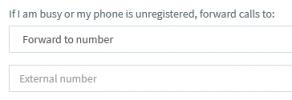
On the Digital Receptionist, play the message and forward to an unused/dummy extension ("Connect to Extension"). Then in that extension choose "Forward to number":
1647129149383.png
 
Thank you so much to all. Yes its resolved :)
 
Glad you managed to resolve this @Nawaz552 with the help of our community, feel free to open a new thread if you require anything else!
 
Status
Not open for further replies.

Forum statistics

Threads
111,974
Messages
590,081
Members
164,899
Latest member
mazet