Agent in queue but status red

Status
Not open for further replies.

JesperVV

Customer
Joined
Feb 15, 2023
Messages
5
Reaction score
0
Hello,

One of my customers had problems this week with their queue, they had multiple times people in queue but they did not get the call on their 3CX app. (they only have 1 agent in queue per shift who answers the phone)

When they noticed it they checked in the webclient and found that there was someone in the queue, but their status was shown red in the webclient even though they were not in a call or not available.

On the screenshot they sent me it also shows that the agent is logged in to the correct queue.

This is not a persistent problem but it occurs sometimes (this week maybe 5/6 times).

I hope someone can help me or help me troubleshoot this problem.
 
Hi @JesperVV try the following:

Get the agent extension and dial *60, then dial *30.

In this way the agent status will be Available.

Then check it again.
 
Hi @JesperVV try the following:

Get the agent extension and dial *60, then dial *30.

In this way the agent status will be Available.

Then check it again.
Hello Alejandro,

The status is already available, but it sometimes happens that the status is in DND without the agent doing this himself.. When this happens no-one is available in queue and people will be waiting in queue but no one gets the call.

This happend this week about 5 times and it resolved itself without me or them doing anything.
 
it sometimes happens that the status is in DND without the agent doing this himself.. When this happens no-one is available in queue and people will be waiting in queue but no one gets the call.
Ok in this scenario check that the extension is not using the switch status.

Using the web client or desktop with the system admin/ system owner extension go to the admin panel —> edit the user —> go to the Schedule tab —-> check the switch status is disabled.
 
Ok in this scenario check that the extension is not using the switch status.

Using the web client or desktop with the system admin/ system owner extension go to the admin panel —> edit the user —> go to the Schedule tab —-> check the switch status is disabled.
It is already disabled, the times this happens is random.

Is there a way to debug this issue?

EDIT:

I do get alot of these messages in the activity log.

https://prnt.sc/3DQelCZ2DAzP
 
Hi Jesper

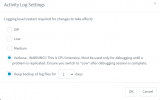
To debug, please set your Activity log to Verbose mode, (Activity Log --> Settings --> Select Verbose and Click OK)

1694382045838.png

Will it always be Ext. 201 that is the trouble phone, or is this random?
Is this extension also registered on a Desk Phone? (A DND on the Deskphone has been seen before ;) )

One thing, you say that the call keeps being in the queue. This shouldn't be possible if the Agent is logged out of the queue, as the call then should go to the Queues DINA (Destination if no answer).

When you have the issue again, go to your Activity log, search for the extension, and see if you can figure out what is happening to this Extension.
 
but it sometimes happens that the status is in DND without the agent doing this himself..
The Status Profile can be changed by the user on demand or if you have any synchronization with O365 calendar or the Auto Switch.

Also please note that from the PBX management console is possible to change the extension status profile and a user with the right perform receptionist operations can change the extension profile to the group of users.

So you have to check all this too ;)
 
I checked the debug logging but I can't seem to find the problem.

One more thing to note. I am the only one able to access the management portal and the webclient portal. No one can enter those 2 portals and change anything other than me.

Also they only have a mobile phone with the 3cx app. no desk phones or anything else. And they do not set there status to DND because it happens at random times when they dont even have the phone in their hand.

Everyone has the user right and no person in the database is receptionist.

Could it be possible that there is something with the firewall? I've run the firewall checker but everything is green.
 
I checked the debug logging but I can't seem to find the problem.

One more thing to note. I am the only one able to access the management portal and the webclient portal. No one can enter those 2 portals and change anything other than me.

Also they only have a mobile phone with the 3cx app. no desk phones or anything else. And they do not set there status to DND because it happens at random times when they dont even have the phone in their hand.

Everyone has the user right and no person in the database is receptionist.

Could it be possible that there is something with the firewall? I've run the firewall checker but everything is green.
Hi @JesperVV kindly ask your 3CX Partner to open a technical support ticket in order to gather the logs when the issue occurs for further analysis
 
One more quick question.

Could this happen if the 3CX server has no IPv6 but the agent logged in to the app does have IPv6?

I reinstalled the server without restoring a backup and the problem still occurs...
 
Status
Not open for further replies.

Forum statistics

Threads
111,974
Messages
590,081
Members
164,899
Latest member
mazet