Amazon Chime No Outbound

Status
Not open for further replies.

greatchoice

Silver Partner
Basic Certified
Joined
Sep 21, 2020
Messages
265
Reaction score
13
It seems that the outbound rules works for a day then stops putting the + in front of the numbers for outbound calling.

everything is setup properly because I see logs where the proper mask is used then not
 
Hi @greatchoice

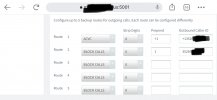
From your description you have an outbound that is set to prepend a + in front of the numbers, is that correct? Can you send us a screenshot of your outbound rule? Also make sure that the logs you are looking are for the invite between the PBX and the provider and not the one from the extension to the PBX. For each call there should be 2 legs. One from the extension to the PBX and one from the PBX to the provider.

Set your logging level to verbose and check a failed call. Look for the Invite to the provider. The invite should contain the User Agent: 3CXPhoneSystem

To enable verbose logging please navigate to your Dashboard / Activity log / Settings and select the verbose logging level
 
I had to remove it so the office could make calls from the original trunk.

it does not prepend the proper +1xxx-xxx-xxxx

I have another offfice I have setup. At this moment it is working.

when setup for outbound is there something I need to do so Amazon knows which number I am using? It seems that once input the trunk info in I can make calls.

does the outbound caller ID in the outbound rule have an effect?
 
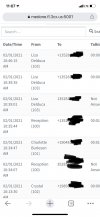
7AE2509F-2F36-4E35-AB63-1ACE97CBC327.jpeg
You can see that it failed a couple of times to make the proper outbound call. I’ve changes it to verbose at this point to see if I can get another capture.
 

Attachments

  • AD8E51E4-CCDE-4A55-84E5-B3103E5D5BCF.jpeg
    AD8E51E4-CCDE-4A55-84E5-B3103E5D5BCF.jpeg
    155.5 KB · Views: 15
Could there also be an issue that I am using the same credentials on two different pbx systems?
 
Could there also be an issue that I am using the same credentials on two different pbx systems?
This may very well be the case. Not all VoIP providers support SIP Forking (the use of two devices, with identical credentials, simultaneously).

What could happen, is that only the last device registered will work, or, all devices will be blocked if it is seen as a security breach. You have to check with your provider.
 
when setup for outbound is there something I need to do so Amazon knows which number I am using? It seems that once input the trunk info in I can make calls.

does the outbound caller ID in the outbound rule have an effect?
As long as the number you are dialing and your caller ID are formatted in the E164 format then you should be OK. AWS supports clip no screening which means you should be able to present numbers that do not belong to you as your caller ID. Of course this feature is meant to be used for forwarded calls so i would recommend not using it for direct outbound calls.

Could there also be an issue that I am using the same credentials on two different pbx systems?
Technically speaking there should be no issue since AWS Chime is an IP based trunk and the credentials are only for validating outbound calls. Since their platform allows you to add multiple IPs then outbound calls should not be affected by this.
But try disabling one trunk to see if that helps since we did not test this configuration.
 
Status
Not open for further replies.

Latest Posts

Forum statistics

Threads
111,990
Messages
590,161
Members
164,926
Latest member
tohoken1