Analog Extension connected via ATA HT 802 isn't ringing

Anthony R

Silver Partner
Joined
Sep 18, 2024
Messages
67
Reaction score
16
Hi team!

I have an analog phone connected through an ATA HT 802 on 3CX, nevertheless, I'm having a continued issue with that extension.

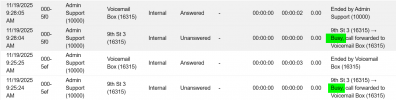
Every time I tried to reach the extension it is not ringing and it seems to be showing as busy.

1763399814492.png

I rebooted the ATA and it works well only on the 1st call, then the error keeps ocurring (extension busy).

The ATA is connected using a Yealink T46U integrated SBC and it is showing as registered on the 3CX, but I am unable to reach the extension and make it ring, keeps receiving that the extension is busy.

1763400158953.png

Any ideas what should I check? What could be happening and how can I sort this busy extension error? Is it something I should check and edit from the ATA web interace?

Thanks for your support and knowledge in advance.

Sincerely,
Anthony R.
 
Did you try a call to the ATA, with the set unplugged?
 
Hi team,

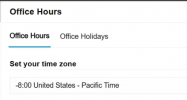
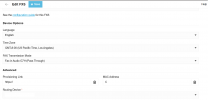
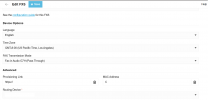
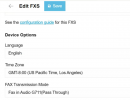
I selected time zone as GMT-8:00 PST as the entire system and department the ATA is being added to.

1763572725277.png

1763572827156.png

I am making a test call without any device plugged in to it:

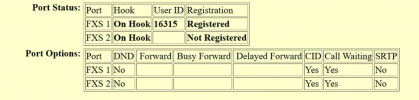
1) Initial Status.

1763572976391.png

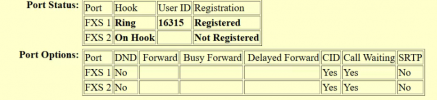
2) Active call (ringing).

1763573071631.png

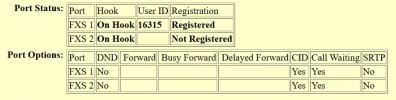
3) Call ended.

1763573113233.png

It returns to On Hook, but once again I am receiving the error that the extension is busy.

1763573379783.png

This time I am not using a Yealink as the SBC, I am using a local computer, so the error isn't on the SBC side I guess.

1763573779290.png

How can I sort this misfunction? Should I check for something deeper on the ATA configuration?

All support you can bring me is much appreciated.

Best Regards,
Anthony R.
 

Attachments

  • 1763573271355.png
    1763573271355.png
    27.6 KB · Views: 5
It remains as I have already written:
https://www.3cx.com/community/threa...ia-ata-ht-802-isnt-ringing.135762/post-649810

You’ve successfully checked off point 1. That leaves two more points.

All that the others have written in the meantime ultimately describes nothing else. After point 3 comes Wireshark; I had described that as well.

Our own experience in the last two years: when using ATA or DECT bases don’t use a router phone in front. Use a separate 3CX SBC instead. That solves several problems on its own. I had already written that. That is simply a straightforward solution that remains reliable independent of the router phones, their availability and their firmware.
The problems other users have had and their solutions here and elsewhere in the 3CX forum have confirmed exactly that.

As I also wrote: we love the router phones, but with long-term use and additional devices that follow we have already encountered some limitations.
 
Last edited:
How can I sort this misfunction? Should I check for something deeper on the ATA configuration?
While anything is possible (and believe me, I've seen a lot of very strange behavior in VoIP), I've yet to see an ATA remain in the off-hook state after a ringing call has ended (this assumes all of the SIP messages are getting through), and going by what you have posted, the ATA is showing back on-hook.
It would seem that the state that 3CX thinks the ATA is in, and the actual state, differs, for some reason.
Does this extension appear anywhere else?
You mentioned that this was a part of a ring group, could you elaborate on the full call flow?
 
While anything is possible (and believe me, I've seen a lot of very strange behavior in VoIP), I've yet to see an ATA remain in the off-hook state after a ringing call has ended (this assumes all of the SIP messages are getting through), and going by what you have posted, the ATA is showing back on-hook.
It would seem that the state that 3CX thinks the ATA is in, and the actual state, differs, for some reason.
Does this extension appear anywhere else?
You mentioned that this was a part of a ring group, could you elaborate on the full call flow?
That is the weirdest thing, that the ATA is On hook but 3CX is seeing the extension as busy, even when I have added the multiple calls feature to that extension, so even if the extension is on an active call, (busy), it should ring, isn't it?

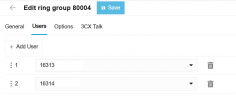
The extension is only part of the ring group ( 2 ext ) and the ATA is only programm to that ext.

1763585150241.png

ATA port config:

1763585241395.png

Should I reach Grandstream or 3CX support?, because this is not normal.

Sincerely,
Anthony R.

 
Do a packet capture from the PBX - see which side is misbehaving.
 
  • Like
Reactions: leejor
If it were me, the next thing I would do is to take the extension out of the ring group to see if that makes any difference, as that would be very quick and easy to do. See if there is any difference. Then, as suggested, use something like Wireshark to see if SIP messaging looks "normal".

All of this also assumes that the ATA itself is not faulty, causing the 3CX status to be incorrect.
 
Hi team,

Well, the only way to partially figure this out was to manually press the hang up button on the cordless phone.

Nevertheless, I am trying to set the Loop Current Disconnect value settled by defect on 3CX template from 0 to 1 and try it out.

I went to Admin -> Advanced -> Templates , selected the Grandstream HT802 template, clicked on copy, edited it and save it.

1764111123918.png

But here is my new question, how can I make 3CX use this custom template as the provisioning when adding the ATA, because, otherwise, when the ATA reboots it will return the Loop Current Disconnect value to 0.

When I'm adding the ATA, I don't see any option to upload or use the custom template. I see to choose SBC, the FAX transmission mode, to configure the Users and that's it, when I add the FXS, it is creating the default template not the one I customized.

1764111123811.png

Inside Templates I also can't find a path to do it, in Provider Templates there is an import option, but I don't see it here. How can I make my custom template be the one used for 3CX when adding a DECT/FXS?

Thanks in advance.

Best,
Anthony R.
 

Attachments

  • 1764109696037.png
    1764109696037.png
    68.7 KB · Views: 2
  • 1764108851490.png
    1764108851490.png
    58.9 KB · Views: 2
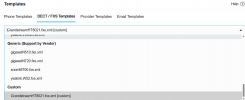
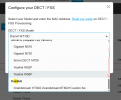
When you are adding a phone the custom template(s) should be at the very bottom of the drop-down list.
 
When you are adding a phone the custom template(s) should be at the very bottom of the drop-down list.
Hi Kyriacos,

I'll show step by step when adding a DECT/FXS device like the Grandstream HT802.

1) Admin -> Voice & Chat -> Add DECT/FXS

1764169968794.png

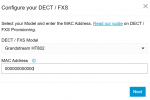
2) Select model and MAC address.

1764170132620.png

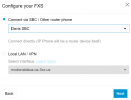
3) Select the SBC, Local LAN / VPN

1764170262168.png


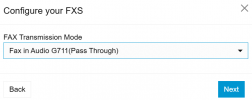
4) Fax transmission mode.

1764170341855.png


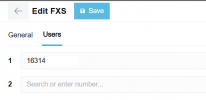
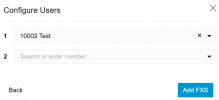
5) Select users for ports.

1764170392669.png

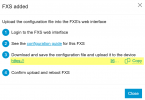
6) After that, the FXS is added, I don't see an option to use a custom template. The configuration file is automatically created by 3CX.

1764170536984.png


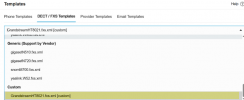
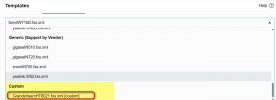
And directly from the Templates, it is in effect at the bottom of the list, but I don't know how to apply or import it to the FXS configuration to be used from now on.

1764170898383.png

If I manually upload the template as a .xml file into the ATA web's interface it works, but after a reboot, the Loop current disconnect value returns to OFF as default on the original template handled by 3CX.

Sincerely,
Anthony R.
 
At Step 2 - when selecting model, keep scrolling to the bottom of that drop-down.

1764227899862.png
 
Thanks Kyriacos. It worked.
 
  • Like
Reactions: KyriacosS_3CX
Hi team,

IWe are experiencing 3 beeps after ending a call.

On the 3CX app, I went to Settings -> Advanced -> Play Busy Tone and I deactivated it and it worked.

Nevertheless, I was looking inside the web interface how to do the same thing to the ext. that I'm using for Paging but I couldn't find that feature as a user nor in the admin portal.

Is there an easy way like inside the 3CX app to deactivate that busy tone?

I found that maybe changing the ATA template could work.

From:

<!-- # Busy Tone -->
<!-- # String -->
<P4002>f1=480@-24,f2=620@-24,c=500/500;</P4002>

To:

<!-- # Busy Tone -->
<!-- # String -->
<P4002>c=0/0;</P4002>

Have anyone tried this before?

Thanks again for all your valuable support in advance.

Best,
Anthony R.
 

Latest Posts

Forum statistics

Threads
111,953
Messages
589,916
Members
164,851
Latest member
DrunkeMeister