Analog Extension connected via ATA HT 802 isn't ringing

Anthony R

Silver Partner
Joined
Sep 18, 2024
Messages
67
Reaction score
16
Hi team!

I have an analog phone connected through an ATA HT 802 on 3CX, nevertheless, I'm having a continued issue with that extension.

Every time I tried to reach the extension it is not ringing and it seems to be showing as busy.

1763399814492.png

I rebooted the ATA and it works well only on the 1st call, then the error keeps ocurring (extension busy).

The ATA is connected using a Yealink T46U integrated SBC and it is showing as registered on the 3CX, but I am unable to reach the extension and make it ring, keeps receiving that the extension is busy.

1763400158953.png

Any ideas what should I check? What could be happening and how can I sort this busy extension error? Is it something I should check and edit from the ATA web interace?

Thanks for your support and knowledge in advance.

Sincerely,
Anthony R.

 
Is it possible to use a 3CX SBC on-site instead of the router phone?

Does the ATA show during the subsequent calls that the line is free (registered only)?
 
Hi Fxbastler,

Well, we don't have an available computer that can host the 3CX SBC on site, that's why we are using ta yealink t46U as a router phone on that location.

When I make a call to that extension, on the 3CX team I see the incoming call, the extension turns red and immediately goes back to green, I have disabled the voicemail on that analog extension, so I just receive a voicemail disabled for this extension as reply.

Should I change something inside the ATA configuration in order to make it work properly? Should I edit something on the 3CX extension configuration?

Thanks for your support in advance.

Best regards,
Anthony R.
 
Does the ATA show during the subsequent calls that the line is free (registered only)?
?

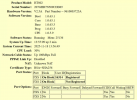
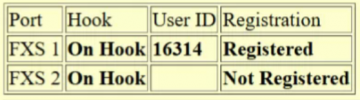
ATA status page

edit:
Sorry, I missed something: is the ATA’s line on hook and registered?
 
?

ATA status page
Hey fxbastler,

Well I don't have remote access to the ATA in this moment since we don't have computers on site. But I will take a look of it once I'll be on site.

This is what I see on the 3CX side:

1763402264583.png

The thing is, that the extension isn't busy, and even if it was, I have enabled the multiple calls feature fot that ext., but it is not working.

1763402382897.png
 
The thing is, that the extension isn't busy
That’s why I’m asking whether the ATA itself thinks the line is busy or not.

The SBC functionality that was built into the router phones is really great. Unfortunately, we’ve already had several cases where there were problems with various router phones (mostly T54W) when no phones but DECT bases or ATAs were connected to such a router phone - even when the codecs used by the SIP trunk, the 3CX and all the devices involved are consistently identical (PCMA here in Europe).
For this reason, we have meanwhile decided to use small x86 devices or a VM as a dedicated 3CX SBC.
But that doesn’t have to apply to your situation, YMMV.

About the used ATA (and maybe DECT base) codec: look at the corresponding 3CX parameter MLTACC_<MAC> .
 
Last edited:
I assumed it, but I haven’t actually asked to be sure:
What firmware is the phone using and what firmware is the ATA using? That should still be checked.
 
This system has multiple locations, there another location where we have one Fanvil V62 as a router and an ATA HT802 and it has worked really well, so the phone model could be part of the issue?

1763403562109.png

We have another with the t46U that has been working fine until now, but it gives headaches (same error) in the beginning.

1763403316294.png

So, do you think that maybe replacing the ATA could be a BTS that could actually work? if the issue persist, may be try the Fanvil, and if nothing, we should replace it for a dedicated small x86 device?

I really appreciate your assistance on this concern, thanks!
 
So, do you think that maybe replacing the ATA could be a BTS that could actually work?
Sorry that I don’t understand it (I’m not a native English speaker): what do you mean by a BTS in this context?
 
I assumed it, but I haven’t actually asked to be sure:
What firmware is the phone using and what firmware is the ATA using? That should still be checked.
The T46U is using 108.87.0.16
The ATA 1.0.63.3

I am using Fax in Audio G711(Pass Through) instead of fax in T.38.
 
Sorry that I don’t understand it (I’m not a native English speaker): what do you mean by a BTS in this context?
BTS is Basic Troubleshooting Step
 
So, do you think that maybe replacing the ATA could be a BTS that could actually work?
not replacing the ATA - replacing the Router Phone as 3CX SBC in front of the ATA

The T46U is using 108.87.0.16
The ATA 1.0.63.3
very current, latest

I am using Fax in Audio G711(Pass Through) instead of fax in T.38.
But you wrote that an analog phone is being operated on the ATA. This fax setting has nothing to do with normal telephony at first.
If you’re referring to what I wrote earlier: I meant in general that the codecs used throughout (SIP trunk, 3CX and ATA) should be the same.
 
If I were you, the path would be clear to me:
  1. check whether the ATA really shows off-hook and registered when no call is in progress
  2. alternatively replace the router phone with another model you have had good experiences with, for example the Fanvil
  3. otherwise set up a dedicated 3CX SBC
A more advanced troubleshooting approach, e.g. using Wireshark, is also possible at any time but it becomes more difficult because of the router phone and requires considerably more knowledge and continuous access to the involved devices.
That’s why I haven’t mentioned it until now.
Searching for the root cause in this way is not easy and may not necessarily allow you to solve the problem.
 
If I were you, the path would be clear to me:
  1. check whether the ATA really shows off-hook and registered when no call is in progress
  2. alternatively replace the router phone with another model you have had good experiences with, for example the Fanvil
  3. otherwise set up a dedicated 3CX SBC
A more advanced troubleshooting approach, e.g. using Wireshark, is also possible at any time but it becomes more difficult because of the router phone and requires considerably more knowledge and continuous access to the involved devices.
That’s why I haven’t mentioned it until now.
Searching for the root cause in this way is not easy and may not necessarily allow you to solve the problem.
Thanks fxbastler,

One last question, do you think that creating a 3CX support ticket could also sort the issue out?

Sincerely,
Anthony R.
 
One last question, do you think that creating a 3CX support ticket could also sort the issue out?
A simple question but not an easy answer. It’s better if I don’t answer that. You can decide.
 
  • Like
Reactions: Anthony R
Leave my routers alone :)

If the ATA says it's busy, it means it's busy.
 
Was the HT 802 previously used elsewhere successfully? I assume that the phone attached is able to make calls. What type of phone is being used? Nothing that could possibly seize the line, on an incoming calls? Did you ever try a call with the set unplugged?
 
Was the HT 802 previously used elsewhere successfully? I assume that the phone attached is able to make calls. What type of phone is being used? Nothing that could possibly seize the line, on an incoming calls? Did you ever try a call with the set unplugged?
The HT802 was used previously, but it was factory reset. The 3CX xml template was successfully uploaded through the web interface and the ATA is registered but only works well the 1st time, after the 1st call, it starts to show the extension as busy.

1763503142297.png

The analog phone model can influence. I don't know if something can be seizing the line, I have a ring group for the 2 existing extensions, the T46U and the analog phone plugged in into the ATA, the T46U works perfectly fine, no issue.

Kind regards,
Anthony R.
 
after the 1st call, it starts to show the extension as busy.
That's a good clue, at that exact point, log in the web UI and see if it still says On Hook.

1763537776848.png
 
  • Like
Reactions: Anthony R
Hi,
was that device already working fine and no more now ? or it never worked fine until now?

Very often "busy" stay after one call because tones are not set for your country use so the ATA doesn't know call is ended and stay with a phantom call and send busy to a new call as for ATA point it is always in call.

So first try to check tones and time interval for ATA to detect properly call status and go to idle when call is ended
 
  • Like
Reactions: Anthony R

Latest Posts

Forum statistics

Threads
112,285
Messages
591,705
Members
165,408
Latest member
tom.walker@blackcountryra