Solved Android App not working outside of local network

Status
Not open for further replies.

ZoloN

Free User
Advanced Certified
Joined
Jun 26, 2020
Messages
30
Reaction score
3
I have still problems with the Android App - last version I've tried is the latest beta (3CXPhone for Android 16.4.0.111) - I cannot make calls - in the call log are the calls logged as " type: 11, dn: DirectSIP ".
I've realized, that the Android App connects to the tunnel service regardless of the current location. OK for me. but the INVITE message format is not corresponding with this approach.
I've assumed, that tunnel connection is something like VPN - so I don't understand, why the INVITE from outside of LAN targets public FQDN instead of local 3CX IP.

is this an intention, "feature" or a bug??? because then the 3CX forwards the INVITE really to public FQDN (public IP of the WAN port), which causes troubles.


here are captured messages:

via LTE - connected to tunnel via public FQDN / INVITE message looks like:

INVITE sip:22@****.my3cx.at:5061;tag3cx=****** SIP/2.0
Via: SIP/2.0/TCP 127.0.0.1:50195;rport;branch=******;alias
Max-Forwards: 70
From: "ZoloN" <sip:12@[local 3CX IP]:5061>;tag=******
To: <sip:22@****.my3cx.at:5061;tag3cx=******>
Contact: "ZoloN" <sip:[email protected]:5060;rinstance=******>
Call-ID: ******
CSeq: 10053 INVITE
Allow: PRACK, INVITE, ACK, BYE, CANCEL, UPDATE, INFO, SUBSCRIBE, NOTIFY, REFER, MESSAGE, OPTIONS
Supported: replaces, 100rel, timer, norefersub
Session-Expires: 1800
Min-SE: 90
User-Agent: 3CXPhone for Android 16.4.0.111


via local LAN - connected to tunnel via internal IP / INVITE message looks like:

INVITE sip:22@[local 3CX IP]:5061;tag3cx=****** SIP/2.0
Via: SIP/2.0/TCP 127.0.0.1:50195;rport;branch=******;alias
Max-Forwards: 70
From: "ZoloN" <sip:12@[local 3CX IP]:5061>;tag=******
To: <sip:22@[local 3CX IP]:5061;tag3cx=******>
Contact: "Zoltan Nemeth" <sip:[email protected]:5060;rinstance=******>
Call-ID: ******
CSeq: 12089 INVITE
Allow: PRACK, INVITE, ACK, BYE, CANCEL, UPDATE, INFO, SUBSCRIBE, NOTIFY, REFER, MESSAGE, OPTIONS
Supported: replaces, 100rel, timer, norefersub
Session-Expires: 1800
Min-SE: 90
User-Agent: 3CXPhone for Android 16.4.0.111


/BR
ZoloN
 
you are clearly not using tunnel as it is on 5090, 5061 port is not tunnel check your config and smartphones settings you should find 5090 as tunnel nothing else.
 
hi aws2p,

negative.... as I mentioned in my first post: " I've realized, that the Android App connects to the tunnel service regardless of the current location." - in clear text: the Android App connects to the PBX via tunnel even when connected to local LAN via WiFi. the only difference is the content of the INVITE message (see my first message)

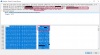
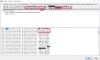
I've disabled encryption of tunnel communication on Android App and this is the capture of communication going from mobile phone via LTE thru tunnel to the 3CX. (I was calling extension 22 from extension 12)

via LTE (outside of LAN):
2020-07-10_17h35_17.png

via WiFi (on local LAN):
2020-07-10_18h16_56.png

/BR
ZoloN
 
Last edited:
digging little bit deeper into network communication between Android App via LTE (outside of LAN) and the 3CX PBX. the following communication goes thru tunnel (I've disabled the encryption on the phone to be able to see what is going on). Android App has extension 12 and I'm calling extension 22 on local LAN connected via Gigaset DECT gateway A510 IP.

what I really do not understand, why builds the INVITE command with the public FQDN while connected via tunnel directly to 3CX, forcing the 3CX PBX to initiate a DirectSIP call (Adroid App displays "DirectSIP" call in the call log - and the PBX " type: 11, dn: DirectSIP")
As the Android App is always connected ti PBX via tunnel regardless of actual network, I would like to suggest to drop the games with the public FQDN and initiate the call against the local 3CX IP address.

and yes, in hosts file IS the record of public FQDN with address 127.0.0.1 - but apparently ignored, as the INVITE is sent out by PBX to real public IP......


INVITE sip:22@****.my3cx.at:5061;tag3cx=**** SIP/2.0
Via: SIP/2.0/TCP 127.0.0.1:50195;rport;branch=****;alias
Max-Forwards: 70
From: "ZoloN" <sip:12@[local 3CX IP]:5061>;tag=****
To: <sip:22@****.my3cx.at:5061;tag3cx=****>
Contact: "ZoloN" <sip:[email protected]:5060;rinstance=*****>
Call-ID: ****
CSeq: 6488 INVITE
Allow: PRACK, INVITE, ACK, BYE, CANCEL, UPDATE, INFO, SUBSCRIBE, NOTIFY, REFER, MESSAGE, OPTIONS
Supported: replaces, 100rel, timer, norefersub
Session-Expires: 1800
Min-SE: 90
User-Agent: 3CXPhone for Android 16.4.0.111
Content-Type: application/sdp
Content-Length: 440
...PAYLOAD...

note: Android App tries to reach the extension 22 via public FQDN, even connected via tunnel directly to 3CX - WHY?????

SIP/2.0 407 Proxy Authentication Required
Via: SIP/2.0/UDP [::ffff:[LTE IP of phone]]:48655;branch=****-1---tunneltid;rport;tnlid=clnt.****
Via: SIP/2.0/TCP 127.0.0.1:50195;rport;branch=****;alias
Proxy-Authenticate: Digest nonce="****",algorithm=MD5,realm="3CXPhoneSystem"
To: <sip:22@****.my3cx.at:5061;tag3cx=****>;tag=****
From: "ZoloN" <sip:12@[local 3CX IP]:5061>;tag=****
Call-ID: ****
CSeq: 6488 INVITE
Content-Length: 0

note: requesting AUTH - fine


ACK sip:22@****.my3cx.at:5061;tag3cx=**** SIP/2.0
Via: SIP/2.0/TCP 127.0.0.1:50195;rport;branch=****;alias
Max-Forwards: 70
From: "ZoloN" <sip:12@[local 3CX IP]:5061>;tag=****
To: <sip:22@****.my3cx.at:5061;tag3cx=****>;tag=****
Call-ID: ****
CSeq: 6488 ACK
Content-Length: 0


INVITE sip:22@****.my3cx.at:5061;tag3cx=**** SIP/2.0
Via: SIP/2.0/TCP 127.0.0.1:50195;rport;branch=****;alias
Max-Forwards: 70
From: "ZoloN" <sip:12[local 3CX IP]:5061>;tag=****
To: <sip:22@****.my3cx.at:5061;tag3cx=****>
Contact: "ZoloN" <sip:[email protected]:5060;rinstance=****>
Call-ID: ****
CSeq: 6489 INVITE
Allow: PRACK, INVITE, ACK, BYE, CANCEL, UPDATE, INFO, SUBSCRIBE, NOTIFY, REFER, MESSAGE, OPTIONS
Supported: replaces, 100rel, timer, norefersub
Session-Expires: 1800
Min-SE: 90
User-Agent: 3CXPhone for Android 16.4.0.111
Proxy-Authorization: Digest username="****", realm="3CXPhoneSystem", nonce="****", uri="sip:22@****.my3cx.at:5061;tag3cx=****", response="****", algorithm=MD5
Content-Type: application/sdp
Content-Length: 440
....PAYLOAD...

note: Android App tries to reach the extension 22 with AUTH, again via public FQDN, even connected via tunnel directly to 3CX - again WHY?????


SIP/2.0 404 Not Found
Via: SIP/2.0/UDP [::ffff:[LTE IP of phone]]:48655;branch=****-1---tunneltid;rport;tnlid=****
Via: SIP/2.0/TCP 127.0.0.1:50195;rport;branch=****;alias
To: <sip:22@****.my3cx.at:5061;tag3cx=****>;tag=****
From: "ZoloN"<sip:12@[local 3CX IP]:5061>;tag=****
Call-ID: ****
CSeq: 6489 INVITE
User-Agent: 3CXPhoneSystem 16.0.5.619 (619)
Warning: 499 [local 3CX FQDN] "Not found"
Content-Length: 0

note: 3CX PBX answers that local 3CX FQDN is unknown! REALLY?????

ACK sip:22@****.my3cx.at:5061;tag3cx=**** SIP/2.0
Via: SIP/2.0/TCP 127.0.0.1:50195;rport;branch=****;alias
Max-Forwards: 70
From: "ZoloB" <sip:12@[local 3CX IP]:5061>;tag=****
To: <sip:22@****.my3cx.at:5061;tag3cx=****>;tag=****
Call-ID: ****
CSeq: 6489 ACK
Content-Length: 0


after this "Not found" message tries the 3CX PBX to contact the extension sending out normal INVITE SIP message to the Public FQDN/Public IP (ignoring the hosts entry), which fails again with error "404 User unknown".

/BR
ZoloN
 
@ZoloN
"<sip:12@[local 3CX IP]:5061>" - what's port 5061 in your PBX configuration?
 
Hi @ZoloN

How is your system set up? This is might reveal what is happening if you share some details so we can better understand.


- What SIP port did you set during setup? Normally its 5060 and 5061 is reserved for SIP TLS only
- How is the public network setup of the PBX? (Local PBX with ports forwarded via firewall?)
- How is your internal network setup, do you use split DNS?
- How many NICs are on the PBX? (if more than one specify more details as to why)
 
hi Vali,

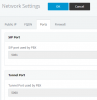
port 5061 is correct, as my internet provider provides on my DSL modem/router a fixed line via VoIP and I had some collisions previously.
2020-07-13_12h30_49.png

SRV records in DNS are OK too:

C:\>nslookup
Default Server: UnKnown
Address: 192.168.33.30

> set type=SRV

> _sip._udp.****.eu
Server: UnKnown
Address: 192.168.33.30

Non-authoritative answer:
_sip._udp.****.eu SRV service location:
priority = 20
weight = 1
port = 5061
svr hostname = sip.****.eu


> _sip._udp.****.my3cx.at
Server: UnKnown
Address: 192.168.33.30

Non-authoritative answer:
_sip._udp.****.my3cx.at SRV service location:
priority = 10
weight = 0
port = 5061
svr hostname = ****.my3cx.at


/BR
ZoloN
 
- What SIP port did you set during setup? Normally its 5060 and 5061 is reserved for SIP TLS only
- How is the public network setup of the PBX? (Local PBX with ports forwarded via firewall?)
- How is your internal network setup, do you use split DNS?
- How many NICs are on the PBX? (if more than one specify more details as to why)

* during setup a port 5061 was selected due interference with VoIP provided by my internet provider (which I can't alred/disable)
* local PBX and ports forwarded via router/firewall
* I'm running windows *.local domain with internal AD-integrated DNS
* PBX has only one NIC

please note: all is working fine, following communications are up&running fine in both directions:
* PBX <-> Gigaset A510 IP (DECT phones)
* PBX <-> RasPBX (GSM gateway)
* PBX <-> SPA3102 (fixed line and fax machine)
* PBX <-> Telnyx

Android App is working fine while on WiFi, when outside of LAN I can receive calls - but not initiate any call - in both call logs are they marked as DirectSIP calls even dialing local . and yes, both options are unchecked:
- Disallow use of extension outside the LAN
- Block Remote Tunnel Connections

my question still remains:
when the Android App is connected to PBX via tunnel regardless of the network, why the format of INVITE differs??? IMHO it should be always the same - targeting local IP of PBX

/BR
Zolon
 
Try to create a brand new extension now, and change absolutely no options, just provision it on your mobile with its own default options.

Then try making a call from that extension and tell us if it works.
 
hi JohnS,

I've created new extension and tried to place a call:
PBX call log:
2020-07-13_13h40_50.png
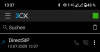
App call log:
Screenshot_20200713-133750 (1).png

one more question - as the windows setup inserts the record "127.0.0.1 [Public FQDN]" into hosts file - this record seems to be ignored when building the call - the INVITE is routed to real public IP -and this record is resolved correctly by OS itself...

btw: when I've reinstalled the PBX - backup the Debian config - install windows PBX with restore, the tunnel has worked for a while. unfortunately I did no network capture (possibly I'll try to repeat the process to see the difference)

/BR
ZoloN
 
@ZoloN
Why I was asking about 5051: please check in Management Console's extension if transport is set to TLS; if yes, switch to UDP, save and then reprovision the client, see if it's working. I want to be sure it's not an old issue resurfaced.
Thanks.
 
@ZoloN
Why I was asking about 5051: please check in Management Console's extension if transport is set to TLS; if yes, switch to UDP, save and then reprovision the client, see if it's working. I want to be sure it's not an old issue resurfaced.
Thanks.

hi Vali, checked: the option is set by default to UDP on all extensions - I didn't changed this.
 
Let's look at what a healthy PBX does:

Code:
INVITE sip:[email protected]:5060
Via: SIP/2.0/UDP 127.0.0.1:5080
Via: SIP/2.0/UDP [::ffff:87.228.187.194]:48408
Via: SIP/2.0/TCP 127.0.0.1:50195
Record-Route: <sip:[email protected]:5080
Contact: "John" <sip:[email protected]:5060
To: <sip:[email protected]>
From: "John"<sip:000@pbxlocaladdress>

As you see, I'm coming via tunnel (127.0.0.1:5060) and going to To: <sip:[email protected]>
Yet in my example, the DirectSIP scenario is not triggered and my call works just fine. I think the FQDN has become somewhat of a distraction from the real issue: Why are you ending up as DirectSIP?

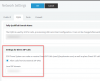
So for now please disregard that you see the FQDN, this is very normal. I'm more interested in what happens that would make your PBX "think" that the incoming call from an authenticated extension appears to be DirectSIP. Can you please tell us if you enabled the below option and what you have here?
1594642757957.png
 
hi JohnS,

yes, I have enabled the direct SIP calls.
* I had there my public external FQDN "sip.****.eu" (in the external DNS is the corresponding SRV record set)
* now tried to change it to internal FQDN "pbx.***.local" (in the internal DNS is the corresponding SRV record set too) - still when I try to call via LTE is a DirectSIP call logged.
* tried to disable the direct SIP calls - call is still impossible - the only change is, that call log on phone shows correctly the name and number dialed - but the PBX call log only the number without name - and call wasn't connected (destination not found)

/BR
ZoloN
 
Leave that Disabled for now until we can troubleshoot further. I don't imagine you have a lot of people calling in via DirectSIP if at all and you should not enable it unless strictly necessary.

Tell me more about your public external FQDN "sip.****.eu"
I though your external FQDN was a 3CX-managed ****.my3cx.at
 
hi JohnS,

apparently this is the real issue - the two entries have to be apparently equal - even here are other scenarios mentioned - which I've tried to use
2020-07-13_15h48_08.png
now the calls are working, will continue to test if all is really working

but still - IMHO it makes definitely no sense to target the public FQDN of the PBX when connected via tunnel - if the phone is connected via tunnel, this connection acts as VPN....


/BR
ZoloN
 
Last edited:
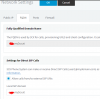
I imagine you did not use this option during the installation? If so and you changed the Local SIP Domain afterwards, it would justify the problem as we saw earlier, and I would estimate the problems probably started after you changed it and then restarted the services.

1594649720062.png
 
I imagine you did not use this option during the installation? If so and you changed the Local SIP Domain afterwards, it would justify the problem as we saw earlier, and I would estimate the problems probably started after you changed it and then restarted the services.
hi JohnS,

no, I didn't.
one question - my infrastructure is behind NAT and uses *.local AD domain (including AD-integrated DNS) and public doman *.eu hosted at my web-hosting company (DNS is fully manageable by me).
so LAN internal FQDN is "pbx.***.local" and accessible from external via "sip.***.eu" (and, of course, via "***.my3cx.at"). which of those FQDNs should I enter?

/BR
ZoloN
 
hi JohnS,

I've just read the split DNS setup article, now it's more clear to me.
just I'm still missing the point for different INVITE packet formats via tunnel....

/BR
ZoloN
 
just I'm still missing the point for different INVITE packet formats via tunnel
The missing key here is the logical SIP domain. In case of 3CX app, inside are a SIP client and a proxy tunnel. Technically, in the provisioning file, the app receives two, totally independent, configurations (even in reality they could be identical). Since tunnel is used as a proxy, the local_ip/public_fqdn acts both as "physical" remote connection for the tunnel, but also as the "logical" SIP domain for the SIP client. If you would have your PBX SIP domain as "bubu" (again, logical name, does need to end in .local or .com, be resolvable, nothing, just a name) and this domain would have been passed to the app in the provisioning profile, then in case of tunnel usage it would try to connect to local_ip/public_fqdn, while the SIP client would invite as INVITE sip:22@bubu:5051 and it would work. So, bottom line, in case of using tunnel, local_ip/public_fqdn acts like logical SIP domain - and, as John said, doesn't matter from PBX point of view as long both are valid.
 
Status
Not open for further replies.

Forum statistics

Threads
112,147
Messages
590,959
Members
165,167
Latest member
Finatra.us