Anrufe werden Abgebrochen und das Anruf Session läuft weiter

Status
Not open for further replies.

Ahmad.asut

Bronze Partner
Basic Certified
Joined
Jun 15, 2020
Messages
9
Reaction score
0
es passiert ab und zu dass die interne Anrufe werden total abgebrochen aber das Session läuft weiter, es wird gezeigt dass beide noch telefonieren obwohl der Anruf abgerochen ist.

das Passiert nur mit Desktop App

die Status wird aber weiterhin als "GELB" und damit als belegt oder auch im Gespräch angezeigt

Ich kann nicht mich wieder auf GRÜN setzen.


Nach einmal Schließen und Neustart von 3CX wird es wieder als grün erscheinen.


Logs

mall Session Failed

Mal Terminated

hat jemanden eine Idee?

wäre ist möglich Jabra Headset?
 
Is your Jabra headset integrated with the Desktop App?
 
If you move the integration what is the behavior?
 
i will try it
but i have the same Headset with another App und i do not have this problem
this Problem just with a few Clients
 
This depends also on the machine. You may try without the integration and see if you still replicate.
 
yes i will try it , let us see
 
Unfortunately, this problem has been occurring since version 18.9.933. We have 260 users with Jabra 930 reporting it.
We were able to reduce the problems a bit, but at times all users continue to have dropped calls.

- Install Jabra Direct
- Always update the headset to the latest firmware.
- Set "Jabra (Support provided by Jabra!)" in the desktop app.

WebHID integration exacerbates the problem.

We will replace all headsets with Yealink
 
Thanks we think also the same Yealink is better
 
Hi
We have 140+ users with the same issue - users continue to have dropped calls
New client with v18.0 (Build 939)
Jabra was highly recommended by our Vendor but seems to be causing issues with our Dell Latitudes and WD19 docks.
Have been unable to progress or resolve any of the problems so will seek other brands to test. The Yealink WH62 or 72 seems to be a contender.
 
@kiwi-nz This is related with the Jabra headset and the OS. For such cases you need to report to vendor.
 
  • Like
Reactions: kiwi-nz
Hi,
i have written again to Jabra support and received the following mail. We will test this


Hello ,

Sorry to hear about this issue.

Could you try the following solution?

Go to control panel > devices and printers.

Right click on the Jabra 930 and go to properties.

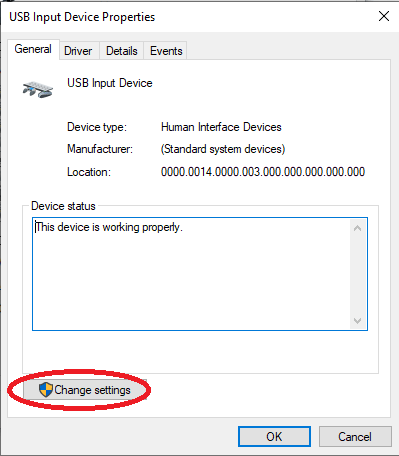
Go to the hardware tab and locate USB input device.
4. Click on Properties.
5. Select Change settings below.

Pro930RandomDropsA

6. Go to the power management tab and uncheck the Allow the computer to turn off this device to save power.
7. Select ok, then select apply and ok to close out the dialog.
 
  • Like
Reactions: jed
Let us know the results ;)
 
Status
Not open for further replies.

Forum statistics

Threads
111,974
Messages
590,081
Members
164,899
Latest member
mazet