


- Joined
- Sep 22, 2022
- Messages
- 1
- Reaction score
- 3
I started a new job in June. At my old job we use Cisco Jabber and their app. Having used 3CX for a few months now I have some suggestions that IMO are sorely needed for 3CX.
First off to be effective with my phone system requires me to create THREE windows and because of your apps sizing restrictions have them in a weird overlay pattern that is a pain to setup and maintain. It also takes up 1/2 of one of my monitors.
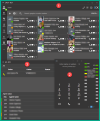
So window 1 has my contacts so I can see my coworkers' statuses. 2. I have to have that numpad up to see who is calling. I'm also supposed to keep window 3 so I can see who is on the phone and with who. Because I don't have true freedom to resize these windows they all overlay one another so I have to have the Dialer on top, the Panel in the middle and the team window on the bottom... otherwise this doesn't even work. They would all cover up the parts I need to see in the other windows and when I click around these 3 windows are always fighting to be on top which means I have to constantly re-setup the arrangement.
Please create a integrated interface with all the parts within a single window like this following mockup I've created. Cisco Jabber has everything integrated into a single window... If your competitor can do it, so can you... Well, let's just say... you should for your own good.
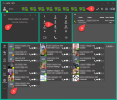
Firstly, with the old arrangement the agent status on the bottom is completely redundant and can be removed. 1. I moved the speed dials up to the top. In the interests of time I just copied SP0 and SP1 across the top although they would be all the speed dials from the old dialer. 2. Here you see your incoming calls and who they are, it doubles as your type in dialer. 3. You have your num pad which you can use to dial or press options in phone menus. DON'T HAVE IT MAKE TONES AND DEADEN SOUNDS WHEN YOU'RE DIALING! I'm often listening to a voicemail and trying to dial their number as they say it and your sounds block the voicemail / number I'm listening to and trying to type... 4. We have our panel so you can see all the other calls happening(I trimmed all the wasted space between the columns). 5. You have your team below so you can monitor everyone's status and such. 6. Isn't on here because I don't currently use it, but below could be your contacts you've created, like your team, so you could push to dial them if you'd want that. To piggyback on that concept you'd want options to turn on or turn off individual panels which would allow your chosen panels to eexpand. Also make the the window free form to any size you want, no restrictions. I put them how I'd like them placed, but these could all be vertical for example with draggable dividing lines to set it up the way you want. That's the crux of the issue any one application shouldn't need 3 windows open, period. Every other app on earth can get their GUI interface done in one... Why not 3cx? You can use this design if wanted. I added the color to help see the dividing lines of the individual panes of the single window.
First off to be effective with my phone system requires me to create THREE windows and because of your apps sizing restrictions have them in a weird overlay pattern that is a pain to setup and maintain. It also takes up 1/2 of one of my monitors.
So window 1 has my contacts so I can see my coworkers' statuses. 2. I have to have that numpad up to see who is calling. I'm also supposed to keep window 3 so I can see who is on the phone and with who. Because I don't have true freedom to resize these windows they all overlay one another so I have to have the Dialer on top, the Panel in the middle and the team window on the bottom... otherwise this doesn't even work. They would all cover up the parts I need to see in the other windows and when I click around these 3 windows are always fighting to be on top which means I have to constantly re-setup the arrangement.
Please create a integrated interface with all the parts within a single window like this following mockup I've created. Cisco Jabber has everything integrated into a single window... If your competitor can do it, so can you... Well, let's just say... you should for your own good.
Firstly, with the old arrangement the agent status on the bottom is completely redundant and can be removed. 1. I moved the speed dials up to the top. In the interests of time I just copied SP0 and SP1 across the top although they would be all the speed dials from the old dialer. 2. Here you see your incoming calls and who they are, it doubles as your type in dialer. 3. You have your num pad which you can use to dial or press options in phone menus. DON'T HAVE IT MAKE TONES AND DEADEN SOUNDS WHEN YOU'RE DIALING! I'm often listening to a voicemail and trying to dial their number as they say it and your sounds block the voicemail / number I'm listening to and trying to type... 4. We have our panel so you can see all the other calls happening(I trimmed all the wasted space between the columns). 5. You have your team below so you can monitor everyone's status and such. 6. Isn't on here because I don't currently use it, but below could be your contacts you've created, like your team, so you could push to dial them if you'd want that. To piggyback on that concept you'd want options to turn on or turn off individual panels which would allow your chosen panels to eexpand. Also make the the window free form to any size you want, no restrictions. I put them how I'd like them placed, but these could all be vertical for example with draggable dividing lines to set it up the way you want. That's the crux of the issue any one application shouldn't need 3 windows open, period. Every other app on earth can get their GUI interface done in one... Why not 3cx? You can use this design if wanted. I added the color to help see the dividing lines of the individual panes of the single window.


