Applying Custom Template to Yealink Removes Address book

Status
Not open for further replies.

ActionJackson

Forum User
Joined
Aug 25, 2021
Messages
18
Reaction score
3
I have Yealink T23G(s). The only reason I am looking to apply a custom template is to enable/configure Multicast Paging.
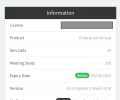
All the Yealink T23G are on the latest firmware 44.84.0.140 as per 3CX
3CX is running on v 18.0 (Build 314)

I've followed the instructions in https://www.3cx.com/docs/custom-ip-phone-templates/#h.3ifas3c43rjk
I've achieved a very interesting result. I got my custom template Multicast Paging settings to apply to the phone(s), but it makes some type of a change that my address book disappears and it switches the phone from SBC to Local LAN. This is a consistent result.
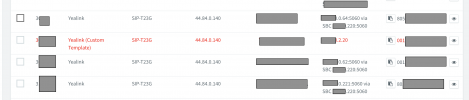
Screen Shot 2022-01-31 at 9.03.52 PM.png


I thought I might have fat fingered something in the custom template, so I created a new custom template with absolutely no changes in the code accept for the https://www.3cx.com/docs/custom-ip-phone-templates/#h.3ifas3c43rjk instructions. And the result is the same. If the custom template is applied, it removes the address book and switches the phone from SBC to Local LAN.

I am sure I am doing something wrong, I just can't figure out what it is I'm doing wrong.

Any help would be greatly appreciated.
 
What happens if you factory default the phone, and provision it with standard template - do you have the address book
 
What Saqqara said, Factory Reset the device, and also in the Extension Settings --> Phone Provisioning tab, delete the device from there and press OK so that only the "3CX Apps" entry is left in the drop-down, then assign the PnP entry in "Phones".

Remember that when it takes you to this page, you need to delete the 'default' entry again, add a a new one, select the custom template from the drop-down, put the MAC back and select the right provisioning method.
(it sounds more difficult than what it really is...)
 
@ActionJackson

As side note, I'm not sure if you need to do something specific we don't already support, but there is already support for multicast paging without the need for custom templates.
 
What happens if you factory default the phone, and provision it with standard template - do you have the address book
Hell Saqqara, I'm sorry I should have explained this in my initial post.
Yes. If I factory reset the phone, add it to 3cx and apply the default template everything works as expected, I get the 3CX address book and the phone is set to SBC.

If I then take a phone that works, delete the default template and apply the custom template, restart the phone, it will gain the Multi Cast features but the status will change to Local LAN and the phone book will disappear.
 
What Saqqara said, Factory Reset the device, and also in the Extension Settings --> Phone Provisioning tab, delete the device from there and press OK so that only the "3CX Apps" entry is left in the drop-down, then assign the PnP entry in "Phones".

Remember that when it takes you to this page, you need to delete the 'default' entry again, add a a new one, select the custom template from the drop-down, put the MAC back and select the right provisioning method.
(it sounds more difficult than what it really is...)
Hi NickD, thank you for the reply and the suggestion.
I could be wrong but I think I'm doing this already.
I add the phone to 3cx with a default template to make sure that it is working correctly.
I then delete the default template and + the custom template (this is done in the Phone Provisioning tab).
I have to add the custom template along with the phones MAC address.
Once I added the custom template I restart the phone.
Once the phone restarts it begins to pull the custom template.

I guessed that if the Multicast settings got applied to the phone that meant that the template was being applied correctly.
 
@ActionJackson

As side note, I'm not sure if you need to do something specific we don't already support, but there is already support for multicast paging without the need for custom templates.
Hi JohnS,
Thank you for the reply. I had blinders on. I was so focused on getting this to work I didn't see that Multicast became a 3CX option. This is fantastic. I would love to still take this opportunity to figure out custom templates. Simply because I can't even get a custom template with no custom settings to apply correctly.

I created a copy of the default template. I think I made all the correct changes to it that 3CX/Yealink requires for Yealink phones and I still get the same issue of the SBC switching to Local LAN and the 3CX address book disappearing.
 
@ActionJackson

As side note, I'm not sure if you need to do something specific we don't already support, but there is already support for multicast paging without the need for custom templates.
@JohnS_3CX is there any manual on how to use the new Multicast Paging feature? I just looked at it and I don't understand how to setup a group or if the Multicast will just apply to every phone on the LAN. TIA

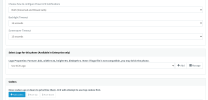
Edit: So I just found a video from 3CX that explains how to setup Multicasting with the new feature and what I figured out is that I am missing the “Enable Multicast Paging Ring Group provisioning” drop down in my Phone Provisioning tab. (see picture attached). I think I am on the right version. TIA

Screen Shot 2022-02-01 at 8.47.28 AM.png


Screen Shot 2022-02-01 at 8.49.01 AM.png
 
Last edited:
Hello,

what I figured out is that I am missing the “Enable Multicast Paging Ring Group provisioning” drop down in my Phone Provisioning tab
This option only appears when you already made at least one multicast paging extension, and only for phones provisioned in LAN mode.

Now I noticed you mentioned you are using an SBC (ie. the PBX machine and the phones are not located on the same network). This means you cannot use the "Paging Multicast" type of paging - this feature is only valid on a LAN where both the PBX machine and the phones will all be connected together where multicast messages can travel from the PBX to reach the phones. Otherwise it's entirely useless because multicast messages will not travel across the internet, even if we did allow you to enable it for SBC based devices.

If you are using SBC, you can instead opt to the plain "Paging" type. This does not require custom templates either. If you wish to return to default templates, delete the phones from the extensions, then factory reset them, and once they appear in the "Phones" page assign them to their respective extensions again,

You can find our guide here https://www.3cx.com/docs/manual/ring-groups-paging-intercom/#h.mrhpuin3fikr
And you can also see our Academy module hear covering both Ring and Paging groups
https://www.3cx.com/3cxacademy/videos/basic/ring-groups/
 
Hello,


This option only appears when you already made at least one multicast paging extension, and only for phones provisioned in LAN mode.

Now I noticed you mentioned you are using an SBC (ie. the PBX machine and the phones are not located on the same network). This means you cannot use the "Paging Multicast" type of paging - this feature is only valid on a LAN where both the PBX machine and the phones will all be connected together where multicast messages can travel from the PBX to reach the phones. Otherwise it's entirely useless because multicast messages will not travel across the internet, even if we did allow you to enable it for SBC based devices.

If you are using SBC, you can instead opt to the plain "Paging" type. This does not require custom templates either. If you wish to return to default templates, delete the phones from the extensions, then factory reset them, and once they appear in the "Phones" page assign them to their respective extensions again,

You can find our guide here https://www.3cx.com/docs/manual/ring-groups-paging-intercom/#h.mrhpuin3fikr
And you can also see our Academy module hear covering both Ring and Paging groups
https://www.3cx.com/3cxacademy/videos/basic/ring-groups/
Hi @JohnS_3CX thank you very much this explains why the dropdown feature is missing, I wish this was covered in that 3CX training video.

Regarding multicast paging not being available over SBC. If I manually login to my IP phone web interface and set them up for Multicast Paging (manually), I can keep the phone on SBC and my multicast paging will work. My issue is that if my phones get re-provisioned the default template removes my manual settings.

This is the reason I was trying to get these settings to apply via a custom template, is because this works fine if I do it manually per each phone.

Is this just an illusion that everything is working fine? We only have 1 LAN and use SBC to keep our PBX in our cloud and to create redundancy.
 
Ok do it manually per each phone since this works fine, and in your custom template don't change anything at all except to remove these two variables.

%%multicastrgname1%%
%%multicastrgipport1%%

3CX will not overwrite anything in the multicast section when these are gone. It will remain empty.
 
Ok do it manually per each phone since this works fine, and in your custom template don't change anything at all except to remove these two variables.

%%multicastrgname1%%
%%multicastrgipport1%%

3CX will not overwrite anything in the multicast section when these are gone. It will remain empty.
Hi @JohnS_3CX
Thank you for the suggestion. Do I just "find" and "delete" the following two items:
%%multicastrgname1%%
%%multicastrgipport1%%
?

I apologize for such a dumb question, I am new to 3CX and I want to make sure I don't many any additional.
Thank you again for all the back and forth.

Edit: We also went full circle. My original post was about my custom template removing SBC and the address book. I am in the same boat. I just created a new custom template with the changes you had suggested and I am in the same boat again. I truly feel I am doing something wrong.

I changed all the y000 to y100
And I changed the original name
"<model name="Yealink T23G" filename="y000000000044.cfg" />"
to
<model name="YYealink T23G-yealinkt4xmulticast" filename="y100000000044.cfg" />
(which is the name of my template)

I don't think I am supposed to make any other changes and I believe these changes are mandatory. Am I wrong?

Edit #2: Can I not have custom templates with SBC?
 
Last edited:
Thank you for the suggestion. Do I just "find" and "delete" the following two items:
%%multicastrgname1%%
%%multicastrgipport1%%
?
Yes delete these so reprovisioning will not affect your settings. You will then need to do the multicast configuration manually from the web UI of the phones.

I changed all the y000 to y100
And I changed the original name
"<model name="Yealink T23G" filename="y000000000044.cfg" />"
to
<model name="YYealink T23G-yealinkt4xmulticast" filename="y100000000044.cfg" />
(which is the name of my template)
When creating the custom template do not create a new yxxxxxxxxxxxxx.cfg file. Leave the default one as is.

Edit #2: Can I not have custom templates with SBC?
Yes you can.

With the above in mind delete all custom templates you done so far, factory reset your phones and start from scratch. Create a new custom template and with the changes proposed and see if that works for you.
 
Hi @YiannisH_3CX thanks so much for the reply and trying to help. Now we are back to square one.

Considering you are saying that I should not change the cfg file names, does this mean that the 3CX's instructions on how to create a template for Yealink phones is wrong? It explicitly details to change the cfg file names, unless I am reading that wrong. https://www.3cx.com/docs/custom-ip-phone-templates/#h.3ifas3c43rjk am I making a mistake following the instructions?

I did exactly as you suggested and created a new custom template.
I did NOT change the cfg file names, I left everything as the default template and just removed the %%multicastrgname1%% and %%multicastrgipport1%%.

Now I am back to where I started this thread, which is when I apply the custom template it removes the address book and switches the phone from SBC to LocalLAN.

I can replicate this behavior on demand.
 
Hi @ActionJackson ,

Custom template creation works just fine. When it comes to Yealink, there is currently a small issue with the generation of y00000000xx files when you go and change the name of them, hence why my colleague @YiannisH_3CX suggested to leave the default values.

Before you think something though, this is no way affects the values you want to change.

We have tried to offer assistance even though custom templates are not supported by 3CX:
https://www.3cx.com/ordering/

I will admit that I even tried to create a custom template myself here with SBC with a Yealink phone and that worked fine.
Short of someone doing a TeamViewer session, I don't think that we can offer any more assistance on this (which we won't do for custom templates issue as not supported...).

We will leave this forum thread open in case some other Forum User of 3CX Partner wants to help you.
 
Hi @NickD_3CX, Thanks for the reply. I understand that custom templates aren't supported by 3CX, that's why I didn't want to go and open a ticket, I figured I would take to the forms to see if anyone else has had similar issues.

The form post got a bit long because we tried other suggestions instead in addition to focusing on the issue of custom templates. It's hard to believe that no one has ran into this problem when I can produce it on demand.

Thanks for trying to help. And thanks for even going as far as to try to create a custom template on your SBC instance.
 
Last edited:
  • Like
Reactions: NickD_3CX
Status
Not open for further replies.

Members Online Now

Forum statistics

Threads
111,832
Messages
589,283
Members
164,662
Latest member
DejanMDS