- Joined
- Dec 13, 2018
- Messages
- 88
- Reaction score
- 6
Greetings,
Management is considering activating call recordings for our 3CX. We would also like to enable archiving so we can keep the recordings and not fill up our drive space. When checking the box, Enable Remote Archiving, in the management console it states:
3CX will automatically archive all recordings to a remote location when enabled. Ensure that Auto Cleaning Options does not conflict with Automatic Archiving Policy. Warning: All current recordings will be archived.
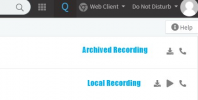
My question is. if the archive job runs and offloads all my recordings, and I have a manager who plans to review recordings, will they still be able to or will they have to restore the recordings back to the original location? My concern is that if the manager takes about a week to get to a recording and the archive job ran, they will lose the opportunity to review the recording as it seems that the archive job will not leave files that are maybe less than 30 days old.
Thanks!
Management is considering activating call recordings for our 3CX. We would also like to enable archiving so we can keep the recordings and not fill up our drive space. When checking the box, Enable Remote Archiving, in the management console it states:
3CX will automatically archive all recordings to a remote location when enabled. Ensure that Auto Cleaning Options does not conflict with Automatic Archiving Policy. Warning: All current recordings will be archived.
My question is. if the archive job runs and offloads all my recordings, and I have a manager who plans to review recordings, will they still be able to or will they have to restore the recordings back to the original location? My concern is that if the manager takes about a week to get to a recording and the archive job ran, they will lose the opportunity to review the recording as it seems that the archive job will not leave files that are maybe less than 30 days old.
Thanks!