Assistant not working outside office with tunnel

Status
Not open for further replies.

summer_day

Joined
Aug 31, 2010
Messages
6
Reaction score
0
Hi everybody,
I am not able to make Assistant working from outside my office ... but 3CX Phone does !!!

I am at home with my laptop :
Windows 7 Professional 32 Bit ITA
3CX Phone ver. 4.0.13679.0
3CX Assistant ver. 9.0.13373.0
3CX Phone System ver. 9.0.13373.540

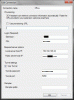
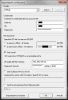
The configuration of 3CX Phone and 3CX Assistant is the same :


Anyway 3CX Phone works very well (audio and video) ... 3CX Assistant is not able to connect/login to server.
From inside my office 3CX Assistant works without problem.

Thanks for help
 

Attachments

  • 3CX_Phone.gif
    3CX_Phone.gif
    19.5 KB · Views: 1,429
  • 3CX_Assistant.gif
    3CX_Assistant.gif
    17.8 KB · Views: 1,429
Did you try connecting with your Router's firewall disabled?
 
Hi , also did you change from Local to Remote.
Go to File > Location > Remote - (due you are outside office i.e. you are connecting to the server from outside ex: home / airport....)

Thanks
 
>Hi , also did you change from Local to Remote?
>Go to File > Location > Remote - (due you are outside office i.e. you are connecting to the server
>from outside ex: home / airport....)

Yes I did, but no luck

>Did you try connecting with your Router's firewall disabled?

My hardware firewall (NetASQ U70) redirects Tunnel's port 5090 to 3CX server.
I can see the firewall redirecting packets from Assistant IP to 3CX Server IP.
This way 3CX Phone works ... 3CX Assistant not.
But both of them are configured to use Tunnel.

I don't understand why only Assistant doesn't work.

Thanks
 
Hi,
Question? Did you put the Public IP Address as follows, Example: 111.111.111.111
From what I am seeing, from the screen shots that you posted, you inserted http://www.__.com
When you enable tunnel, Call Assistant can't resolve so you need to put the Public IP address as follows 111.111.111.111

Please let me know.
Thanks and Regards
 
It works now !!!
I used the IP address instead of the domain name as suggested by MichaelB.

>When you enable tunnel, Call Assistant can't resolve so you need
>to put the Public IP address

3CX Phone with Tunnel works also with the domain name ... 3CX Assistant not.

I think it's something 3CX cas easily fix : 3CX Assistant should resolve the domain name into the IP address before initialize the Tunnel.

We have a rudundant internet access and it would be very useful to use domain name insted of IP address.

Thanks
 
UPDATE

I wrote it works and it's true ... but Assistant works with tunnel from the house of one of my fellows ... from my house it doesn't work.

My fellow use a cable ADSL Router to connect to internet.
The difference from me and him is I don't have a cable ADSL Router to connect to Internet, instead I use an USB Internet Key.

Using the USB Internet Key 3CX Phone works ... 3CX Assistant not.

This is the IP configuration created by the Internet Key software :


Anyway there is something different in the way 3CX Phone and 3CX Assistant create a connection with the server.

Thanks for help
 

Attachments

  • IPConfig.gif
    IPConfig.gif
    16.6 KB · Views: 1,347
Hi, I will need logs from Client side ( Call assistant logs) and Server side( Verbose Logging).
Also I will need a capture when you are trying to connect to the server.
Please send them to [email protected]
Thanks and Regards
 
Hi MichaelB,
where can I find the 3CX Assistant log ?

Thanks
 
Hi, First go to - C:\Users\Phonetester\AppData\Roaming\3CX Assistant\data and open the config file.

Change the level to "Xtra"

[Debug]
Level=Xtra

Then restart Call Assistant and go to - C:\Users\Phonetester\AppData\Roaming\3CX Assistant\Logs
Copy that file and send it to my email account.
Thanks
 
Hi Michael,
I have news about my problem : I tried 3CX Assistant on a Windows XP Prof. connected to Internet with the same USB Internet Key I used with my laptop at home and ... it works !!!

So now I have to understand if the problem is :
1. 3CX Assistant on Windows 7 Prof. connected to Internet with the USB Internet Key
2. 3CX Assistant on MY LAPTOP with Windows 7 Prof. connected to Internet with the USB Internet Key

Keep in touch
 
Hi, can you try using the USB Stick to another Windows 7 - I think is that your machine is giving problems.
I checked the logs and Captures you sent us, and from 3CX Side we are good.

Also Question why is your gateway default set to 0.0.0.0?
I would do the following install 3CX Assistant on another Windows 7 and put the usb stick and check if you can replicate.
Thanks
 
Hey guys,

Any luck on resolving the issue. I have exactly the same setup as described earlier in the posts, and the assistant is not working.
Thank you.

Simon
 
Status
Not open for further replies.

Forum statistics

Threads
111,872
Messages
589,493
Members
164,718
Latest member
appservices@bergmanbrothe