Audio "drops"(pause) for user(s) Part 2

Status
Not open for further replies.

TLCtech

Customer
Joined
Oct 12, 2020
Messages
263
Reaction score
29
  • CX Version, e.g. Standard Annual 16.0.8.9
  • Server OS, Raspberry Pi
  • 3cx hosted locally
  • Provisioning Method: Local
  • Trunk Provider: Call Centric
  • Has the Firewall Checker passed: YES
  • Are custom Phone Templates being used: NO

In case you missed it, we are having some very weird audio issues at our lawfirm.
Previous Threads:
https://www.3cx.com/community/threads/audio-drops-pause-for-user-s.80903/#post-372959
https://www.3cx.com/community/threads/voice-mail-issues.82503/

TL;DR
The audio for either the caller calling in, or the user going out, will just drop for several seconds and the come back. This has been going on for almost a year, but had been really bad since spring. When people leave us voicemails, the audio will stop for several seconds, and then either catch up super fast or drop back in. Often the voicemail audio is jumbled, like it was spliced and layered over itself.

Ive been tearing my hair out trying to get this fixed. A call to callcentrix showed we have jitter coming from the ports 3cx is using. The client has been hard to work with regarding this issue, and Ive been out with an injury for several weeks, but they finally let me do a packet capture. The problem is they have switched to a fall back system using their personal phones, so virtually no calls are being made. So we set up a call with one extension who sees this issue often, calling out to my personal cell phone using my cell carrier. We did about 20 min of a podcast going one way, with the other person listening for any gaps. Then, we switched and had the other side for 17 min do the same thing with a different podcast. Prior to this test, another user reported poor 3cx "signal" during an internal call and had to switch to cellular to call them back. This is possibly unrelated, but should also be reflected in the capture.

Should I upload that capture data here? I wasnt sure how safe that was to do.

Before I forget:

  • "Poor signal" call was either at 2:38 or 2:44pm, as those were the two calls she showed me
  • First test call started at 4:04 pm
  • Second test call started at 4:48 pm
Thanks in advance
 
Could it be as simple as QOS on your network? If the network is saturated, QOS would help the VoIP be prioritized, but if not, you may experience packet loss which will cause audio loss.
 
Could it be as simple as QOS on your network? If the network is saturated, QOS would help the VoIP be prioritized, but if not, you may experience packet loss which will cause audio loss.
How would I find that out? The office only has at max, 10 users. And often we saw these issues when people were working from home.
 
As Frederick pointed out, this could be a congestion problem on the network, particularly the symptom you describe "...the audio will stop for several seconds, and then either catch up super fast" seems like a lot of UDP packets arriving all at the same time, which would also justify what CallCentric said, seeing Jitter (in other words, the audio packets not having the correct time difference between them).

Just a question, what internet connection is being used (Down/Up)? I remember a case distinctly from my support days where someone has a similar problem at a remote site, and it turned out the users had their torrent client running when this was happening because it was hogging all the Upload of the internet connection.


We did about 20 min of a podcast going one way, with the other person listening for any gaps. Then, we switched and had the other side for 17 min do the same thing with a different podcast.
Also, you said this but I didn't quite understand if there was a problem or not.


Last, no, no captures on the public forum. If some other forum users agrees to check it for you, please coordinate via PMs.
 
  • Like
Reactions: Evolute IT
As Frederick pointed out, this could be a congestion problem on the network, particularly the symptom you describe "...the audio will stop for several seconds, and then either catch up super fast" seems like a lot of UDP packets arriving all at the same time, which would also justify what CallCentric said, seeing Jitter (in other words, the audio packets not having the correct time difference between them).

Just a question, what internet connection is being used (Down/Up)? I remember a case distinctly from my support days where someone has a similar problem at a remote site, and it turned out the users had their torrent client running when this was happening because it was hogging all the Upload of the internet connection.


Also, you said this but I didn't quite understand if there was a problem or not.


Last, no, no captures on the public forum. If some other forum users agrees to check it for you, please coordinate via PMs.
Our internet connection is 100 down and 10 up, and we usually get that. Latency is usually really good too. Usually under 20ms. And yeah we saw it when no one was at the office, and we just had the phones running through it. And that makes me think its the 3cx machine, router, or connection. Ive gone through the router settings and made sure all of callcentric's settings and advice was set.

I only noticed the drop 2x at the beginning of the 2nd set. After that, it was fine. Users report this happens between 3-5 min into a call. But no one else was using the system at the time. Everyone was at the office, but no one was using our phone system.

I really dont know what Im looking at with the wireshark capture. The only thing I really see is a lot of RTP Malformed packets (since callcentric was seeing those jitter). Other than that, Im kind of lost. What am I looking for?

If I cant figure this out, they are going to have me switch to another system. I think moving it to a cloud system would fix a lot of this but IDK.
 
Our internet connection is 100 down and 10 up, and we usually get that. Latency is usually really good too. Usually under 20ms. And yeah we saw it when no one was at the office, and we just had the phones running through it. And that makes me think its the 3cx machine, router, or connection. Ive gone through the router settings and made sure all of callcentric's settings and advice was set.

I only noticed the drop 2x at the beginning of the 2nd set. After that, it was fine. Users report this happens between 3-5 min into a call. But no one else was using the system at the time. Everyone was at the office, but no one was using our phone system.

I really dont know what Im looking at with the wireshark capture. The only thing I really see is a lot of RTP Malformed packets (since callcentric was seeing those jitter). Other than that, Im kind of lost. What am I looking for?

If I cant figure this out, they are going to have me switch to another system. I think moving it to a cloud system would fix a lot of this but IDK.
3CX can be hosted Cloud? No need to switch. If you need help, DM me. We are a 3CX Partner.

By the way, 10 up is slow for on-prem VoIP.

RTP malformed is probably your own ISP causing issue here. Maybe SIP ALG on the modem itself.
 
3CX can be hosted Cloud? No need to switch. If you need help, DM me. We are a 3CX Partner.

By the way, 10 up is slow for on-prem VoIP.

RTP malformed is probably your own ISP causing issue here. Maybe SIP ALG on the modem itself.
YEah, 10 up hasnt been flagged as an issue per-say. I was told it was fine.

Yeah, I thought 3cx offered hosting, but I see its "private cloud" and I have seen how to install it on AWS on youtube.

If 10 up is too slow, then we do need to move it off site.
 
I just did an off-site test call and it happens quite often through the call. Seems like it's mostly the user's audio that drops. 2-3 seconds of silence then it picks back up. No one is at the office. No other devices are using the network. Speed tests are optimal.
 
@TLCtech
If you have a packet capture that contains a call that you or a user says that had the issue, if you want send it to me in a PM and I can have a look, but I would consider Frederick's suggestion as well, contacting a 3CX Partner who could be able to give you more "hands-on" assistance.
 
  • Like
Reactions: Evolute IT
@TLCtech
If you have a packet capture that contains a call that you or a user says that had the issue, if you want send it to me in a PM and I can have a look, but I would consider Frederick's suggestion as well, contacting a 3CX Partner who could be able to give you more "hands-on" assistance.
I appreciate it. Yes, Ill PM you. The last partner we spoke with wanted $1500 to diagnose the issue that Im fairly certain can be fixed by moving this elsewhere. But I dont know 100% . So Im doing what I can to save the client cash. IF they were faced with that, they would switch systems completely. This is the most value, even if it doesn't interface with their CRM.
 
  • Like
Reactions: Evolute IT
The bandwidth required for voice is going to be dependent on the call volume ("n" Kb per second per call). Is there any QoS on the router to prioritize the voice traffic? (to/from CallCentric and/or to/from the 3CX server IP, depending on how the router does it)
 
The bandwidth required for voice is going to be dependent on the call volume ("n" Kb per second per call). Is there any QoS on the router to prioritize the voice traffic? (to/from CallCentric and/or to/from the 3CX server IP, depending on how the router does it)
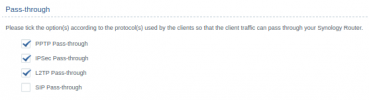
Not that I am aware of. The only thing I could find was labeled SIP passthrough, which ive been told needs to be unchecked.
1628638539027.png

We had to swap from a beefy linksys router that couldnt manage to keep the wifi antenna's on, to a synology router that was recommended to me from a friend, of which I am not super impressed with so far. If it helps, we are using a synology rt2600ac.
 
This is an old post but lists bandwidth usage for codecs. It's not super high. I would definitely prioritize the voice/UDP traffic first, or test without other traffic.
 
This is an old post but lists bandwidth usage for codecs. It's not super high. I would definitely prioritize the voice/UDP traffic first, or test without other traffic.
I can try after hours and see what it does. So far, no matter what, it happens.

Im looking for a way to prioritize certain traffic. So far I see I can limit devices and applications, and give other applications more bandwidth. But thats per device, not over all.
 
https://www.synology.com/en-us/srm/feature/traffic_management implies one can adjust priority. It would be a bit overkill but you could make the 3CX server higher priority. If nothing else the brute force approach would be to lower everything else except the 3CX server.

I reread some posts above. If staff is at home bandwidth usage is doubled (from home into the office, and from 3CX to CallCentric). But a rounded up 100 Kbps * 20 streams (10 calls) would be around 2 Mbps.
 
So as it stands now, the server has the highest priority. It has for a while. And I made sure it had a minimum of 2mbps so it wouldnt interfere.
 
I would also make note on Jitter of buffer issues within the modem/router/firewall you are using. Go to fast.com and let it run, once it's done hit the more info button and look at the loaded latency and jitter. If it's supper high then most likely you are losing packets when your device gets under any kind of load causing packet loss. I've seen home routers for my users die and seem to work just fine, but sporadically there loaded latency would go crazy when there pipe isn't even touched. Replacing there router or modem fixed things all together. Another thing you could try and do is a constant ping with a full frame packet constantly to your sip carrier and log it to a file for 5 minutes. Look at the ending average as well as manually look how consistent the latency is. If it's all over the place it could be your modem, ISP etc and that would be your jitter.

Are extension to extension calls exhibiting the issue in the office?
 
Id get a screenshot but their internet is down again.
 
I would also make note on Jitter of buffer issues within the modem/router/firewall you are using. Go to fast.com and let it run, once it's done hit the more info button and look at the loaded latency and jitter. If it's supper high then most likely you are losing packets when your device gets under any kind of load causing packet loss. I've seen home routers for my users die and seem to work just fine, but sporadically there loaded latency would go crazy when there pipe isn't even touched. Replacing there router or modem fixed things all together. Another thing you could try and do is a constant ping with a full frame packet constantly to your sip carrier and log it to a file for 5 minutes. Look at the ending average as well as manually look how consistent the latency is. If it's all over the place it could be your modem, ISP etc and that would be your jitter.

Are extension to extension calls exhibiting the issue in the office?
For the most part, we dont have any extension to extension issues. Sometimes we will have poor signal reported but that could be a lot of other things

I have done speedtests from the PI and there isnt often bad jitter.

I haven't done the ping to the sip carrier. But I have done a constant ping to google, for instance, and there wasnt really bad latency or any dropped packets. I dont know what a "full frame packet" is and google is being less than helpful.
 
I would also make note on Jitter of buffer issues within the modem/router/firewall you are using. Go to fast.com and let it run, once it's done hit the more info button and look at the loaded latency and jitter. If it's supper high then most likely you are losing packets when your device gets under any kind of load causing packet loss. I've seen home routers for my users die and seem to work just fine, but sporadically there loaded latency would go crazy when there pipe isn't even touched. Replacing there router or modem fixed things all together. Another thing you could try and do is a constant ping with a full frame packet constantly to your sip carrier and log it to a file for 5 minutes. Look at the ending average as well as manually look how consistent the latency is. If it's all over the place it could be your modem, ISP etc and that would be your jitter.

Are extension to extension calls exhibiting the issue in the office?
1628814289075.png
1628814369977.png
 
Status
Not open for further replies.

Forum statistics

Threads
111,981
Messages
590,115
Members
164,908
Latest member
FarizQasimov