Solved Audio issue on 3CX for windows

Status
Not open for further replies.

luc.jubeau

Platinum Partner
Advanced Certified
Joined
Nov 10, 2021
Messages
42
Reaction score
3
We have a PC with Windows 10. We have plugged a headphone : Jabra biz 24002 USB UC.
We have installed 3CX app for windows v16. The microphone is ok but we have no audio.
When we use 3cx Webclient, all is ok.
We have updated all what we could.
Have you any idea ?
thanks
Luc
 
@ChrisBCH

First off just to clarify, are you saying that the microphone is not working even if you connect the sennheiser headset to this PC? I'd recommend making absolutely sure the webclient site has permissions to use the microphone. Also, maybe give another browser a try such as firefox too.

If both fail, give this site a go that will check the mic in the browser to hopefully help narrow this down: https://www.onlinemictest.com/
We are using the new Windows App, are you saying the webClient still needs Mic permissions?
 
We are using the new Windows App, are you saying the webClient still needs Mic permissions?
No, that was my mistake, I completely missed the fact that you mentioned using the new Desktop App.

Now, regarding the audio devices, the 3CX Desktop App does not follow the system audio devices settings unless you set the desktop app to use the "default" devices. You mention setting the speaker to a specific device (not default) fixes the speaker but this does not happen for the mic, not even if you specify the sennheiser mic (not default)?

Since it came up, could you also give the webclient a go and let me know if that works(test both the built-in and sennheiser mic/speakers)?
 
No, that was my mistake, I completely missed the fact that you mentioned using the new Desktop App.

Now, regarding the audio devices, the 3CX Desktop App does not follow the system audio devices settings unless you set the desktop app to use the "default" devices. You mention setting the speaker to a specific device (not default) fixes the speaker but this does not happen for the mic, not even if you specify the sennheiser mic (not default)?

Since it came up, could you also give the webclient a go and let me know if that works(test both the built-in and sennheiser mic/speakers)?
If I go to the meet tab of the windows app, it does pop up to allow access to mic and camera, but there is no prompt. It then comes and goes as I go back to that tab.

Echo service, I can here the tone when dialing and ringing, but then silence once the call is connected.

Just tried the webClient (Edge and Chrome), it does prompt to allow Mic access, but again same issue with *777 - completely silent once the call connects.

Its Synaptics Audio device, tried with and without external monitor attached.

v16 was working fine on the webclient.
 
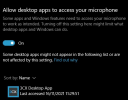
Regarding the microphone permissions, just make sure that the Windows "Microphone Privacy Settings" are set to allow the 3CX Desktop app to use the microphone:
1637060407902.png

Regarding the device, I thought you said that everyone having the same issue works with a sennheiser headset but this one user:
"Also having no end of audio problems with the new windows app. For everyone the inbuild audio/mic just does not work. Luckily, they have Sennheiser headsets, which is working for all but one user."
Have you not tried this headset on this users PC after all? Is there any chance you could give it a go?
 
@luc.jubeau

As per our PM conversation, after looking into this in depth we've managed to identify the cause being related the to the network configuration on the specific LAN. That said,, I'll leave this thread open for now in hopes that you'll manage to get this sorted soon and come back with good news:)
 
Regarding the microphone permissions, just make sure that the Windows "Microphone Privacy Settings" are set to allow the 3CX Desktop app to use the microphone:
View attachment 25874

Regarding the device, I thought you said that everyone having the same issue works with a sennheiser headset but this one user:

Have you not tried this headset on this users PC after all? Is there any chance you could give it a go?
Hi,

Yes a headset is connected to this users PC and it also has the same issues.
 
@ChrisBCH

I'll send you a PM about this shortly.
 
@ChrisBCH
As per our PM conversation you've informed me that port forwarding for webRTC, which is required for the 3CX Webclient and Desktop App, was not configured for the firewall on the PBX end. That said, I'll be waiting for you to update this thread once that has been taken care of.
 
Got this fixed, we needed to open the 9000-10999 UDP. These were not open on the external firewall before as we only used the mobile app and old v16 windows App.
 
  • Like
Reactions: ChrisC_3CX
@ChrisBCH
Brilliant! I'm happy to see you managed to sort this out!

@luc.jubeau
Have you managed to resolve the network issue causing one way audio for the 3CX Windows Apps at all?
 
@ChrisBCH
Brilliant! I'm happy to see you managed to sort this out!

@luc.jubeau
Have you managed to resolve the network issue causing one way audio for the 3CX Windows Apps at all?
Sorry to answer only now,
Yes, we have resolved this issue. We changed the network interface : ip address by fqdn
Thanks a lot for your time on this issue.
 
  • Like
Reactions: ChrisC_3CX
Glad to hear you managed to get this sorted, but, do bear in mind that changing the network interface to the FQDN merely means that the 3CX Windows App is now contacting the PBX's Public IP meaning the traffic is going out the WAN and back in, allowing you to bypass the internal LAN and hence the problem. I do recommend looking into this at some point in order to find a way to have the local 3CX Windows Apps actually communicate with the PBX over local routing.
 
Status
Not open for further replies.