Solved Audio problems between WebRTC Users and Dial-in Users

Status
Not open for further replies.

fc_sys

Premier Customer
Joined
Jan 29, 2019
Messages
37
Reaction score
2
Hello we have a problem that users who join by browser can hear other browser users but if a user joins with the telephonethey can't here the PC user and vice versa.

Seems to be a problem with the Webmeeting bridge and that our 3cx is not properly connected to the webmeeting.

Any suggestions how to fix or how to troubleshoot this?

Maybe a authentification issue?
 
Hi there, you'll need to forward your 5001 port and the RTP port ranges listed here.
https://www.3cx.com/docs/ports/
Hello Leonidas,
all ports are forwarded (inbound to the 3cx Server). Firewall check is green.


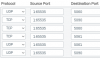
3cx inbound
11215
11216
11217

3cx outbound
currently any port is allowed

Client PCs can use 80, 443

One thing is already strange, if I start a webmeeting at my PC and then dial in via telephone I get the hold music until another telephone member is joining. No matter how many people are already in the webmeeting via browser, as long as I'm the only one joined via telephone I get music.
 
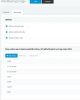
That's pretty weird. Can you check your 'Bridges' section in your PBX? Do you see any bridges there related to WebMeeting?
 
That's pretty weird. Can you check your 'Bridges' section in your PBX? Do you see any bridges there related to WebMeeting?

Hi,
yes:
11249

11250

I've added opus, speex and iLBC last weekend for testing. I thought maybe I could solve the problem that way as the webmeeting uses opus, but no luck.

Quick test, joined with browser and with telephone, hearing music with the phone. (also tried my private smartphone etc.)
11251

11253
 
In your PBX parameters, ALLOW_MYPHONE_WEBRTC_ENDPOINT was set to 0. Not sure how this happened since we've only made releases with this parameter enabled.

In any case, all seems to work well now.
 
  • Love
Reactions: fc_sys
In your PBX parameters, ALLOW_MYPHONE_WEBRTC_ENDPOINT was set to 0. Not sure how this happened since we've only made releases with this parameter enabled.

In any case, all seems to work well now.

Thanks for the help :) its working perfectly now.

It could be from a reinstall with a backup from an older version?! Where the parameter didn't existed.

PS: I don't know if anyone want this disabled, maybe check important parameters on an update and set them back to default? For anyone who wants other configurations maybe a lock symbol for locking parameters?
 
Status
Not open for further replies.

Latest Posts

Forum statistics

Threads
111,973
Messages
590,075
Members
164,895
Latest member
jasonkkrause