AUTO SWITCH - not coming back

Status
Not open for further replies.

XCON1

Titanium Partner
Advanced Certified
Joined
Mar 18, 2019
Messages
51
Reaction score
78
Hi,

Extension => Automatically switch status to available during office hours

we have set this up, specific working times for our People, but a lot people stay as DND, people who only have the app and also people who have app & phones (yealink LAN) and people using app, phones via stun

of course we also set global working times in sip trunk, and we have incoming rules with working times - similar to the working times in the extensions

any ideas why status of some people is not changing back to available during the working times?
 
Last edited:
interesting, an employee also fall back immediately to DND... after changing re-provision her app, was online and then set automatically back to DND, but of course we are IN the office hours
 
Last edited:
Hello @XCON1

Do trunks and people without a 3CX app switchback automatically? Is this affecting only people who use a 3CX app? What PBX version are you running?
Do they manually set the app to a different status when not in office hours?
 
Version 16, hosted not local in the house
it happens to people who have the app, also to people who dont have app and only phones

on friday, the status went from online to DND after the office hours where gone

on monday, only a few came back automatically, thats annoying because not good for business if customers are not reachable "back to office hours"
 
Do all afected extensions have the Auto Switch option enabled and do all use the global office hours or do these extensions follow specific office hours?
Can you post a screenshot of the config of an effected extension as well as one of the global office hours?
 
as i said....

people are NOT coming back from DND automatically, this is NOT WORKING correctly

see the attached screenshots below
 
Last edited:
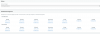
10080

THIS is a sales extension auto switch screenshot, they have to be available without brakes and earlier

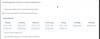
10081

THIS is an Office extension Auto Switch screenshot

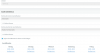
10082


THIS is the incoming rule for the sales extension, using specifc times to "open" the external voice channel

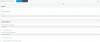
10083


THIS is the rule for the office extension, using global times to "open" the external voice channel to be reachable from outside

10084
 
normally the office people have to be AVAILABLE at 09:00 and set to AWAY at 12:00 until 13:00 and have to be AVAILABLE again until 17:00 - after that have to be DND until 09:00 next day

sales people have to be DND until 08:30 and then have to be AVAILABLE until 18:00 - and then switch to DND until next day 08:30
 
Your settings look correct so i would recommend creating a ticket with our support department so they can look into the PBX logs and determine the source of the issue.
 
Status
Not open for further replies.

Forum statistics

Threads
111,918
Messages
589,735
Members
164,790
Latest member
Sgtpsyco