- Joined
- Nov 25, 2015
- Messages
- 244
- Reaction score
- 168
Hello everyone,
We're very happy with v20 so far, but I do have some questions about the available / away / DND turning on/off automatically.
-We have Teams and Calender sync activated
-Let's say a user is available in 3CX (and also in Teams).
-They also have their 3CX-app on their iPhone logged in
-They also have a normal desk phone
-There are no appointments in the (Outlook/Teams) calendar
-They have the 3CX PWA or the softphone client open in Windows
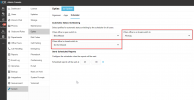
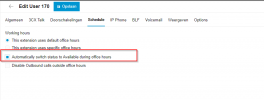
-In System > Options > Scheduler the options to automatically switch to available (when office opens), away (when on break) and DND (when closed) are turned on
1) What should happen when a user walks away from their computer / locks it?
I have a feeling that after a few minutes, their 3CX-status changes to Away. Could that be because of Teams automatically going to 'away'? We do not want this, because many users still carry their iPhone with them and could be reached just fine, despite not being behind their computer. If this is the case, turning off Teams-sync could fix this, right? But then if they are in a meeting, it wouldn't switch to DND anymore either?
1a) Or does the 3CX PWA / Windows-client also automatically set the status to 'away'? I believe there was a setting for this in the v16 client? But I am not sure.
2) There are two options in the User-panel in 3CX: 'Enable MS Teams Integration' and 'Sync calendars and Teams Presence'. What is the difference between these two?
3) The 3CX scheduler automatically sets users to a specific status, for example to available when the office opens. But which office times are used for that? Are these the office times of the standard group a user has assigned? Some departments have office hours set of 0:00-0:00 (basically being available 24/7). Should the scheduler do anything with these users?
I have been doing some testing with this of course, but I can't really get a handle on it.
People that work behind their computer the entire day, there everything is fine. But people that leave their computer, they switch to 'away' at seemingly random moments.
I understand this is all a bit vague but I can't really seem to get a handle on it, when statuses start changing automatically...
It seems to have gotten a bit complicated.
What would really help, would be some log somewhere, that would just contain lines like this:
18-9-2024 10:05 User XX changed to Away, because their Teams client went to 'away'-status. New status: Away.
18-9-2024 10:07 User XX Teams client went to 'away', ignoring because they are also signed in on iPhone. Status unchanged: Available
18-9-2024 10:09 User XX Calender has an appointment starting at 10:09, changing status to 'DND. New status: DND
But this would only be useful if more people are having trouble figuring out why a status changes
Thanks!
We're very happy with v20 so far, but I do have some questions about the available / away / DND turning on/off automatically.
-We have Teams and Calender sync activated
-Let's say a user is available in 3CX (and also in Teams).
-They also have their 3CX-app on their iPhone logged in
-They also have a normal desk phone
-There are no appointments in the (Outlook/Teams) calendar
-They have the 3CX PWA or the softphone client open in Windows
-In System > Options > Scheduler the options to automatically switch to available (when office opens), away (when on break) and DND (when closed) are turned on
1) What should happen when a user walks away from their computer / locks it?
I have a feeling that after a few minutes, their 3CX-status changes to Away. Could that be because of Teams automatically going to 'away'? We do not want this, because many users still carry their iPhone with them and could be reached just fine, despite not being behind their computer. If this is the case, turning off Teams-sync could fix this, right? But then if they are in a meeting, it wouldn't switch to DND anymore either?
1a) Or does the 3CX PWA / Windows-client also automatically set the status to 'away'? I believe there was a setting for this in the v16 client? But I am not sure.
2) There are two options in the User-panel in 3CX: 'Enable MS Teams Integration' and 'Sync calendars and Teams Presence'. What is the difference between these two?
3) The 3CX scheduler automatically sets users to a specific status, for example to available when the office opens. But which office times are used for that? Are these the office times of the standard group a user has assigned? Some departments have office hours set of 0:00-0:00 (basically being available 24/7). Should the scheduler do anything with these users?
I have been doing some testing with this of course, but I can't really get a handle on it.
People that work behind their computer the entire day, there everything is fine. But people that leave their computer, they switch to 'away' at seemingly random moments.
I understand this is all a bit vague but I can't really seem to get a handle on it, when statuses start changing automatically...
It seems to have gotten a bit complicated.
What would really help, would be some log somewhere, that would just contain lines like this:
18-9-2024 10:05 User XX changed to Away, because their Teams client went to 'away'-status. New status: Away.
18-9-2024 10:07 User XX Teams client went to 'away', ignoring because they are also signed in on iPhone. Status unchanged: Available
18-9-2024 10:09 User XX Calender has an appointment starting at 10:09, changing status to 'DND. New status: DND
But this would only be useful if more people are having trouble figuring out why a status changes
Thanks!